
Disclosure: This page may contain affiliate links. Prices were checked on the date shown and may change.
An introduction to Waves X-Hum, based on information from the maker and distributors: what it does, how to use it and who it may suit. It is not scored.
Remove 50/60 Hz hum, DC offset, and low rumble
— Waves official site
What is X-Hum?
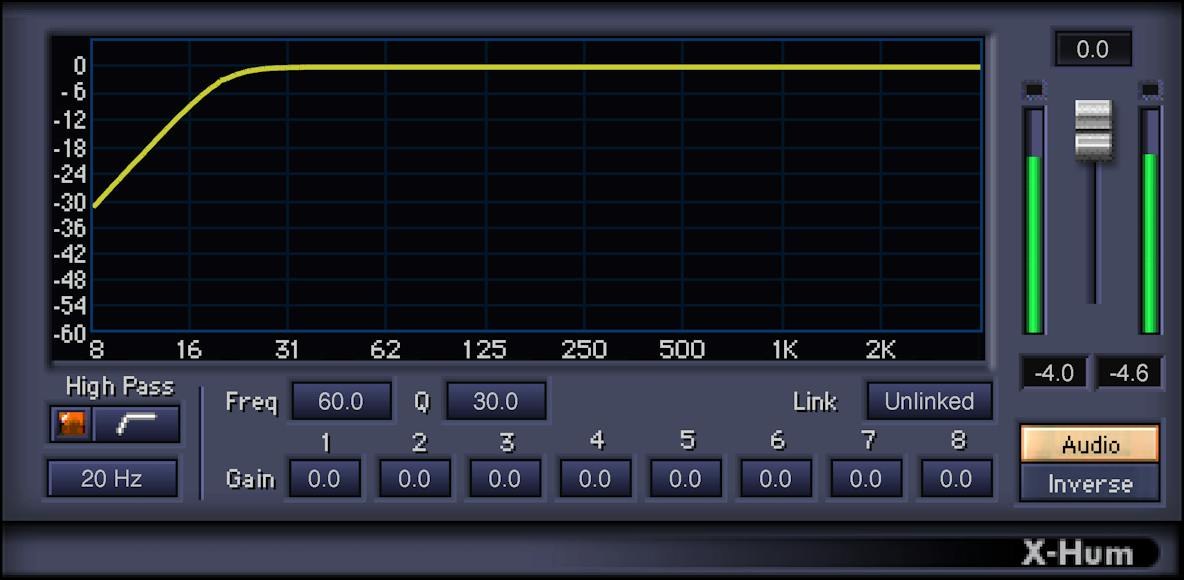
Waves X-Hum is a plug-in that removes 50/60 Hz hum, DC offset and low rumble. Hum is a low buzzing sound caused by problems such as ground loops, bad connections, proximity to transformers and rumble from mechanical devices.
Eight tuned notch filters, which cut only a very narrow band, reduce hum and its harmonics by up to 60 dB, and it handles both 50 and 60 Hz mains frequencies. A high-pass filter at 12 or 24 dB per octave reduces rumble.
Filters can be linked for simultaneous settings or unlinked, and factory presets cover the most common uses. Setting the filter cutoff removes DC offset while leaving the bass intact.
The maker says it has zero latency and virtually no drain on the CPU.
Key features
Removes 50/60 Hz hum
Eight tuned notch filters reduce hum and its harmonics by up to 60 dB.
Rumble reduction
A 12 or 24 dB per octave high-pass filter reduces low rumble from mechanical devices.
DC offset removal
Set the cutoff to remove DC offset while keeping the bass, since DC offset can reduce headroom.
Linked filters
Link filters for simultaneous parameter settings, or unlink them.
Factory presets
Factory presets handle the most common use cases.
Zero latency, light load
Described as zero latency with virtually no CPU drain.
Specifications
| Item | Details |
|---|---|
| Type | Hum and rumble removal plug-in |
| Notch filters | 8 (hum and harmonics up to -60 dB) |
| Mains frequencies | 50 and 60 Hz |
| High-pass filter | 12 or 24 dB per octave |
| Latency | Zero (per the maker) |
What is included and system requirements
- X-Hum
- Factory presets
- Check Waves' page for formats and system requirements
How to use it
- Insert X-Hum on the track that has hum.
- Choose a 50 or 60 Hz preset.
- Adjust the notch filters until the hum is gone.
- Use the high-pass filter if low rumble remains.
- Listen to check the bass has not thinned.
Where it may come in handy
Removing hum from recordings
For hum from ground loops or bad connections.
Reducing mechanical rumble
For low rumble from mechanical devices.
Removing DC offset
The maker's page describes recovering headroom.
Who it may suit
- People whose recordings picked up 50/60 Hz hum
- People who want to clean up low-frequency noise
Good to know before you buy
- Cutting too much can thin the bass, so adjust while listening.
- X-Hum is sometimes part of Waves bundle deals, so check the price before buying.
- This article is based on the maker's product pages. Check the maker or retailer pages for the latest specifications and prices.
Price
Please check the official page for the price.
More of the same kind
Other introduction articles of the same kind.
- IK Multimedia ReSing MAX
- MeldaProduction MMatcher
- Blue Cat Audio Blue Cat's Re-Guitar
- MeldaProduction MCompare
- W. A. Production DJFX
- NUGEN Audio Aligner
We have introduced 215 other products from Waves.
See the full list in Product database: Effects.
Sources: waves.com (checked 2026-11-09)









Comments