
Disclosure: This page may contain affiliate links. Prices were checked on the date shown and may change.
An introduction to Wave Arts MasterVerb 7, based on information from the maker and distributors: what it does, how to use it and who it may suit. It is not scored.
Classic sounding reverb with modern control
— Wave Arts official site
What is MasterVerb 7?
Wave Arts MasterVerb 7 is a reverb plug-in for creating pristine-sounding spaces. With two algorithms, Hall and Plate, the maker says it recreates a wide range of spaces from intimate rooms to expansive concert halls and dense plate reverbs.
The early reflection section includes halls, rooms, plates, chambers, echo, cathedral, nightclub and ping-pong. There are 3-band EQs for both the early and late reverb.
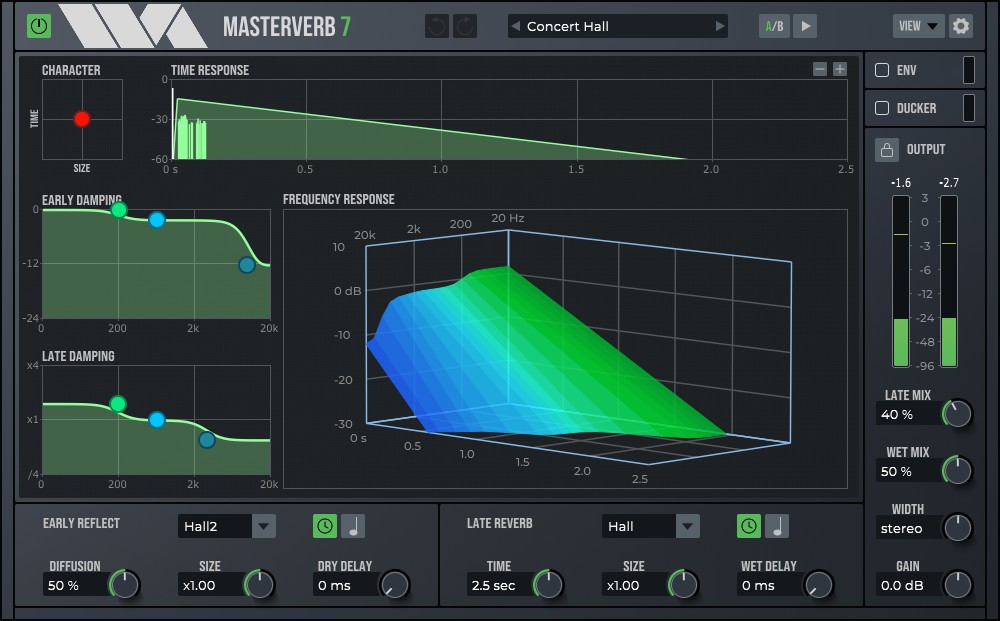
It also has triggered envelope control for special effects such as gated and reverse reverb, a ducking compressor that lowers the reverb during foreground sounds, beat synchronisation for delay and envelope times, and graphical displays for EQ curves, time response and 3-D frequency response. Normal and detailed views are available.
Key features
Hall and Plate algorithms
Hall suits rooms of all sizes and Plate gives super-dense plate reverbs.
Early reflection section
Halls, rooms, plates, chambers, echo, cathedral, nightclub and ping-pong.
3-band EQs
Separate 3-band EQs for early and late reverb.
Triggered envelope
For special effects such as gated and reverse reverb.
Ducking compressor
Ducks the reverb during foreground sounds.
Graphical displays
EQ curves, time response and 3-D frequency response.
Specifications
| Item | Details |
|---|---|
| Formats | Mac: AU, VST3, AAX (macOS 10.13 or later; AAX needs Pro Tools 11 or later). Windows: VST2, VST3, AAX (AAX needs Pro Tools 10.3.5 or later, or 11 or later, depending on the product) |
| Main features | Hall and Plate algorithms, Early reflection section, 3-band EQs, Triggered envelope |
What is included and system requirements
- MasterVerb 7
- Formats: AU, VST3, AAX (Mac), VST2, VST3, AAX (Windows)
How to use it
- Insert MasterVerb 7 on a send or insert.
- Choose Hall or Plate.
- Pick an early reflection type.
- Shape the reverb length and tone with the 3-band EQs.
- Add ducking or envelope effects if needed.
Where it may come in handy
Mix reverb
Adding hall or plate reverb to a mix.
Special effects
Gated and reverse reverb.
Keeping the foreground clear
Ducking lowers the reverb while the foreground sounds.
Who it may suit
- People who want hall and plate in one plug-in
- People who want ducking and gated effects too
Good to know before you buy
- This article is based on the Wave Arts product page. Check the maker or retailer pages for the latest specifications and prices.
Price
Please check the official page for the price.
See MasterVerb 7 on the product page
More of the same kind
We have introduced 112 reverbs. Here are some of the others.
- Acon Digital Verberate Immersive 2
- Minimal Audio Swarm Reverb
- Sonnox Oxford Reverb
- IK Multimedia Sunset Sound Studio Reverb II
- IK Multimedia CSR Inverse Reverb
- Waves TrueVerb
We have introduced 8 other products from Wave Arts.
- Wave Arts Convology XT
- Wave Arts Dialog 2
- Wave Arts Tube Saturator 2
- Wave Arts TrackPlug 7
- Wave Arts MultiDynamics 7
For a side-by-side comparison scored on the same criteria, see our comparison of reverbs.
See the full list in Product database: Effects.
Sources: wavearts.com (checked 2026-11-09)









Comments