
Disclosure: This page may contain affiliate links. Prices were checked on the date shown and may change.
An introduction to Stagecraft Software ReContour, based on information from the maker and distributors: what it does, how to use it and who it may suit. It is not scored.
What is ReContour?
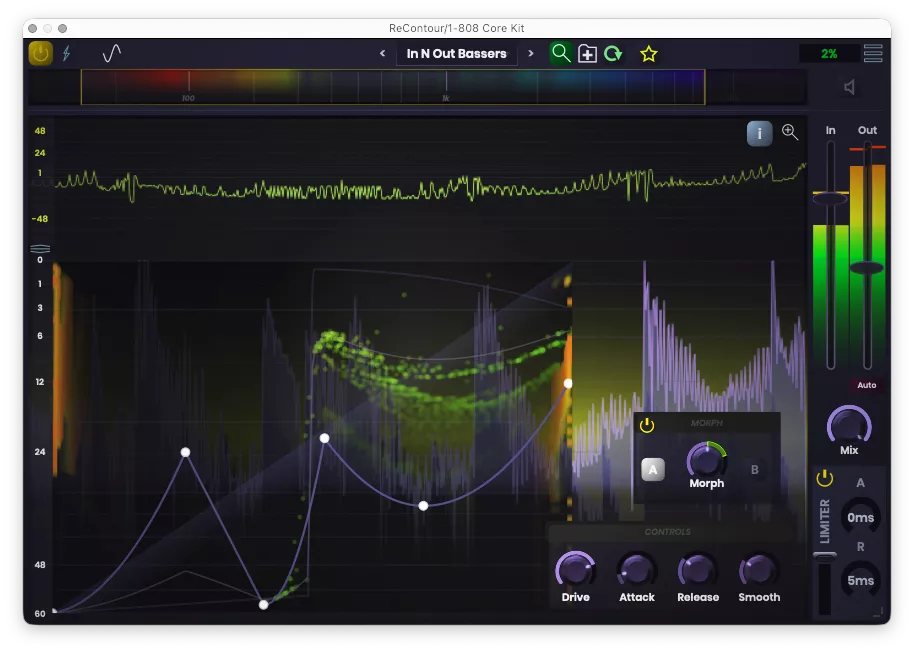
ReContour sits between a compressor and a waveshaper; you draw in a compression curve (per the maker).
This article follows the maker's description on the Plugin Boutique product page for this Stagecraft Software product. Check demos, trial versions or the maker's videos before buying, and note that prices and sales change over time.
Key features
Draw the curve
Just draw in a compression curve (per the maker).
Delivered by download
It is sold as downloadable software at Plugin Boutique, and the steps for receiving and installing it after purchase can be found in your Plugin Boutique library (per Plugin Boutique).
What is included and system requirements
- Windows 10+
- macOS 11+ (Big Sur and above)
Good to know before you buy
- Supported operating systems and formats can be checked in the system requirements section of the Plugin Boutique product page.
Price
$65 (Plugin Boutique, checked 2026-11-19). Prices can vary by region and promotion, so check the official page before buying.
See ReContour on the product page
More of the same kind
We have introduced 123 compressors. Here are some of the others.
- Black Rooster Audio VLA-FET
- Softube Summit Audio TLA-100A Compressor
- Audified ToneKnob Compressor
- Tone Empire E-LUX
- FLUX:: Pure Compressor
- Minimal System Group SSi Pro Compressor
We have introduced 6 other products from Stagecraft Software.
- Stagecraft Software Picante
- Stagecraft Software Overdrive 5
- Stagecraft Software Universal Plug
- Stagecraft Software Theremin
- Stagecraft Software Parity EQ
For a side-by-side comparison scored on the same criteria, see our comparison of compressors.
See the full list in Product database: Effects.
Sources: pluginboutique.com (checked 2026-11-19)










Comments