
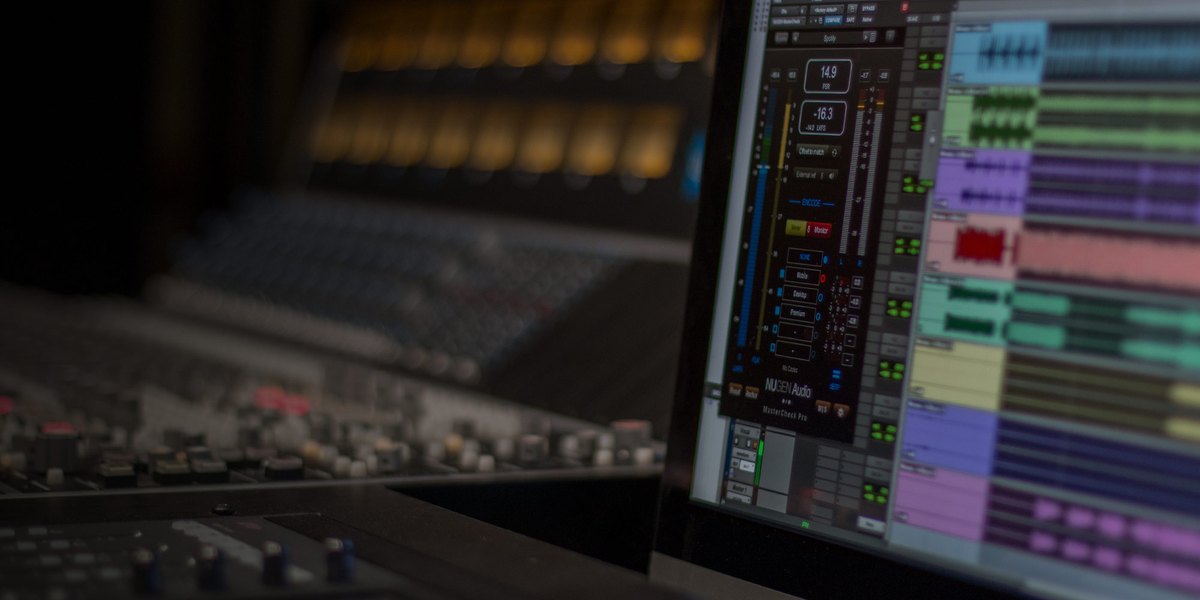
NUGEN Audio’s MasterCheck is a plug-in that, at the finishing stage, lets you listen to how streaming services’ automatic volume adjustment (loudness normalization) and audio compression (codecs) change the sound. It can also measure loudness (how loud a person perceives the sound), true peak (a guide to the clipping that happens when exporting or converting for streaming), PLR and more.
A loudness meter measures how loud a song sounds. You use it to check that a track fits the loudness guidelines of streaming services such as YouTube and Spotify.
In this article we compare MasterCheck with 10 loudness meters and rate how well it serves its purpose on three criteria. The basis is official manufacturer information.
Disclosure: This article contains affiliate links. If you buy through them, SoundBounty may earn a commission at no extra cost to you. Prices and sale information are as of the date we checked them and can change.
Score 4.0 / 5 (average of the 10 products compared: 3.6)
- Specs last checked
- 2026/09/25
- Streaming checks
- Preview auto-adjust and compression
- Measurable values
- LUFS, TP, PLR
- Finding problems
- Mainly volume
- Price (store, date)
- $249 [Official, checked Oct 26]
Image: from the NUGEN Audio official website (product image)
Summary
Among the 10 loudness meters, MasterCheck is rank A. The ranks run S, A, B and C, and A is second from the top. Averaging the scores for each criterion (out of 5, with the one criterion that matters most for the purpose counted double) gives 4.0.
Strengths
- Streaming checks (5 points): you can quickly check that a track fits the targets of each streaming service.
- Measurable values (4 points): it can measure a wide range of values about volume.
Things to keep in mind
- Finding problems (2 points): it is mainly for measuring volume.
Who it suits: people who want to check how a track will actually sound on streaming services before they release it.
Main features of MasterCheck
Listen to the automatic volume adjustment of streaming
To even out differences in volume between songs, streaming services automatically turn down songs that are too loud. MasterCheck is a meter that recreates this automatic adjustment so you can check how it actually sounds on streaming. You can confirm by ear that making a song too loud does not pay off.
Listen to the changes from audio compression
In Codec mode you can listen to how a track sounds after the compression (codec) used for streaming. Offset matches the volume, so you can fairly compare before and after compression.
LUFS, PLR and true peak
It can measure the overall loudness, PLR and PSR (the difference between peak and loudness) and true peak. The manufacturer recommends watching these values from the mixing stage.
Video: “Introducing: MasterCheck 2 — One Master. Every Platform. Verified” (official NUGEN Audio YouTube channel; narration in English) Watch on YouTube
Where it is useful
- Checking how a finished song sounds when a streaming service turns its volume down
- Listening to the change in the sound when it is compressed for streaming
- Watching PLR to avoid crushing the sound too much
Rating by criterion
Streaming checks: 5 / 5
We check whether you can confirm that a track fits the targets of each streaming service.
You can listen to the automatic volume adjustment of streaming services and the changes caused by audio compression (codecs).
Measurable values: 4 / 5
We check how many values it can measure, such as loudness, loudness range and the risk of clipping (true peak).
It can measure loudness, true peak and PLR (and PSR).
Finding problems: 2 / 5
We check whether it finds and tells you about problems other than volume (such as the balance of the sound).
It centers on checking volume and sound quality on streaming; it includes no tools for analyzing stereo width or frequency.
If “finding problems” matters most to you, EXPOSE 2 (5 points) is a better fit.
How we score (Loudness meters)
| Criterion | Basis | 5 pt | 4 pt | 3 pt | 2 pt | 1 pt |
|---|---|---|---|---|---|---|
| Streaming checks | Whether you can check against the targets of streaming services | Streaming-service targets, plus automatic loudness adjustment and a preview of how it sounds after audio compression | Targets for each streaming service (presets) | Presets for standards such as broadcast | It only measures numbers | — |
| Measurable values | How many of loudness, loudness range, true peak and PLR or dynamic range it can measure | All four | Three | Two | One | — |
| Finding problems | Analysis and advice beyond volume | Three or more kinds of analysis, plus advice on how to fix problems | Three or more kinds (stereo width, frequency distribution, dynamics and so on) | One or two kinds | No analysis beyond volume | — |
Each criterion is scored from 1 to 5 on how well the product serves one goal: checking that a song can be released at a volume suited to streaming services. Scores follow the conditions in the table above, and the rank is based on an average in which "Streaming checks" counts double. The basis is official manufacturer information, and features that could not be confirmed on the official page are treated as absent. Measurement accuracy has not been tested, so it is not part of the score. Price is not part of the score. Features that cannot be confirmed from the manufacturer's or a retailer's description are scored as if absent. The "OBS (streaming)" column in the table shows whether the official page lists the VST2 format that the streaming software OBS Studio can use (○). OBS does not support the VST3 format. It is not part of the score.
MasterCheck system requirements and getting started
| Operating system | Windows / Mac |
|---|---|
| Plug-in formats | AAX, VST3, AU, AudioSuite (64-bit) |
| OBS (streaming) | Does not work as it is (VST3 only). It can be loaded through a bridge plug-in |
Checked on the manufacturer’s official pages on September 27, 2026.
Compared with other loudness meters
Click a heading to sort. On a phone, the table scrolls sideways.
| Product | RankAvg. score | Streaming checks | Measurable values | Finding problems | Free | OBS (streaming) | Price (store, date) |
|---|---|---|---|---|---|---|---|
| YouleanYoulean Loudness Meter | A 4.0 | Streaming presets | All four | Dynamics | Free | ○ | $39 (sale; regular $49) [Official, checked Oct 26] |
| iZotopeInsight 2 | A 3.8 | Streaming targets | LUFS, LRA | Width, spectrum, intelligibility | — | ○ | $199 [PB, checked Oct 26] |
| NUGEN AudioMasterCheck | A 4.0 | Preview auto-adjust and compression | LUFS, TP, PLR | Mainly volume | — | × (VST3 only) | $249 [Official, checked Oct 26] |
| MeldaProductionMLoudnessAnalyzer | C 2.3 | Measures only | LUFS, LRA | None | Free | ○ | Not listed |
| Mastering The MixLEVELS | S 4.3 | Streaming presets | All four | Width, bass, dynamics | — | × (VST3 only) | $80 [PB, checked Oct 26] |
| Mastering The MixEXPOSE 2 | S 4.5 | Choose the destination | All four | Analysis + fix advice | — | × (standalone app only) | $80 [PB, checked Oct 26] |
| WavesWLM Plus | B 3.0 | Supports broadcast standards | LUFS, TP, LU | None | — | Not confirmed | Not listed |
| MeterPlugsLoudness Penalty 2 | A 4.0 | Audition automatic adjustment | LUFS, TP, LRA | None | — | Not confirmed | $49 [Official, checked Oct 26] |
| Signum AudioBUTE Loudness Analyser 2 | B 3.3 | Streaming service presets | LUFS, TP | None | — | Not confirmed | ≈$92.27 [Official, checked Oct 26] |
| NUGEN AudioVisLM | B 2.8 | Supports broadcast standards | LUFS, TP | None | — | Not confirmed | $499 [Official, checked Oct 26] |
Features checked on each manufacturer's official website on September 25, 2026. Check the store page behind the buy button for the price.
Read next
- Youlean Loudness Meter: features and rating (rank A)
- Insight 2: features and rating (rank A)
- MLoudnessAnalyzer: features and rating (rank C)
- LEVELS: features and rating (rank S)

Comments