
Disclosure: This page may contain affiliate links. Prices were checked on the date shown and may change.
An introduction to Acon Digital Drum Production Suite, based on information from the maker and distributors: what it does, how to use it and who it may suit. It is not scored.
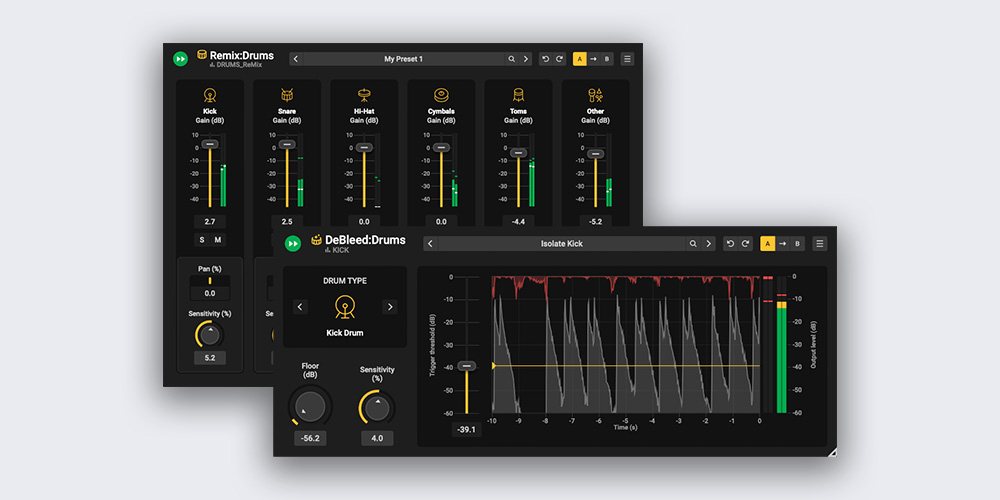
DeBleed:Drums removes spill from close-mic'd tracks in real time without smearing transients.
— Acon Digital official site
What is Drum Production Suite?
Acon Digital Drum Production Suite bundles two AI-powered drum plugins, Remix:Drums and DeBleed:Drums. They target two common drum-recording problems: microphone bleed and inflexibility after the fact.
DeBleed:Drums removes spill from close-miked drum tracks in real time. The maker says it does so without smearing transients.
Remix:Drums separates a drum loop or recording into Kick, Snare, Hat, Cymbals, Toms and Other so each element can be controlled independently, even in audio you did not record yourself.
Everything runs in real time with no offline rendering. It is a perpetual licence rather than a subscription, and the maker says buying the bundle saves 29 dollars against the 148 dollars for the two separately.
Key features
Bleed removal with DeBleed:Drums
It removes spill from other drums in close-mic'd tracks in real time, which may make it easier to mix each drum on its own.
Drum separation with Remix:Drums
Loops and recordings are split into six parts. You can raise, lower or remove each one.
Sensitivity control
A single sensitivity control moves from a rough split to a precise one, helping you dial in quickly.
Multi-output routing
In supported hosts each stem can go to its own track, letting you place inserts on kick or snare alone.
Trigger threshold
In DeBleed:Drums only the hits you want are processed, which helps keep the wanted hits while stripping spill.
Automation
Every parameter can be automated in the DAW, so the mix can evolve across the timeline.
Real-time and perpetual
There are no offline jobs, so you adjust while listening, and the licence is one-time.
Specifications
| Item | Details |
|---|---|
| Contents | Remix:Drums + DeBleed:Drums (two plugins) |
| Stems | Kick / Snare / Hat / Cymbals / Toms / Other |
| Processing | Real-time (AI) |
| Licence | Perpetual, no subscription |
| Formats (Windows) | VST / VST3 / AAX (Pro Tools 2018 or later) |
| Formats (Mac) | AU / VST / VST3 / AAX |
| OS (Windows) | Windows 11 / 10 |
| OS (Mac) | OS X 10.13 or later (ARM64 and Intel) |
| RAM | 1 GB (4 GB or more recommended) |
| Disk space | 1 GB |
What is included and system requirements
- Remix:Drums
- DeBleed:Drums
- Windows: Windows 11 / 10, Intel Core i5 or AMD multi-core, VST / VST3 / AAX
- Mac: OS X 10.13 or later, Apple silicon and Intel, AU / VST / VST3 / AAX
- 1 GB RAM (4 GB or more recommended), 1 GB free disk space
How to use it
- Insert DeBleed:Drums on the drum track that has bleed.
- Adjust the trigger threshold so it reacts only to the hits you want.
- Move the sensitivity and listen to check that bleed drops without thinning the hits.
- Insert Remix:Drums on a drum loop or stereo mix.
- Adjust sensitivity to split it into kick, snare and the rest.
- Raise or lower each part, pulling down what you do not want.
- In a supported host, send each part to its own track via multi-output.
- Apply EQ, compression and other processing to each part individually.
Where it may come in handy
Tidying bleedy live drum recordings
DeBleed:Drums could reduce spill from studio or rehearsal-room takes so each drum is easier to handle.
Rebalancing overheads and room mics
The maker cites adjusting drum balance in overhead or room-mic recordings.
Rebuilding loops and remixing
Splitting a sample or loop may let you recombine only some parts with other material.
Processing material for DJing or remixing
Boosting the kick or removing the snare could change the feel of existing audio.
Who it may suit
- People who record or mix acoustic drums
- Those who want to split drums in loops and samples
- Remixers and producers reworking source material
- Anyone who prefers a one-time purchase to a subscription
Good to know before you buy
- Because the processing is AI-based, results vary with the material; the maker offers a free trial for checking.
- A host list is on the official page, and for older or unlisted hosts the maker suggests testing the demo.
- Multi-output works only in compatible DAWs.
How it differs from similar products
We do not pick a winner; the official figures are placed side by side.
Acon Digital Remix:Drums
Drum Production Suite adds DeBleed:Drums to Remix:Drums in a two-plugin set. The maker says the two cost 148 dollars separately and the bundle saves 29 dollars.
Price
$119 (Acon Digital official site, checked 2026-10-27). Prices can vary by region and promotion, so check the official page before buying.
See Drum Production Suite on the product page
More of the same kind
Other introduction articles of the same kind.
- Kilohearts Kilohearts Essentials
- Slate Digital Virtual Tube Collection
- MeldaProduction MFreeFXBundle
- McDSP Classic Pack v7
- Zynaptiq Mac Audio Apps Bundle 2
- Waves Abbey Road Collection
We have introduced 8 other products from Acon Digital.
- Acon Digital DeVerberate 3
- Acon Digital Remix
- Acon Digital Verberate Immersive 2
- Acon Digital Remix:Drums
- Acon Digital DeFilter
See the full list in Product database: Bundles.
Sources: acondigital.com pluginboutique.com (checked 2026-10-27)










Comments