
Disclosure: This page may contain affiliate links. Prices were checked on the date shown and may change.
An introduction to Antelope Audio VP Drum-All-Nite, based on information from the maker and distributors: what it does, how to use it and who it may suit. It is not scored.
capable of absurd amounts of gain reduction while maintaining the signal’s integrity with minimal distortion and unwanted artifacts.
— Antelope Audio official site
What is VP Drum-All-Nite?
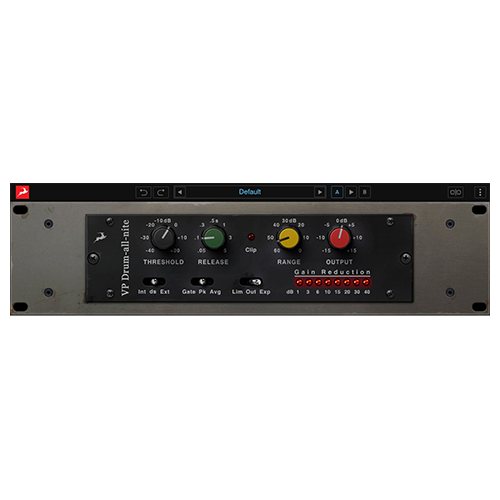
VP Drum-All-Nite is a VCA-style dynamics processor from Antelope Audio, modeled on the Valley People Dyna-mite hardware from the 1980s. Antelope describes it as a 4-in-1 tool that combines a compressor/limiter, gate, expander and de-esser function.
The maker presents it mainly for drum recording and mixing. It is described as handling large amounts of gain reduction while keeping the signal intact, and the product page gives parallel processing as an example for bringing out the body and room of drums.
The panel is built around four knobs: Threshold, Release, Range and Output. The limiter has Peak and Avg. modes, which the product page lists with attack times of 6 microseconds and 10 milliseconds respectively, and the Gate and Expander modes can be used at the same time.
It comes as a native plugin for your DAW and as a real-time version for compatible Synergy Core devices. External side-chaining is supported, so it may suit setups where the effect should react to another track. It is also part of the Antelope Cosmos subscription.
Key features
Four dynamics tools in one
It combines compressor/limiter, gate, expander and de-esser duties in a single plugin, which may save you from loading several separate effects when shaping drums.
Peak and Avg. limiter modes
The product page lists a 6-microsecond attack for Peak and 10 milliseconds for Avg. In a parallel chain, Peak is described as taming transients while lifting decays, and Avg. as keeping punch.
Gate and Expander together
Using both modes at once is described as shortening drum decays while avoiding pumping and keeping the hit’s punch, which may help when tightening drums in a mix.
Minimal control set
Main controls are Threshold, Release, Range and Output. The Release control features Anticipatory Release Computation, described as anticipating the input to avoid waveform modulation and excessive pumping.
External side-chain
Switching to external mode and choosing an input source lets another signal drive the effect, as described on the product page for the Synergy Core real-time version.
Usable beyond drums
Plugin Boutique’s description adds that it can handle any sound source you feed through it, so bass or percussion may be worth trying.
Specifications
| Item | Details |
|---|---|
| Type | VCA dynamics processor (compressor/limiter, gate, expander) |
| Hardware reference | Valley People Dyna-mite (1980s) |
| Main controls | Threshold / Release / Range / Output |
| Limiter modes | Peak (6 microsecond attack) / Avg. (10 millisecond attack) |
| Versions | Native / Synergy Core real-time |
What is included and system requirements
- Native plugin (no extra hardware needed)
- Synergy Core real-time version (for compatible Synergy Core devices)
How to use it
- After purchase, register the license and install the plugin with the installer.
- Insert VP Drum-All-Nite on a drum bus or on individual drum tracks in your DAW.
- If you want parallel processing, set it up on a send/return or with your DAW’s mix control so it blends with the dry signal.
- Move Threshold and Range to set the amount of gain reduction.
- Switch the limiter between Peak and Avg. and compare.
- Adjust Release and listen to the decay length and pumping.
- To shorten decays, try Gate and Expander modes together.
- Set the level with Output and compare against bypass.
Where it may come in handy
Parallel drum processing
Placed on a drum bus and blended with the dry signal, it may help bring out body and room. Parallel use is the first example on the product page.
Tidying drum decays
Using Gate and Expander together may make it easier to clean up spill and unwanted tails while keeping the initial impact.
Percussion or bass
Plugin Boutique’s description says it can process any source, so transient-heavy tracks may be worth comparing against your usual compressor.
Who it may suit
- People who want to try parallel compression on drums with few controls
- Users who prefer dynamics plugins with a small control set
- Antelope Cosmos or Synergy Core owners who want to choose between native and real-time versions
Good to know before you buy
- The product page states that Valley People, maker of the original unit, has not endorsed or sponsored this product or licensed any intellectual property.
- The real-time version needs a compatible Synergy Core device; the native version needs no extra hardware.
- The external side-chain function is described in the product page in connection with Synergy Core real-time effects; check the official specs for how it works in the native version.
- Antelope Cosmos, a subscription, is described as offering 75+ native plugins.
Price
$179 (Plugin Boutique, checked 2026-10-27). Prices can vary by region and promotion, so check the official page before buying.
See VP Drum-All-Nite on the product page
More of the same kind
Other introduction articles of the same kind.
- Eventide H3000 Factory Mk II
- NUGEN Audio Aligner
- Metric Halo MH MultibandDynamics v4
- United Plugins QuickMuse
- Waves Waves CLA Nx
- Waves C6 Multiband Compressor
We have introduced 54 other products from Antelope Audio.
- Antelope Audio RD47
- Antelope Audio Marble White AutoWah
- Antelope Audio V-AMP
- Antelope Audio VEQ-STU 169
- Antelope Audio Antelope Audio Gyratec X
See the full list in Product database: Effects.
Sources: en.antelopeaudio.com pluginboutique.com (checked 2026-10-27)










Comments