
Disclosure: This page may contain affiliate links. Prices were checked on the date shown and may change.
An introduction to Antelope Audio Marble White AutoWah, based on information from the maker and distributors: what it does, how to use it and who it may suit. It is not scored.
For the times when you are unable to stomp on a real wah pedal, get a reliable AutoWah to do that for you.
— Antelope Audio official site
What is Marble White AutoWah?
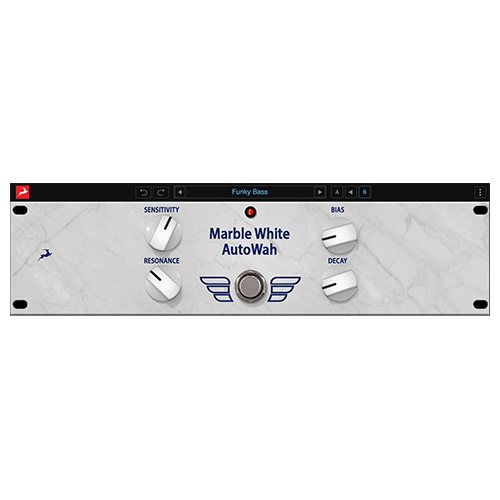
Marble White AutoWah is an auto-wah plugin from Antelope Audio. The maker describes it as a replica of a boutique auto-wah pedal from Finland, whose circuit is based on a vintage rackmount wah.
The wah effect responds to the dynamics of the incoming signal, so it can stand in when you cannot use a wah pedal with your foot. It is described as working on both guitar and bass.
Four controls are central: Sensitivity, Bias, Resonance and Decay. Decay is highlighted as the control that sets how quickly the filter frequency falls.
The native version runs in a DAW on macOS or Windows, and a real-time version runs on Antelope interfaces with Synergy Core. The maker also suggests combining it with its other guitar plugins.
Key features
Auto-wah that follows input
The wah moves according to how hard you play, so no foot pedal is needed. Changing your touch changes how the effect responds.
Four controls
Sensitivity, Bias, Resonance and Decay keep the layout compact. With few parameters, settings can be decided quickly.
Decay sets how fast the filter falls
Decay shifts the behavior between drenching every note in wah and a more traditional auto-wah response. It helps tailor the effect to your playing.
Guitar and bass
The maker says it works on bass as well as guitar, and mentions trying it on other sources such as electric piano.
Native and real-time versions
Besides the native version in the DAW, a version runs in real time on compatible Synergy Core devices without CPU load. You can choose according to your setup.
Antelope Cosmos
The maker points to Antelope Cosmos, which unlocks more than 75 native plugins. This is a separate way to obtain it from buying individually.
Specifications
| Item | Details |
|---|---|
| Type | Auto-wah (effect) |
| Sources | Guitar, bass |
| Controls | Sensitivity, Bias, Resonance, Decay |
| Versions | Native (macOS/Windows), Synergy Core real-time |
| Official price shown | EUR 99.00 |
What is included and system requirements
- Native plugin (macOS/Windows)
- Synergy Core real-time version for compatible devices
How to use it
- Get the product from Antelope Audio's software store or a retailer.
- Sign in to your account and install the native version with the installer.
- Launch the DAW and rescan plugins.
- Insert Marble White AutoWah on a guitar or bass track.
- Adjust Sensitivity and check how it responds to playing strength.
- Set the wah range and character with Bias and Resonance.
- Move Decay to set how quickly the filter falls.
- If you use a Synergy Core device, load the real-time version on the device.
Where it may come in handy
Guitar chops and riffs
Adjusting Sensitivity and Decay lets the wah follow your playing dynamics. You may be able to try it in the DAW even without a pedal.
Adding movement to bass lines
The maker says an auto-wah works on bass too. You can start with modest resonance so the sense of pitch stays.
Electric piano and keyboard sounds
The maker mentions electric piano as a source. You can explore how the wah changes a keyboard tone.
Who it may suit
- People without a wah pedal who want the effect in the DAW
- Players who want auto-wah on guitar or bass
- Antelope Synergy Core users who want to avoid CPU load
- Those who prefer a simple effect with few controls
Good to know before you buy
- The official price is shown as EUR 99.00.
- The real-time version requires a compatible Synergy Core device.
- The official site has an Offers section for special promotions.
- System requirements are listed on the official requirements page.
How it differs from similar products
We do not pick a winner; the official figures are placed side by side.
Arturia Filter MS-20
Marble White AutoWah is an auto-wah for guitar and bass driven by Sensitivity, Bias, Resonance and Decay. Filter MS-20 is a multi-function filter with low-pass and high-pass modes, distortion and a 16-step sequencer.
Price
Please check the official page for the price.
See Marble White AutoWah on the product page
More of the same kind
Other introduction articles of the same kind.
- Waves TRACT SPL Meter
- Waves Greg Wells PianoCentric
- Waves MaxxVolume
- Waves TRACT System Calibration
- NUGEN Audio AB Assist 2
- Blue Cat Audio Plug'n Script
We have introduced 54 other products from Antelope Audio.
- Antelope Audio RD47
- Antelope Audio V-AMP
- Antelope Audio VP Drum-All-Nite
- Antelope Audio Tape Delay
- Antelope Audio Blonder Tongue Audio Baton
See the full list in Product database: Effects.
Sources: en.antelopeaudio.com pluginboutique.com (checked 2026-10-27)










Comments