
Disclosure: This page may contain affiliate links. Prices were checked on the date shown and may change.
An introduction to Arturia Jun-6 V, based on information from the maker and distributors: what it does, how to use it and who it may suit. It is not scored.
Jun-6 V is pure analogue spirit presented on a silver platter. Modelled on the legendary Juno-6, its immediate colossal sound remains awe-inspiring to this day
— Arturia official site
What is Jun-6 V?
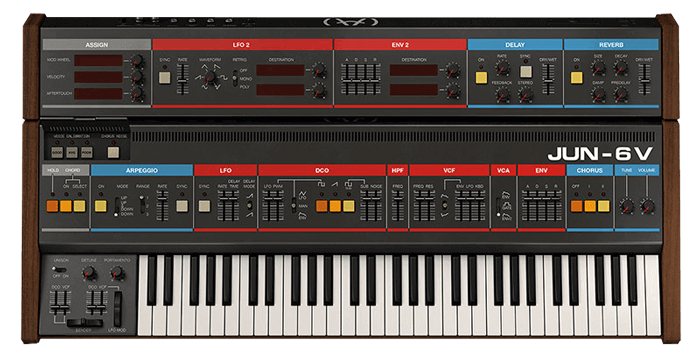
Jun-6 V is Arturia's virtual synthesizer modeled on the Roland Juno-6 (1982), emphasizing simple controls.
The signal path runs from DCOs (square, ramp, sub, noise) through high-pass and low-pass filters, LFO and ADSR, to a three-mode stereo chorus.
Additions include a bender, unison, a second envelope and LFO, a chord mode with 12 voicings, delay and reverb, with up to 36 voices.
Voice calibration has three states of analog drift. Formats: Standalone, VST, VST3, AU, AAX and NKS.
Key features
DCO and twin filters
Square, ramp, sub and noise with low-pass and high-pass filtering.
BBD chorus
A three-mode stereo chorus modeled on the classic Juno design.
Voice calibration
Three levels of analog voice variation.
Arpeggiator and chord mode
A simple arpeggiator and a chord mode with 12 voicings.
Expanded modulation
Two envelopes and LFOs, with mod wheel, velocity and aftertouch assignable.
Delay, reverb and macros
Built-in delay and reverb, four macros and in-app tutorials.
Bender and unison
The bender is tied to DCO and filter; unison stacks voices with adjustable density and detune.
Specifications
| Item | Details |
|---|---|
| Original | Roland Juno-6 (1982) |
| Polyphony | Up to 36 voices |
| Presets | 180+ |
| Effects | BBD chorus, delay, reverb |
| Formats | Standalone / VST / VST3 / AU / AAX / NKS |
| OS | macOS 10.13+, Windows 10+ (64-bit) |
| System | 4 GB RAM, 4-core 3.4 GHz or Apple Silicon, 3 GB disk, OpenGL 2.0 GPU |
What is included and system requirements
- Jun-6 V (Standalone / VST / VST3 / AU / AAX / NKS)
- 180+ factory presets
- In-app tutorials
- Arturia Software Center
- macOS 10.13+ and Windows 10+ (64-bit)
How to use it
- Get the installer and sign in to Arturia Software Center.
- Activate and install Jun-6 V.
- Load it on an instrument track.
- Choose a preset and play.
- Mix the DCO waveforms and move the low-pass filter.
- Switch chorus modes.
- Set voice calibration for the amount of drift.
- Try chord mode or the arpeggiator and save.
Where it may come in handy
Pads and chords
Wide chorus-drenched pads.
Unison bass and leads
Set density and detune.
Arpeggio phrases
Build driving patterns quickly.
80s-style pop synth
Chorus-widened brass and strings, with delay and reverb for modern mixes.
Who it may suit
- Players who want a simple synth
- Fans of Juno-style sound design
- V Collection users
- Players who want a little extra modulation
Good to know before you buy
- ARM processors are not supported on Windows.
- Licenses are managed in Arturia Software Center.
- Jun-6 V adds features beyond the original, so it is not identical in operation.
How it differs from similar products
We do not pick a winner; the official figures are placed side by side.
Arturia Matrix-12 V
Jun-6 V: up to 36 voices, simple DCO and chorus. Matrix-12 V: 12 voices, 15-mode filter, 27 sources and 47 destinations.
Price
$149 (Plugin Boutique, checked 2026-10-27). Prices can vary by region and promotion, so check the official page before buying.
See Jun-6 V on the product page
More of the same kind
We have introduced 178 synthesizers. Here are some of the others.
- Dawesome Tracktion Dawesome Abyss II
- Applied Acoustics Systems String Studio VS-3
- Klevgrand Klevgrand Jussi
- AIR Music Technology OPx-4
- Tracktion MOK MOK Waverazor
- Cherry Audio Miniverse
We have introduced 45 other products from Arturia.
For a side-by-side comparison scored on the same criteria, see our comparison of synthesizers.
See the full list in Product database: Instruments.
Sources: arturia.com pluginboutique.com (checked 2026-10-27)










Comments