
Disclosure: This page may contain affiliate links. Prices were checked on the date shown and may change.
An introduction to AudioThing Fog Convolver 2, based on information from the maker and distributors: what it does, how to use it and who it may suit. It is not scored.
Fog Convolver 2 is a true stereo convolution reverb/processor plugin. This new version has been rewritten and redesigned from scratch.
— AudioThing official site
What is Fog Convolver 2?
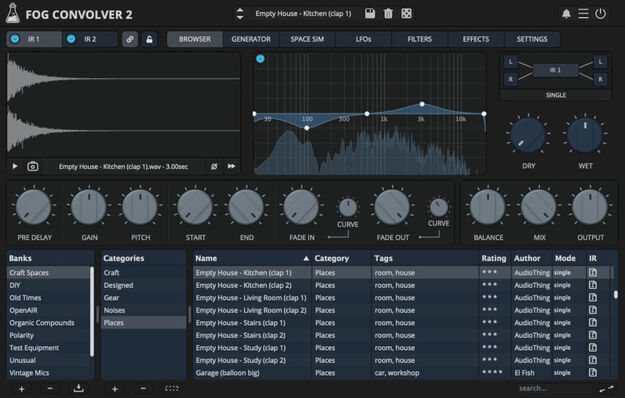
Fog Convolver 2 is a true stereo convolution reverb and processor from AudioThing. It loads impulse response (IR) files, which capture the character of a space or a piece of gear, and applies that character to the incoming audio.
The maker says this second version was rewritten and redesigned from scratch. It adds modulation, effects and an impulse response generator, along with other improvements. You can load two separate IRs, or a single true stereo (quad-channel) IR.
The two impulses can be arranged in five routing modes: single, serial, parallel, parallel mix and true stereo. Each impulse has two LFOs (10 waveforms, 18 destinations), a dedicated multi-mode filter and a 5-band graphic EQ.
There are 8 factory banks with more than 660 impulse responses made from spaces, analog and digital equipment, organic sources and more. Any WAV or AIFF file can be dragged in to use as your own IR.
Key features
Dual IR engine
Two IRs can be loaded with linked or separate controls. It may help when you want to layer the response of a room with the texture of a piece of gear.
Five routing modes
Single, serial, parallel, parallel mix and true stereo are available. How the impulses are combined changes the spread, so it may suit experimental spaces too.
LFOs, filters and EQ
Each impulse has two LFOs, a multi-mode filter (pre, IR or post position) and a 5-band graphic EQ. It may be useful for moving or shaping the response.
Effects and IR generator
Chorus, phaser, compressor and waveshaper are included, along with an impulse response space simulator and an IR generator. It may be handy for building artificial spaces without existing IRs.
Eight factory banks
Craft Spaces, Old Times, OpenAIR, Organic Compounds, Polarity, Test Equipment, Unusual and Vintage Mics make up the banks, listed at 740+ impulse responses. It may let you try everything from ordinary reverbs to unusual sources.
Drag and drop, preset browser
WAV or AIFF files load with a simple drag, and two files are assigned to IR1 and IR2. The preset browser supports categories, tags and ratings.
Resizable window and snapshots
The window is resizable, and there is a preset system with a randomizer plus a snapshot system. It may speed up sound hunting.
Specifications
| Item | Details |
|---|---|
| Type | Convolution reverb / processor |
| IR engine | Dual IR (6 modes including true stereo) |
| LFOs | 4 with multiple destinations |
| Filters | 2 multi-mode |
| Impulse responses | 740+ |
| Formats (Windows) | VST2 / VST3 / AAX / CLAP (64-bit) |
| Formats (Mac) | VST2 / VST3 / AU / AAX / CLAP (64-bit, Universal 2) |
| Formats (Linux) | VST2 / VST3 / CLAP (64-bit) |
| System | 2GHz CPU, 4GB RAM, 1.5GB HD (Windows 7-11, OS X 10.13 to macOS 14, Ubuntu 20.04 LTS) |
| Activation | Online or offline, 1 license up to 3 computers, no iLok |
What is included and system requirements
- Fog Convolver 2 plugin
- 8 factory banks (660+ IRs; the feature list says 740+)
- Preset browser with randomizer
- Plugin formats for Windows, Mac and Linux (see above)
- When bought at Plugin Boutique, the code is redeemed in an AudioThing account to download
How to use it
- Create an AudioThing account, redeem the purchase code, and download the installer and license.
- Run the installer and choose the plugin formats you want.
- Load Fog Convolver 2 in your DAW as a reverb and activate it online or offline.
- Pick a preset from the browser that is close to what you want.
- Choose IR1 and IR2, or drag in WAV/AIFF files.
- Select a routing mode and shape the result with mix, filters and EQ.
- Add movement with the LFOs and effects, then save your own preset.
Where it may come in handy
Spaces for vocals and instruments
Real-space IRs may add a natural sense of room to vocals and instruments. Layering two IRs is another way to look for a response you like.
Sound effects and sound design
IRs from banks such as Test Equipment and Unusual may suit drones and glitchy textures.
Texture for post production
IRs based on radio or old recordings may help when you want audio to feel like another era.
Using your own IRs
Turning your own WAV recordings into IRs may let you build a space unique to your work.
Who it may suit
- People who want to try a convolution reverb
- People who want the response of real spaces or gear in a mix
- People who like layering and moving IRs for experimental sounds
- People who want to use their own recordings as reverb material
Good to know before you buy
- The IR count is given as 660+ in the description and 740+ in the feature list.
- An AudioThing account is required; iLok is not.
- A limited demo may be available on AudioThing's product page.
- System requirements list Windows 7-11 and OS X 10.13 to macOS 14.
Price
$69 (Plugin Boutique, checked 2026-10-27). Prices can vary by region and promotion, so check the official page before buying.
See Fog Convolver 2 on the product page
More of the same kind
We have introduced 112 reverbs. Here are some of the others.
- Arturia Rev OCEAN
- ADPTR AUDIO Utopia
- Valhalla DSP ValhallaShimmer
- TAL Software TAL-Reverb-2
- Rob Papen RevSane
- Universal Audio Galaxy Tape Echo
We have introduced 34 other products from AudioThing.
- AudioThing Environments
- AudioThing Springs
- AudioThing miniVerb
- AudioThing Things – Texture
- AudioThing Orbita
For a side-by-side comparison scored on the same criteria, see our comparison of reverbs.
See the full list in Product database: Effects.
Sources: pluginboutique.com (checked 2026-10-27)










Comments