
Disclosure: This page may contain affiliate links. Prices were checked on the date shown and may change.
An introduction to BABY Audio Spaced Out, based on information from the maker and distributors: what it does, how to use it and who it may suit. It is not scored.
Spaced Out is a lush wet-FX generator, built for sending your sounds and vocals into weightless, heavenly orbit.
— BABY Audio official site
What is Spaced Out?
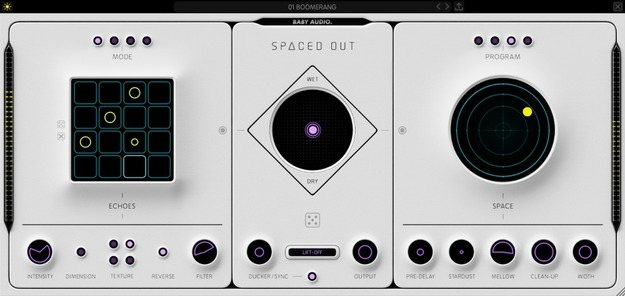
Spaced Out is a wet-FX generator that combines reverb, modulation and delay in one plug-in, designed to send sounds and vocals drifting into wide space.
At its core are a crystalline reverb engine and a 16-step delay sequencer synced to the DAW tempo. The seller says more than 50 individual effects come together.
An X-Y joystick morphs reverb length and modulation behaviour, and another X-Y control in the mixer moves between echoes/space and wet/dry.
A Generate button creates musically tuned random settings. It ships with 125 presets from BABY Audio and guests, and is aimed at drums, instruments and vocals.
Key features
16-step delay sequencer
Tempo-synced with Straight, 2x, Dotted and Triplet modes; Intensity sets sustain and feedback behaviour for rhythmic echoes.
Four reverb programs
Choose Vacuum, Small Space, Medium Space or Outer Space; Stardust adds a sustained shimmer to the tail.
Dimension, Texture, Reverse
Dimension offers Off, Ultra-Wide and Motion; Texture offers Clean, Wonky Tape, Lofi and Hazy; Reverse flips delay playback.
Lift-Off and Ducker
Lift-Off glues the wet signals via compression, mid-side and EQ; Ducker lowers the wet signal while dry plays and can sync to BPM.
Generate and 125 presets
Musically tuned randomising gives starting points, and a wet-lock keeps the wet/dry balance while browsing presets.
Specifications
| Item | Details |
|---|---|
| Type | Reverb / delay / modulation |
| Presets | 125 |
| Delay | 16-step, tempo-synced |
| Reverb programs | Vacuum, Small Space, Medium Space, Outer Space |
| Interface | Light and dark schemes |
What is included and system requirements
- Mac (Intel / M1 native) and Windows
- Works with major DAWs including Ableton Live, Pro Tools, Logic Pro, FL Studio, Cubase, Nuendo, Reaper and Reason
- Internet connection required for authorisation
How to use it
- Install and authorise with an internet connection.
- Load it on an aux send/return or as an insert.
- Pick a preset and set the wet/dry balance.
- Move the X-Y joystick to change reverb length and modulation.
- Set delay-sequencer mode and Intensity for rhythm.
- Press Generate to try new settings.
- Use the Ducker to keep the wet signal out of the dry's way.
Where it may come in handy
Vocal space
May suit adding depth and movement behind a vocal.
Drum and instrument flavour
The 16-step sequencer may help add rhythmic delays to snares or guitars.
Ambient sound design
Shimmer and Wonky Tape modes may help build floating textures.
Idea generation
Generate may help spark ideas for a track.
Who it may suit
- Those who want reverb and delay in one plug-in
- People after a quick wet-FX for vocals and drums
- Users who like exploring by moving controls
Good to know before you buy
- Authorisation requires an internet connection.
- Because it bundles many effects, you may use it alongside single-purpose reverbs and delays.
Price
$99 (Plugin Boutique, checked 2026-10-27). Prices can vary by region and promotion, so check the official page before buying.
See Spaced Out on the product page
More of the same kind
We have introduced 62 delays. Here are some of the others.
- Valhalla DSP ValhallaFreqEcho
- Waves SuperTap
- Metric Halo MH DirtyDelay v4
- Klevgrand Røverb
- Boz Digital Labs Imperial Delay
- Waves CLA Epic
For a side-by-side comparison scored on the same criteria, see our comparison of delays.
See the full list in Product database: Effects.
Sources: pluginboutique.com (checked 2026-10-27)










Comments