
Disclosure: This page may contain affiliate links. Prices were checked on the date shown and may change.
An introduction to Waves SuperTap, based on information from the maker and distributors: what it does, how to use it and who it may suit. It is not scored.
Multi-head tape delays defined the sound of spacey echoes. SuperTap does everything the vintage hardware did, but its 6 independent stereo delay lines deliver far more flexibility.
— Waves official site
What is SuperTap?
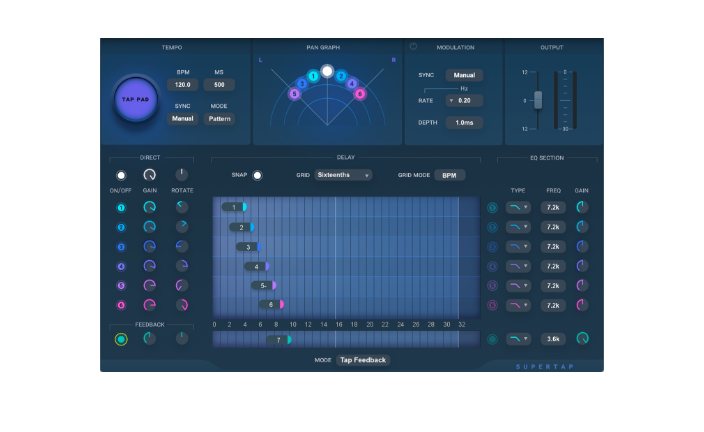
SuperTap is a multi-tap delay plug-in from Waves. It is described as a modern rebuild of the spacey echoes produced by multi-head tape echo units. With 6 independent delay lines, you can build the number and timing of repeats in detail.
It consists of two components, a 6-tap and a 2-tap version, each offered in mono, mono-to-stereo and stereo formats. The Japanese distributor page lists delay times of up to 6 seconds, set by host tempo sync or by tapping.
Each tap has its own EQ filter, gain, rotation (panning that keeps left and right levels) and precise time setting. The interface is said to follow the style of Waves' classic Q10 equalizer. LFO modulation and two kinds of feedback are also included.
A tap pad lets you enter rhythms or delay patterns by tapping, and analog-style self-oscillating feedback is available. Factory presets include a recreation of an Ampex 440 tape delay.
Key features
Six independent delay lines
Every tap has its own filter, gain, pan and time. Setting each differently lets you build layered echoes from one source.
Six filter curves
Each line's tone is shaped with six filter curves. You can roll off highs for a tape-like feel or trim lows so the echoes stay out of the way of vocals and instruments.
Feedback and modulation
Feedback, including self-oscillation, and LFO movement can be added. Echoes can wobble like chorus.
Rotation-based panning
Echoes are moved while keeping left and right channel levels. Placing them wide across the stereo field is designed to avoid level imbalance.
6x tap tempo and tap pad
The tap tempo button can create polyrhythmic echoes across six lines. Sync to song tempo, or set the timing by hand.
From slapback to long echoes
It is described as covering short slapback and early-reflection uses up to long tape echoes, which can be tried on guitar solos, vocal ornaments and more.
Specifications
| Item | Details |
|---|---|
| Type | Multi-tap delay (6-tap / 2-tap) |
| Delay time | Up to 4958 ms (Plugin Boutique) / up to 6 seconds (Japanese distributor page) |
| Formats | Mono / Mono-to-Stereo / Stereo |
| Plug-in formats (distributor page) | AAX Native, AudioSuite, Audio Units, VST3 |
| Supported OS (distributor page) | macOS Ventura 13 to Tahoe 26 / Windows 10 and 11 (64-bit) |
What is included and system requirements
- SuperTap 6-tap and 2-tap versions
- Factory presets including an Ampex 440 tape delay recreation
- Installation and activation through Waves Central (Waves account required)
- Waves V17 requirements: 16 GB RAM or more, 30 GB or more free system-drive space
How to use it
- Register the serial number in your Waves account.
- Install and activate with Waves Central.
- Insert SuperTap on an aux track or as an insert in your DAW.
- Choose the 6-tap or 2-tap version and the mono or stereo format.
- Pick a preset, then set the mix amount and feedback.
- Sync delay time to tempo, or tap it in on the tap pad.
- Adjust each tap's filter, gain and pan to place and shape the echoes.
- Add LFO modulation a little at a time to set the amount of movement.
Where it may come in handy
Guitar and synth solos
Layering echoes with six taps could build spatial width. Starting with a tape-echo-style setting with rolled-off highs may be a good entry point.
Vocal slapback and width
A short time setting can add thin slapback, or tempo-synced echoes can widen the space behind a vocal.
Polyrhythmic delays
With 6x tap tempo and independent time settings, you may be able to stack echoes at different intervals.
Self-oscillation for sound design
Raising feedback until it self-oscillates may let you make swirling textures.
Who it may suit
- People who want to build tape-echo-style repeats in detail
- Those who want to stack several echoes with different tones and positions
- People who want rhythmic echoes using tempo sync or tap input
- Anyone who also wants to try self-oscillation for sound design
Good to know before you buy
- The maximum delay time is given as 4958 ms by Plugin Boutique and up to 6 seconds by the Japanese distributor. Please check before buying.
- Supported OS ranges differ between Plugin Boutique and the Japanese distributor.
- A Waves account and an internet connection are needed for activation.
- The Japanese distributor page mentions a 7-day demo.
How it differs from similar products
We do not pick a winner; the official figures are placed side by side.
W. A. Production SphereDelay 2
SuperTap is a 6-tap / 2-tap multi-tap delay with independent time and filter per line. SphereDelay 2 is a multimode delay with Mono, Stereo, Ping-Pong and Ping-Pong Separate modes and 50+ presets.
Price
$79 (Plugin Boutique, checked 2026-10-27). Prices can vary by region and promotion, so check the official page before buying.
See SuperTap on the product page
More of the same kind
We have introduced 62 delays. Here are some of the others.
- Minimal Audio Cluster Delay
- Arturia Delay ETERNITY
- Solid State Logic SSL Native X-Echo
- United Plugins Continuum
- UJAM UFX Delay
- BLEASS BLEASS Tides
We have introduced 215 other products from Waves.
- Waves Manny Marroquin Delay
- Waves CLA Epic
- Waves H-Delay Hybrid Delay
- Waves Lofi Space
- Waves InPhase LT
For a side-by-side comparison scored on the same criteria, see our comparison of delays.
See the full list in Product database: Effects.
Sources: pluginboutique.com wavesjapan.jp (checked 2026-10-27)










Comments