
Disclosure: This page may contain affiliate links. Prices were checked on the date shown and may change.
An introduction to BeatSkillz Rekraft, based on information from the maker and distributors: what it does, how to use it and who it may suit. It is not scored.
What is Rekraft?
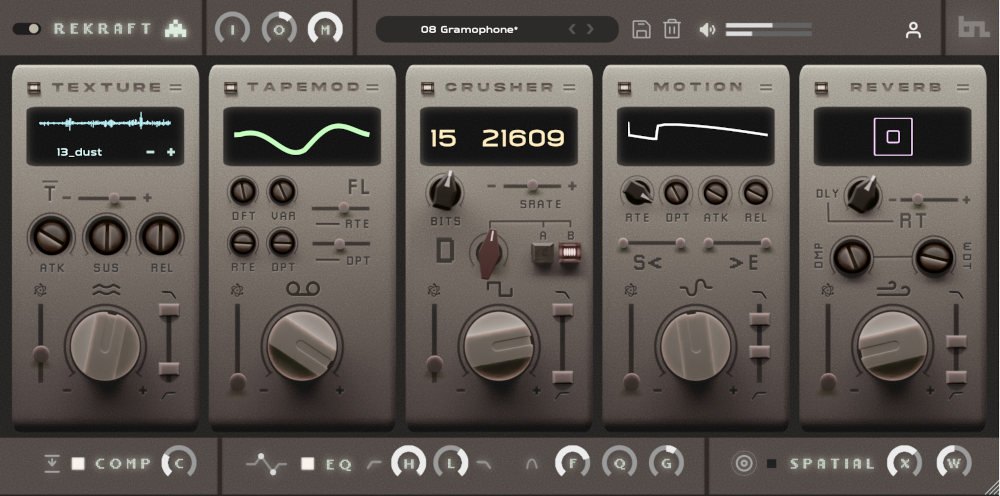
Rekraft is a multi-effect for lo-fi and vintage-style tones, built from five modules you can reorder. It runs on Mac and Windows in VST3, AU and AAX (64-bit host). The manufacturer's site offers a trial for each system.
Key features
Five reorderable modules
Reverb, TapeMod, Texture, Crusher and Motion can be dragged into any order, followed by a global EQ, compressor and stereo widener (per the manufacturer).
Texture
Noise, scratches and other samples can be layered with an envelope, and you can load your own (the store's description).
Crusher, TapeMod and Motion
Crusher covers bit crushing and distortion, TapeMod covers wow and flutter, and Motion adds tempo-synced shapes from subtle to pumping (the store's description).
Presets and workflow
It ships with 200 factory presets, a resizable interface and tooltips on every control (the store's description).
After you buy: installation and activation
This is the general flow for products bought at Plugin Boutique. Activation differs by product (serial number, a manufacturer account, iLok and so on), so check the instructions in your library after purchase.
- Log in to your Plugin Boutique account and find the product in “Library”.
- Download the installer (you can switch between the Windows and Mac versions). Depending on the product, you also get a serial number, an unlock code or a key file.
- Product-specific steps are under “…” → “Installation Instructions” next to the product in your library, and also near the bottom of the product page.
Price
Please check the official page for the price.
See Rekraft on the product page
More of the same kind
Other introduction articles of the same kind.
- Waves JJP Bass
- Waves S1 Stereo Imager
- Waves OneKnob Louder
- Waves Waves Maserati B72
- Waves Sub Align
- FLUX:: Ircam Trax
See the full list in Product database: Effects.
Sources: beatskillz.com pluginboutique.com help.pluginboutique.com support.pluginboutique.com (checked 2026-11-15)










Comments