
Disclosure: This page may contain affiliate links. Prices were checked on the date shown and may change.
An introduction to Waves Waves Maserati B72, based on information from the maker and distributors: what it does, how to use it and who it may suit. It is not scored.
Synth mode adds width, buzz, and color to synths, but also gives novel flavors to any kind of bass.
— Waves official site
What is Waves Maserati B72?
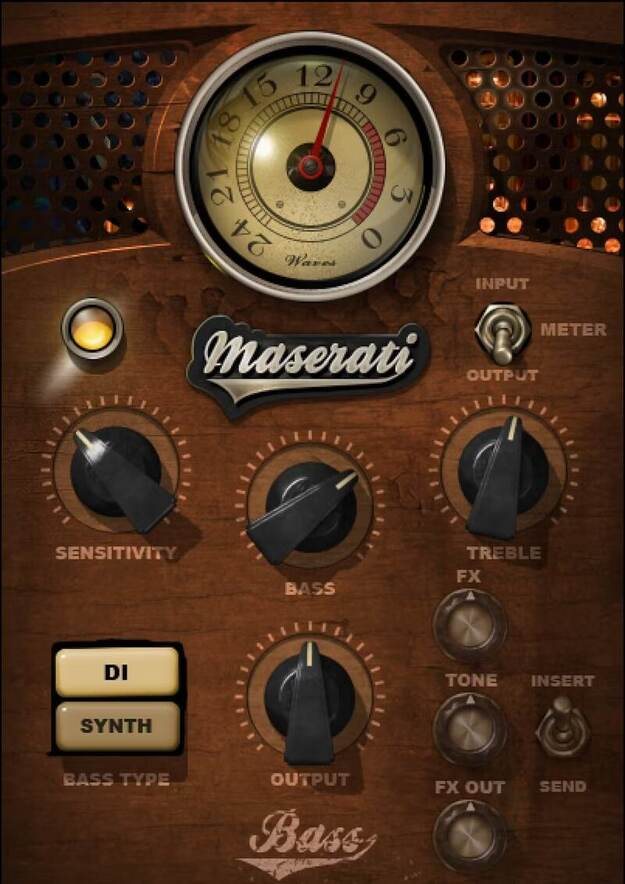
Maserati B72 is a bass-focused effect from Waves, created with mix engineer Tony Maserati. It is intended for shaping and coloring electric bass, acoustic bass and synth bass.
It has two modes. DI mode is for electric or acoustic bass and shapes the sound with high and low EQ. Synth mode adds width, buzz and color to synths, and the product page says it can also give different flavors to other kinds of bass.
Synth mode includes a toggle between insert and send use. The plugin ships with 12 DI mode presets and 16 synth mode presets.
The description mentions genres from hip hop to pop and rock. Typical uses are adding body to a thin bass or adding width to a synth bass.
Key features
DI mode
A mode for electric or acoustic bass. High and low EQ shape roundness and clarity, and it may suit light shaping of a line-recorded bass.
Synth mode
This mode adds width, buzz and color to synths. The product page also describes it as a way to give other bass sounds a different flavor.
Insert or send use
Synth mode has a toggle between insert and send operation, so the effect can be blended with the original sound.
Widening mono bass sounds
The page lists enriching traditional mono bass synth sounds. It suits cases where a bass sounds sparse.
Synth-like character for electric and acoustic bass
The page also describes adding synth-like character to electric or acoustic bass, which can help when a track needs a more distinctive tone.
28 presets
12 DI mode presets and 16 synth mode presets are included, which can serve as starting points for your own settings.
Specifications
| Item | Details |
|---|---|
| macOS | Monterey 12 / Ventura 13 / Sonoma 14 / Sequoia 15 |
| Windows | Windows 10 or later |
| Formats (Mac) | VST / AU / AAX |
| Formats (Windows) | VST / AAX |
| Activation and installation | Waves account and Waves Central (enter the Plugin Boutique serial number) |
| Presets | 12 DI mode / 16 synth mode |
What is included and system requirements
- DI mode
- Synth mode with insert/send toggle
- Presets: 12 for DI mode, 16 for synth mode
- Supported systems: Mac with macOS Monterey 12, Ventura 13, Sonoma 14 or Sequoia 15 (VST, AU, AAX); Windows 10 or later (VST, AAX).
How to use it
- Buy the plugin at Plugin Boutique and note the serial number shown in your account.
- Create a Waves account (or log in) and enter the serial number under Register New Products.
- Download Waves Central from your Plugin Boutique account or the Waves downloads page and install it.
- Log in to Waves Central, tick the plugin on the Install Products tab, and click Install & Activate.
- Open a bass track in your DAW and insert Maserati B72.
- Choose DI mode or synth mode depending on the source.
- Step through the presets and pick one close to what you want.
- Adjust the EQ or synth amount in small steps and check against the kick and other low-end instruments.
Where it may come in handy
Home-recorded electric bass
If a line-recorded bass sounds thin, DI mode may add some roundness. It could serve as a final touch after recording.
Programmed synth bass
You may try synth mode to add width and buzz to a synth bass made in your DAW. Using it as a send keeps the original sound.
Hip hop-style tracks
It may help add body to a track whose low end feels sparse.
Acoustic bass arrangements
In an acoustic arrangement, you may try the DI mode presets to give the bass a bit more character.
Who it may suit
- People who record electric bass direct and want to shape it in the mix
- Those who want to add width or color to a synth bass
- Users interested in an effect designed with Tony Maserati
Good to know before you buy
- Activation requires a Waves account and Waves Central.
- This article does not judge the sound.
- Formats are VST, AU and AAX on Mac and VST and AAX on Windows, per the Plugin Boutique page.
Price
Please check the official page for the price.
See Waves Maserati B72 on the product page
More of the same kind
Other introduction articles of the same kind.
- McDSP SA-2 Dialog Processor v7
- IK Multimedia T-RackS Leslie
- MeldaProduction MMatcher
- United Plugins Lofinity
- NUGEN Audio LM-Correct
- United Plugins Cryostasis
We have introduced 215 other products from Waves.
See the full list in Product database: Effects.
Sources: pluginboutique.com (checked 2026-10-27)










Comments