
Disclosure: This page may contain affiliate links. Prices were checked on the date shown and may change.
An introduction to Eventide EChannel, based on information from the maker and distributors: what it does, how to use it and who it may suit. It is not scored.
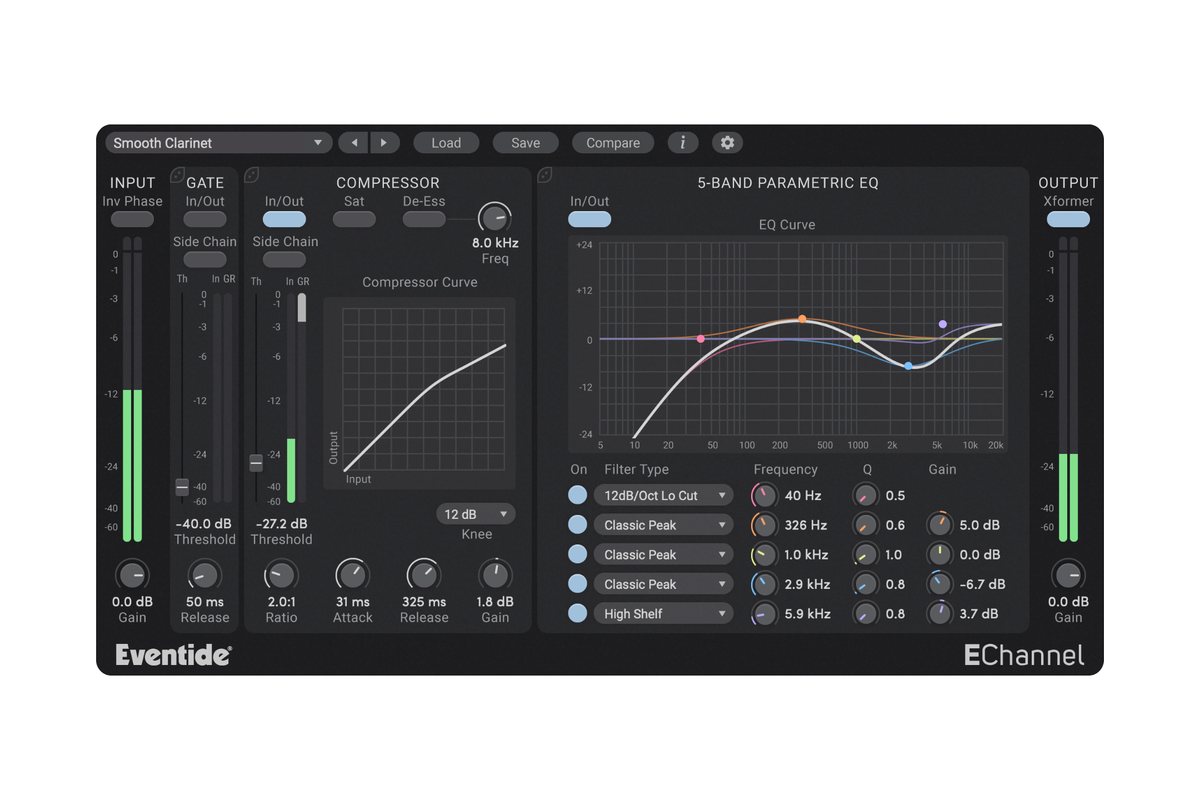
EChannel is a versatile and lightweight channel strip plug-in that includes a routable Gate, Parametric EQ, and Compressor.
— Eventide official site
What is EChannel?
EChannel is a lightweight channel strip from Eventide that combines a gate, a parametric EQ and a compressor. Its modular design lets you change the order of processing.
Graphical displays show frequency information on screen, which makes adjusting the target bands easier. The interface is described as intuitive and easy to learn.
More than 100 presets are provided for a variety of instruments and uses. The gate is introduced as suited to multi-miked drum kits and fret noise.
The compressor has optional soft saturation and a de-esser, and a sidechain can be used. It may be a candidate for people who want to cover basic sound shaping in one plug-in.
Key features
FlexiPath routing
The order of the gate, EQ and compressor can be changed to suit your workflow. You can try placing the EQ before or after the compressor.
Gate
It removes signals below the set threshold. It is introduced as suited to multi-miked drum kits and fret noise.
Compressor
It shapes the dynamics of the input. Soft saturation and a de-esser can be combined with it.
Sidechain
Gain reduction can be triggered by the signal of another instrument. It can be used to sort out competing instruments.
5-band parametric EQ
A five-band EQ for precise adjustment across the spectrum, with a frequency graph display. It can be used for tidying harsh bands.
Output transformer emulation
It is introduced as adding a subtle effect to low-frequency-heavy signals or being driven into saturation for analog warmth.
100+ presets
Presets tailored for various instruments and uses are included. You can adjust a similar one instead of building from scratch.
Specifications
| Item | Details |
|---|---|
| Maker | Eventide |
| Type | Channel strip (gate / parametric EQ / compressor) |
| Plug-in formats (Windows) | AAX / VST2 / VST3 (64-bit) |
| Plug-in formats (Mac) | AAX / AU / VST2 / VST3 (64-bit) |
| OS | Windows 10 and later, macOS 10.14 and later (Intel and Apple Silicon) |
| Authorization | No iLok dongle required; a free iLok account and iLok Manager are needed |
| Presets | 100+ |
| Demo | Free demo available |
What is included and system requirements
- EChannel plug-in
- 100+ presets
- Gate, 5-band EQ, compressor and output transformer modules
- Example hosts tested by Eventide: Ableton Live, Cubase, FL Studio, Logic Pro, Pro Tools, Studio One
How to use it
- Purchase from Eventide's site or a retailer and run the installer.
- Create a free iLok account and authorize with iLok Manager.
- In your DAW, insert EChannel on the track you want to process.
- Choose a preset close to the instrument or use.
- Decide the order of gate, EQ and compressor with FlexiPath.
- Move the gate threshold and check whether unwanted low-level sounds are reduced.
- Adjust bands with the 5-band EQ while listening.
- Adjust the compressor and output transformer and compare with the original sound.
Where it may come in handy
Drum recording
Using the gate on a multi-miked drum kit to tidy up unwanted sounds may be worth trying.
Tidying guitars
Reducing fret noise with the gate and shaping the outline with EQ and compression is one possible flow.
Basic vocal processing
Starting from a preset and using EQ, compression and the de-esser may help with basic sound shaping.
Groundwork on many tracks
Because it is lightweight, it could be inserted on many tracks to even out basic processing.
Who it may suit
- People who want a gate, EQ and compressor in one plug-in
- People who want to try different processing orders
- People looking for a light channel strip
- People who want to start quickly from presets
Good to know before you buy
- Authorization requires a free iLok account and iLok Manager; a dongle is not needed.
- Eventide tests in Ableton Live, Cubase, FL Studio, Logic Pro, Pro Tools and Studio One.
How it differs from similar products
We do not pick a winner; the official figures are placed side by side.
Eventide EQ
EChannel combines a gate, 5-band EQ and compressor in one plug-in.
Price
$49 (Eventide official site, checked 2026-10-27). Prices can vary by region and promotion, so check the official page before buying.
See EChannel on the product page
More of the same kind
We have introduced 51 channel strips. Here are some of the others.
- Waves Renaissance Channel
- Waves SSL G-Channel
- Solid State Logic SSL Guitarstrip
- Waves Scheps Omni Channel 2
- Waves Waves Eddie Kramer Drum Channel
- Wave Arts TrackPlug 7
We have introduced 21 other products from Eventide.
- Eventide EQ65
- Eventide Instant Flanger Mk II
- Eventide Precision Time Align
- Eventide H3000 Factory Mk II
- Eventide TriceraChorus
See the full list in Product database: Effects.
Sources: eventideaudio.com pluginboutique.com (checked 2026-10-27)










Comments