
Disclosure: This page may contain affiliate links. Prices were checked on the date shown and may change.
An introduction to Eventide UltraReverb, based on information from the maker and distributors: what it does, how to use it and who it may suit. It is not scored.
9 High End Hardware-Based Reverb Algorithms Bundled in a Single Native Plug-in
— Eventide official site
What is UltraReverb?
Eventide UltraReverb is a reverb plug-in that gathers more than 35 years of the company's reverb R&D. Plugin Boutique's page describes nine high-end, hardware-based reverb algorithms bundled in one plug-in.
Its halls, chambers, rooms, plates and ambience are derived from Eventide's flagship H8000 UltraHarmonizer hardware processor. It can create acoustically natural or other-worldly spaces and ships with more than 300 presets for mixing, mastering, post-production and sound design.
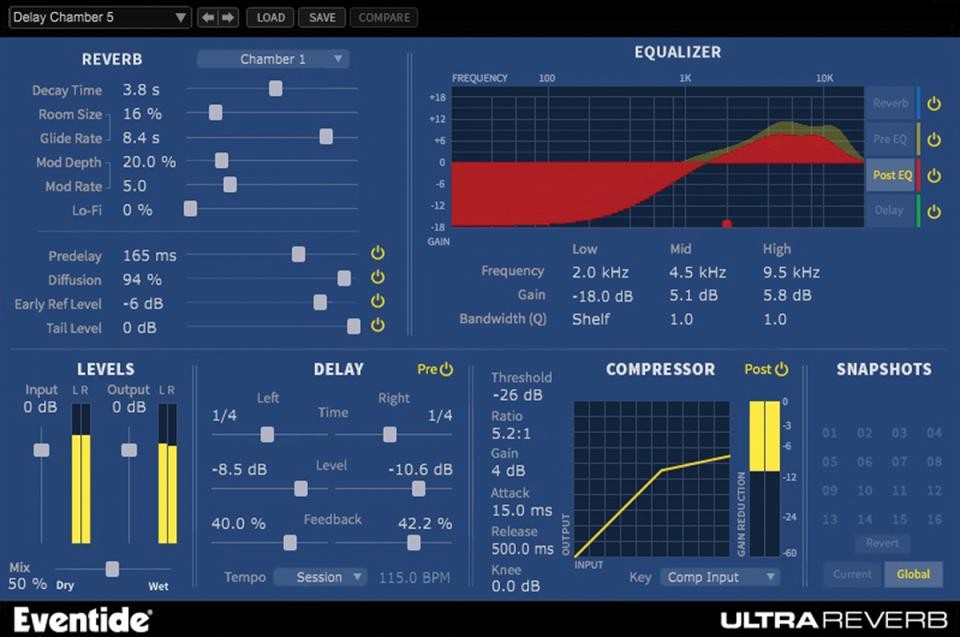
It has stereo delays, before or after the reverb with tempo sync, a compressor with key input, and four independent 3-band parametric EQs: pre-EQ, post-EQ, reverb EQ and delay EQ. Reverb tail randomisation based on the H949 Harmonizer's Random setting and a LoFi control for subtle grit or all-out mangling are also included.
Key features
Nine H8000-derived algorithms
Halls, chambers, rooms, plates and ambience in one plug-in.
300+ presets
For mixing, mastering, post-production and sound design, including artist presets by engineers.
Delay and compressor
Tempo-synced stereo delays and a compressor with key input, before or after the reverb.
Four independent 3-band EQs
Pre-EQ, post-EQ, reverb EQ and delay EQ.
Tail randomisation
Reverb tail randomisation based on the H949 Random setting.
LoFi control
From subtle grit to all-out mangling.
Specifications
| Item | Details |
|---|---|
| Type | Reverb |
| Algorithms | 9 (H8000-derived) |
| Presets | 300+ |
| EQs | 4 (independent 3-band parametric) |
| Windows | Windows 10 or later (64-bit, Windows 11 supported) |
| Mac | macOS 10.14 or later (Intel and Apple Silicon, 64-bit) |
| Compatibility | Session compatible with Eventide Reverb HD/TDM from Anthology II |
What is included and system requirements
- UltraReverb
How to use it
- Insert UltraReverb on a send or insert.
- Choose a preset close to the space you want.
- Set the delay position, before or after the reverb, and tempo sync.
- Shape the sound with the compressor and four EQs.
- Add randomisation or LoFi for character if needed.
Where it may come in handy
Mixing and mastering
300+ presets are provided for mixing and mastering.
Post-production and sound design
From natural to other-worldly spaces.
Reverb with delay
Placing delays before or after the reverb.
Who it may suit
- People who want one high-end reverb for many jobs
- People who want delay and EQ inside the same plug-in
Good to know before you buy
- It has many functions, so starting from presets makes it easier to use.
- This article is based on the Plugin Boutique product page, which carries the maker's description. Check the maker or retailer pages for the latest specifications and prices.
Price
$99 (Plugin Boutique, checked 2026-11-10). Prices can vary by region and promotion, so check the official page before buying.
See UltraReverb on the product page
More of the same kind
We have introduced 112 reverbs. Here are some of the others.
- Waves Manny Marroquin Reverb
- Soundtoys SpaceBlender
- Slate Digital VerbSuite Classics
- McDSP FutzVerb
- Waves Magma Springs
- Lexicon PCM Native Reverb Plug-in Bundle
We have introduced 21 other products from Eventide.
- Eventide ShimmerVerb
- Eventide Temperance Lite
- Eventide H3000 Band Delays Mk II
- Eventide EQ65
- Eventide Anthology XII
For a side-by-side comparison scored on the same criteria, see our comparison of reverbs.
See the full list in Product database: Effects.
Sources: pluginboutique.com (checked 2026-11-10)










Comments