
Disclosure: This page may contain affiliate links. Prices were checked on the date shown and may change.
An introduction to Soundtoys SpaceBlender, based on information from the maker and distributors: what it does, how to use it and who it may suit. It is not scored.
It’s an experimental reverb that lets you create unreal and imaginary spaces – shapes, textures, and tones otherwise impossible in the real world.
— Soundtoys official site
What is SpaceBlender?
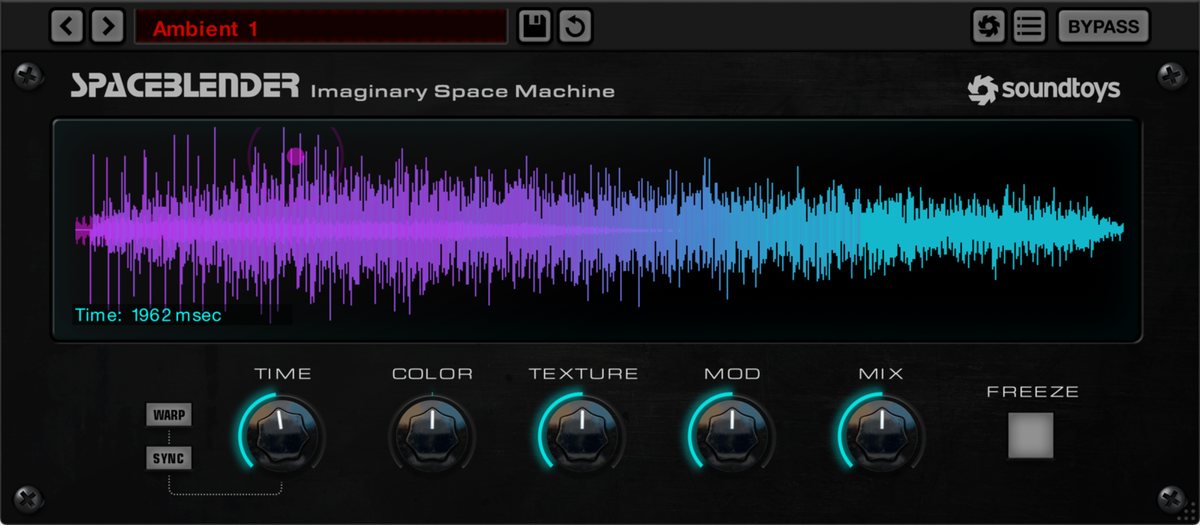
SpaceBlender is an experimental reverb from Soundtoys, designed to create spaces and textures that do not exist in the real world. It draws inspiration from layered tape loops and delays used by ambient pioneers.
The Time knob sets reverb length from 100 ms to a minute. In Sync mode it locks to tempo, useful for ambient loops, frozen tails or gated effects.
Color makes the reverb darker or brighter over time, and Texture moves from smooth, lush reverb to sparse, swarming repeats. Mod controls random movement inside, and Freeze feeds the output back into itself for evolving loops.
A Visualizer shows the shape and texture, and an X/Y cursor changes the reverb envelope in real time. The price on Plugin Boutique is $99.
Key features
Time
From 100 ms non-linear bursts to sprawling 60-second tails.
Color
Darker lo-fi tails, or brighter over time, which conventional reverbs cannot do.
Texture
From smooth and lush to sparse and swarming.
Mod and Freeze
Mod adds internal movement, and Freeze creates evolving, degrading loops.
Visualizer
Shows the shape and lets the X/Y cursor morph between gate, reverse, decay and bloom.
Algorithm background
Designed by Ken Bogdanowicz and Andrew Schlesinger, who made the original Black Hole algorithm.
Specifications
| Item | Details |
|---|---|
| Type | Experimental reverb |
| Reverb time | 100 ms to 60 seconds |
| OS | Mac OS X 10.14 or later, Windows 10 or later (Apple Silicon supported, 64-bit) |
| Formats | AAX Native, AAX AudioSuite, VST2, VST3, AU |
| Authorisation | Internet connection needed at activation |
What is included and system requirements
- SpaceBlender plugin
- Visualizer interface
How to use it
- Install with the Soundtoys installer after purchase.
- Authorise with an internet connection.
- Load SpaceBlender on a send.
- Set length with Time.
- Adjust Color and Texture.
- Add movement with Mod.
- Move the shape with the X/Y cursor.
- Hold the tail with Freeze.
Where it may come in handy
Ambient and cinematic work
Very long tails may help build slow swells.
Depth on vocals and instruments
It can also add subtle depth as an everyday reverb.
Transition effects
Freeze and gated shapes may suit scene-change sounds.
Who it may suit
- People who want experimental spatial effects
- Users who want slowly evolving tails
- Those who prefer to shape reverb visually
Good to know before you buy
- An internet connection is needed at activation.
How it differs from similar products
We do not pick a winner; the official figures are placed side by side.
Eventide MangledVerb
SpaceBlender stretches reverb time from 100 ms to 60 seconds with shape control. MangledVerb places distortion after the reverb and has 180+ presets.
Price
$99 (Plugin Boutique, checked 2026-10-27). Prices can vary by region and promotion, so check the official page before buying.
See SpaceBlender on the product page
More of the same kind
We have introduced 112 reverbs. Here are some of the others.
- Plugin Alliance Bettermaker Bettermaker BM60
- United Plugins FireSnareVerb
- sonible pure:verb
- Pulsar Audio Pulsar Primavera
- IK Multimedia CSR Inverse Reverb
- United Plugins Biverb
We have introduced 8 other products from Soundtoys.
- Soundtoys Soundtoys 5
- Soundtoys Devil-Loc Deluxe
- Soundtoys Little MicroShift
- Soundtoys FilterFreak
- Soundtoys Tremolator
For a side-by-side comparison scored on the same criteria, see our comparison of reverbs.
See the full list in Product database: Effects.
Sources: soundtoys.com pluginboutique.com (checked 2026-10-27)










Comments