
Disclosure: This page may contain affiliate links. Prices were checked on the date shown and may change.
An introduction to iZotope Neoverb, based on information from the maker and distributors: what it does, how to use it and who it may suit. It is not scored.
From the minds behind Ozone and Nectar, and powered by legendary Exponential Audio technology, iZotope Neoverb is the most intelligent reverb plug-in for music producers.
— iZotope official site
What is Neoverb?
Neoverb is a reverb plug-in from iZotope. It builds on Exponential Audio reverb engines and adds an AI-assisted assistant and EQs.
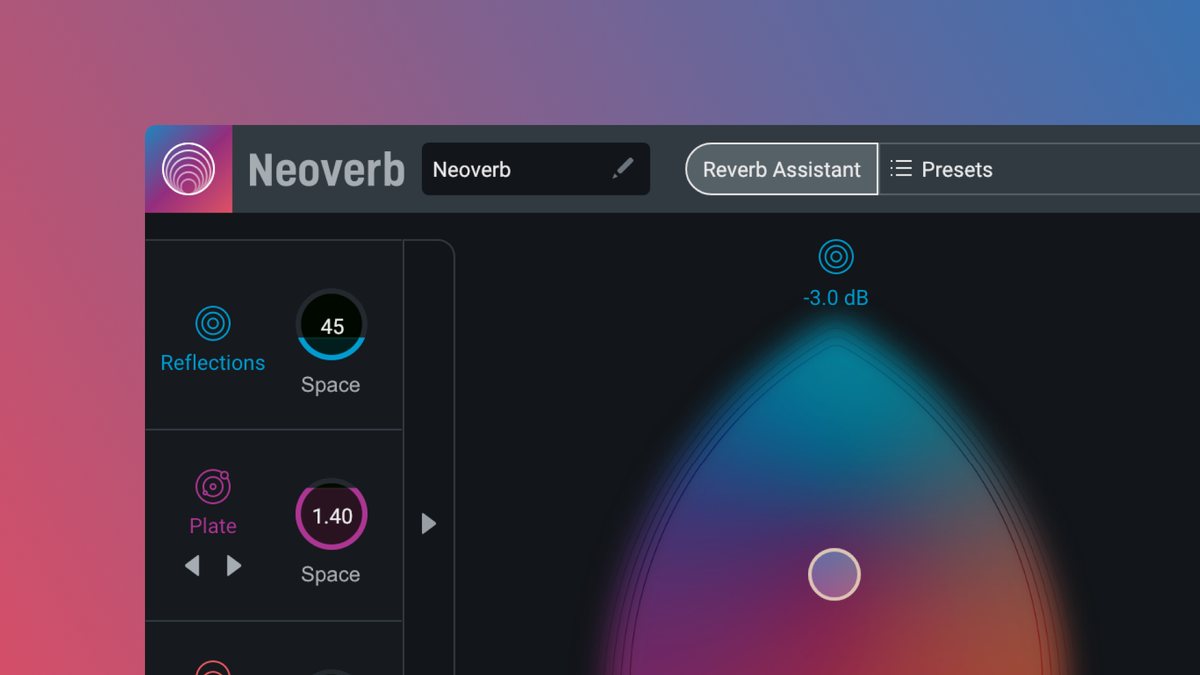
Its core is the Blend Pad, which mixes up to three reverbs: Reflections, Plate and Hall. You set the character by moving a point on one pad.
The Reverb Assistant adjusts settings in real time as you choose size and style in four steps. You can get close to what you want without touching every parameter.
Pre EQ and Reverb EQ listen to the input and suggest what to cut, and help keep the reverb from masking the dry signal.
Key features
Blend Pad
Mix Reflections (space), Plate (classic ambience) and Hall (height and depth). The pad can be automated in your DAW to change the reverb during a song.
Reverb Assistant
Choose Size and Style and pick from four Tone options (from dark to bright). It also sets the Advanced panel values.
Pre EQ with Auto Cut
A 3-band EQ cleans the signal before it reaches the reverb, and Auto Cut suggests where to cut.
Reverb EQ and Masking Meter
The Reverb EQ has an Unmask function for areas that clash with the dry signal, and the meter can work with other compatible iZotope plug-ins.
Advanced panel
Attack, Crossover, Damping and more are set per reverb type, and pre-delay and reverb time can sync to host tempo.
Smooth and pre-delay
Smooth softens input transients, and pre-delay, Dry/Wet and level control the sense of distance and blend.
Specifications
| Item | Details |
|---|---|
| Type | AI reverb plug-in |
| Formats | AAX / AU / VST2 / VST3 (64-bit only) |
| Technology | Exponential Audio reverb engines |
| Reverb types | Reflections / Plate / Hall (three blended) |
| Key features | Reverb Assistant, Blend Pad, Pre EQ, Reverb EQ, Masking Meter |
| Works with | Compatible iZotope plug-ins such as Neutron 3, Nectar 3 Plus, VocalSynth 2, Relay |
| Trial | Available |
What is included and system requirements
- The plug-in (AAX / AU / VST2 / VST3)
- Dozens of presets for vocals, instruments and genres
- Online manual
How to use it
- Authorize Neoverb with your iZotope account and download the installer.
- Run the installer and restart your DAW.
- Insert Neoverb on a send or on the track you want reverb on.
- Open the Reverb Assistant and choose Size and Style.
- Choose a Tone and move the Blend Pad point to refine the character.
- Try Pre EQ Auto Cut and the Reverb EQ Unmask.
- Adjust Dry/Wet and pre-delay for distance in the mix.
Where it may come in handy
Finishing vocals
The Unmask function may lower areas where the voice and reverb clash.
Placing instruments
Blending Reflections and Hall on the pad may help give each instrument its own place.
Changing space through a song
Automating the Blend Pad could give a wider reverb in the chorus only.
Who it may suit
- People who find detailed reverb settings difficult and want assistant support
- People who find reverb tends to muddy a mix
- People who use other iZotope products
Good to know before you buy
- The Plugin Boutique page mentions a crossgrade for current iZotope users from Music Production Suite 1-3 or Music Production Bundle 1-2.
- Masking Meter linking works with compatible iZotope plug-ins.
- A trial lets you check your system before buying.
Price
$99 (iZotope official site, checked 2026-10-27). Prices can vary by region and promotion, so check the official page before buying.
See Neoverb on the product page
More of the same kind
We have introduced 112 reverbs. Here are some of the others.
- Solid State Logic SSL Native FlexVerb
- MeldaProduction MReverbMB
- Relab Development REV6000 Essentials
- McDSP FutzVerb
- AIR Music Technology Ether
- LiquidSonics Seventh Heaven Professional
We have introduced 15 other products from iZotope.
- iZotope Aurora
- iZotope Equinox
- iZotope RX Voice De-noise
- iZotope Ozone Imager
- iZotope Tonal Balance Control 3
For a side-by-side comparison scored on the same criteria, see our comparison of reverbs.
See the full list in Product database: Effects.
Sources: izotope.com pluginboutique.com (checked 2026-10-27)










Comments