
Disclosure: This page may contain affiliate links. Prices were checked on the date shown and may change.
An introduction to iZotope Ozone Imager, based on information from the maker and distributors: what it does, how to use it and who it may suit. It is not scored.
Stereoize can turn mono into stereo, with no need for reverb or doubling.
— iZotope official site
What is Ozone Imager?
Ozone Imager is a free stereo imaging plugin from iZotope. With simple controls you can widen or narrow the left-right spread (stereo width) of a sound.
It is the imager from iZotope's Ozone mastering suite offered as a standalone plugin. The free version is a sampling of what Ozone offers, and it is included in every version of Ozone.
The Stereoize function can turn a mono source into stereo without reverb or doubling. Stereoize II is for subtle enhancement and Stereoize I gives a colorful phasing effect.
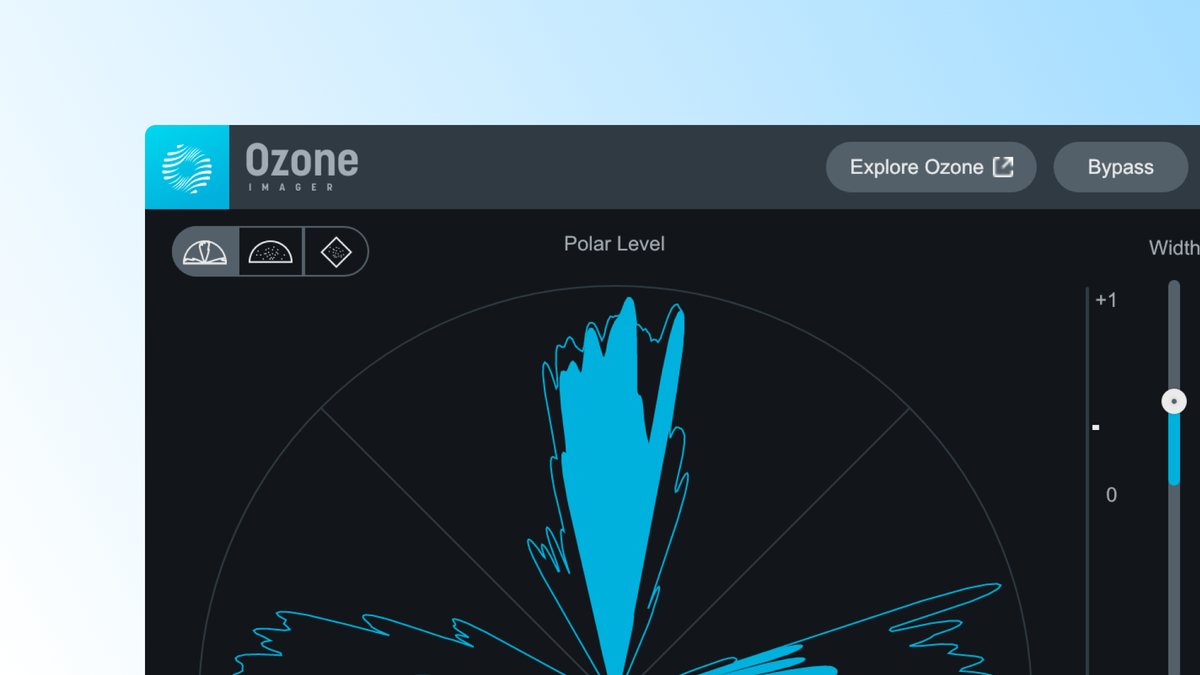
Three vectorscope meters let you check stereo width and whether left and right channels are lining up. The window can be resized.
Key features
Width control
Widens or narrows a track. The maker suggests widening pianos, synths and cymbals, and narrowing bass and kick drums to tighten the low end.
Stereoize
Turns mono into stereo without reverb or doubling. Stereoize II is a subtle enhancement and Stereoize I a colorful phasing effect.
Three vectorscopes
Three different vectorscopes show stereo width and whether the left and right channels are lining up properly.
Resizable window
The maker says that enlarging the window gives a better view of the meters.
Relation to Ozone
It is a free version of the imager included in every version of Ozone. The paid Ozone 12 Elements, Standard and Advanced include more tools.
Many DAWs
Supports AU, AAX, VST2 and VST3 (64-bit only), with hosts such as Logic Pro, Pro Tools, Ableton Live, Cubase, Studio One, Reaper and FL Studio listed.
Specifications
| Item | Details |
|---|---|
| Type | Stereo imaging plugin (free) |
| Formats | AU, AAX, VST2, VST3 (64-bit only) |
| Supported hosts | Logic Pro 11, Pro Tools 2024, Ableton Live 12, Cubase 14, Nuendo 14, Studio One 7, Reaper 7, FL Studio 2024, Adobe Audition 2025, Adobe Premiere Pro 2025, DaVinci Resolve 19, Reason 13 |
| Mac | macOS Sonoma 14.7.x, Sequoia 15.7.x, Tahoe 26.1.x (Intel or Apple silicon) |
| Windows | Windows 10 (22H2), Windows 11 (24H2) |
| Access | Free download, available immediately |
| Manual | Online manual available |
What is included and system requirements
- Free plugin (AU / AAX / VST2 / VST3)
- Online user manual
- Distributed free as 'Ozone Imager 2' on Plugin Boutique
How to use it
- Download it for free from iZotope's page or Plugin Boutique.
- Log in with your iZotope account.
- Run the installer and select the formats you need.
- Rescan plugins in your DAW.
- Insert Ozone Imager on a track you want to widen or narrow.
- Move the width control and check the spread on the vectorscopes.
- For mono sources, try Stereoize.
- Toggle it on and off to check for unnatural level or phase.
Where it may come in handy
Widening pianos, synths and cymbals
It may suit widening the sources the maker lists to use the left-right space of a mix.
Centering bass and kick
It may be worth trying to narrow low-end instruments toward the center.
Mono source to stereo
Stereoize may suit cases where you want width without reverb or doubling.
Checking stereo image
The vectorscopes may also help check left-right phase.
Who it may suit
- People who want to adjust stereo width for free
- People who want to try part of Ozone
- People who want to spread a mono source to stereo easily
- People who want to bring low end closer to mono in a mix
Good to know before you buy
- The free version is a part of Ozone; other tools are in the paid Ozone versions (Elements, Standard, Advanced).
- Downloading may require an iZotope account.
- Plugin Boutique lists it as 'Ozone Imager 2' with older OS notes; check iZotope's page for the latest supported OS.
Price
Free to use (iZotope official site, checked 2026-10-27).
See Ozone Imager on the product page
More of the same kind
We have introduced 18 stereo and imaging tools. Here are some of the others.
- MeldaProduction MAutopanMB
- Waves Waves PS22 Stereo Maker
- Auburn Sounds Panagement 2
- W. A. Production Dynawide
- W. A. Production Pumper 3
- Waves Brauer Motion
We have introduced 15 other products from iZotope.
- iZotope Neutron 5
- iZotope Vinyl
- iZotope Mix & Master Bundle Advanced
- iZotope Aurora
- iZotope Vocal Doubler
See the full list in Product database: Effects.
Sources: izotope.com pluginboutique.com (checked 2026-10-27)










Comments