
Disclosure: This page may contain affiliate links. Prices were checked on the date shown and may change.
An introduction to Lunacy BEAM, based on information from the maker and distributors: what it does, how to use it and who it may suit. It is not scored.
What is BEAM?
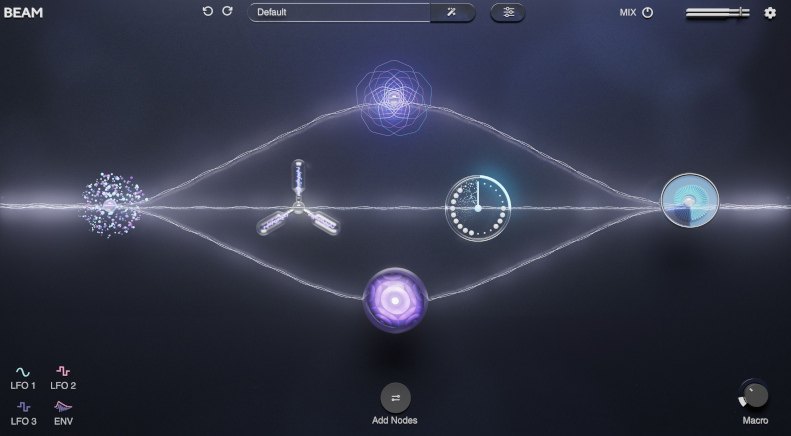
BEAM is Lunacy's modular multi-effect. You can combine the company's effects, such as convolution reverb and granular processing (per the maker).
Key features
A creative effects playground you build yourself
BEAM 2.0 is a modular collection of effects. Every Lunacy effect can be used inside BEAM. The maker suggests uses such as making keyboards sparkle, adding flavor to vocals, reshaping drums or sending synths into space.
Space effect: a convolution reverb with character
A reverb that uses carefully selected impulse responses (IRs), including sound design by BennJordan and Venus Theory. It can create textured spaces that are not ordinary rooms (per the maker).
Grains effect: real-time granular processing
It can create glittering clouds of grains, glitchy rhythms and rhythmic soundscapes. Up to three grain engines can run in parallel (per the maker).
New in 2.0: effects that work on their own
Every BEAM effect can be used as a standalone plug-in. BEAM includes four standalone effects: Grains, Space, Filter and Haze.
Presets and the preset generator
There are more than 300 presets in total, more than 200 impulse responses and more than 150 node presets. A button generates new presets with the maker's own probability-based algorithm (per the maker).
What is included and system requirements
- Runs natively on macOS and Windows computers
- For detailed system requirements, see Lunacy's official BEAM user manual
- BEAM 2.0: the main product.
- BEAM Bundle: BEAM plus expansions such as Patterns (per the maker).
- CUBE & BEAM Bundle: BEAM together with all products and expansions of the company's sample-morphing instrument CUBE (per the maker).
After you buy: installation and activation
This is the general flow for products bought at Plugin Boutique. Activation differs by product (serial number, a manufacturer account, iLok and so on), so check the instructions in your library after purchase.
- Log in to your Plugin Boutique account and find the product in “Library”.
- Download the installer (you can switch between the Windows and Mac versions). Depending on the product, you also get a serial number, an unlock code or a key file.
- Product-specific steps are under “…” → “Installation Instructions” next to the product in your library, and also near the bottom of the product page.
Price
Please check the official page for the price.
More of the same kind
Other introduction articles of the same kind.
- Waves MaxxVolume
- Sound Particles Brightness Panner 2
- FLUX:: Ircam Trax
- Waves Abbey Road King's Microphones
- Waves Waves Maserati ACG
- Mellowmuse Mellowmuse ATA Auto Time Adjuster
See the full list in Product database: Effects.
Sources: lunacy.audio pluginboutique.com help.pluginboutique.com support.pluginboutique.com (checked 2026-11-16)










Comments