
Disclosure: This page may contain affiliate links. Prices were checked on the date shown and may change.
An introduction to McDSP SA-2 Dialog Processor v7, based on information from the maker and distributors: what it does, how to use it and who it may suit. It is not scored.
The SA-2 Dialog Processor is based on hardware originally conceived by Academy Award winning re-recording mixer Mike Minkler and used on over 100 major motion pictures.
— McDSP official site
What is SA-2 Dialog Processor v7?
SA-2 Dialog Processor is a plug-in for dialogue and voice from the American developer McDSP. The maker says it is based on hardware conceived by Academy Award-winning re-recording mixer Mike Minkler and used on more than 100 major motion pictures.
It is designed to improve the overall sound of recorded speech, but the maker adds that it is not only for dialogue. It can be used on vocals and to adjust the timbre of any track, and is also described as a de-esser and a multi-frequency compressor.
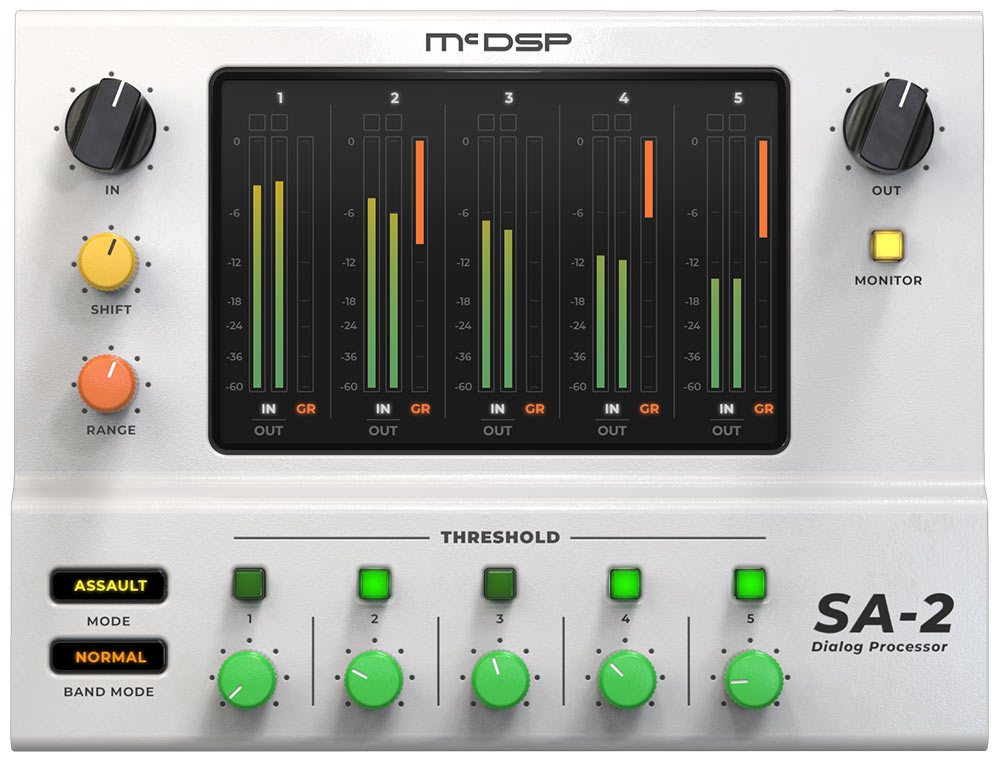
The processor has five bands of active equalization. Each band has a threshold that sets the level at which the EQ starts to act, plus an enable button. Two mode selectors control the ballistics of the active EQ and the placement of the five bands, and there are input and output gain controls.
The v7 release adds Shift, which moves all five band frequencies up or down by as much as one octave; Range, which adjusts the overall amount of processing; and Monitor, which lets you audition the signal being removed. The Native version costs 79 US dollars at Plugin Boutique.
Key features
Five independent active EQ bands
Each of the five bands acts when its threshold is exceeded, which suits reducing only the problem range of a voice when it is needed.
Two mode selectors
One sets the ballistics of the active EQ (Gentle, Normal, Assault) and the other sets where the five bands sit. Switch them to suit the material.
Shift
Moves all five band frequencies up or down as much as one octave from the original settings, so you can adapt to voice pitch or recording conditions.
Range
Adjusts the overall amount of processing without moving each threshold. It can increase attenuation by up to 50 percent beyond the original design.
Monitor
The Monitor button lets you hear the signal being removed, which helps you judge what you are cutting and avoid overdoing it.
Reduction meters and presets
Meters show which bands are working and by how much. Presets by award-winning mix engineers are included.
Mono and stereo versions
Both mono and stereo versions are provided, with double-precision processing and zero latency. The HD version also supports AAX DSP.
Specifications
| Item | Details |
|---|---|
| Type | Dialogue processor (active EQ) |
| Bands | 5 (with a threshold per band) |
| Modes | Gentle / Normal / Assault (ballistics), band-placement mode |
| v7 functions | Shift (up to one octave), Range (up to 50 percent more), Monitor |
| Channels | Mono and stereo |
| Processing | Double precision, zero latency |
| Formats | Native: AAX Native / AU / VST3; HD: also AAX DSP |
| Authorization | iLok2 / iLok3 or iLok Cloud, two activations per license |
| Price (Plugin Boutique, Native) | 79 USD |
What is included and system requirements
- SA-2 Dialog Processor (mono and stereo versions)
- Presets by award-winning mix engineers
- Formats: AAX Native, AU, VST3 (HD also AAX DSP)
- Two activations per license
How to use it
- Create a free iLok account and install the iLok License Manager.
- Redeem the 30-digit activation code you receive after purchase.
- Open an iLok Cloud session and assign the license.
- Download and run the Mac or Windows installer from your purchase page.
- Insert SA-2 on a dialogue, narration or vocal track in your DAW.
- Pick a preset first and choose the ballistics with the mode selector.
- Lower each band's threshold until you find where the problem range starts to be treated.
- Press Monitor to hear what is being removed and use Range to set the overall amount.
Where it may come in handy
Cleaning up narration and dialogue
It may help when you want to reduce sibilance, boxiness or other problem ranges in a recorded voice only when they appear.
De-essing vocals
The maker says it also works on vocals and quotes a review saying the five frequency bands help zero in on problem frequencies. It could be tried on harsh vocal ranges.
Streaming and podcast voices
As an active EQ for the voice range, it could be used on recorded speech.
Guitars, horns and other instruments
The sound examples on the maker's page include electric guitar, horns, strings and overheads, so adjusting timbre on instruments is a possible use.
Who it may suit
- People who want to tidy the sound of dialogue or narration.
- People who want to reduce problem ranges in a voice only when needed.
- People doing post-production for film, TV or video.
- People who want to try a de-esser and multi-band processor in one plug-in.
Good to know before you buy
- McDSP v7 plug-ins need authorization through an iLok2 or iLok3 USB key, or a free iLok License Manager account with iLok Cloud.
- VST is no longer supported from v7; the formats are AAX, AU and VST3. v6 VST versions are no longer updated and are uninstalled.
- Plugin Boutique's guide lists macOS 10.13 to 12 and Windows 10 as supported systems. Check current compatibility before buying.
- A subscription covering every McDSP plug-in is also offered, and the maker's site mentions a 14-day demo.
How it differs from similar products
We do not pick a winner; the official figures are placed side by side.
McDSP 4020 Retro EQ
SA-2 has five active EQ bands that act when each threshold is exceeded. The 4020 Retro EQ is a conventional four-band EQ with HF and LF shelves and HMF and LMF parametric bands.
Price
$79 (Plugin Boutique, checked 2026-10-27). Prices can vary by region and promotion, so check the official page before buying.
See SA-2 Dialog Processor v7 on the product page
More of the same kind
Other introduction articles of the same kind.
- United Plugins FireCobra
- Klevgrand Walls
- Fiedler Audio armada
- NUGEN Audio Aligner
- Blue Cat Audio Blue Cat's Connector
- W. A. Production BeatQuake
We have introduced 53 other products from McDSP.
- McDSP SA-2 Dialog Processor HD v7
- McDSP McDSP 6050 Ultimate Channel Strip HD v7
- McDSP Analog Channel
- McDSP SA-2 Dialog Processor
- McDSP 6034 Multi-Band Compressor
See the full list in Product database: Effects.
Sources: mcdsp.com pluginboutique.com (checked 2026-10-27)










Comments