
Disclosure: This page may contain affiliate links. Prices were checked on the date shown and may change.
An introduction to Native Instruments Tape Wobble, based on information from the maker and distributors: what it does, how to use it and who it may suit. It is not scored.
Experience the nostalgic warmth of vintage analog tape with Tape Wobble, a lo-fi effect that faithfully recreates the sonic quirks of classic tape machines.
— Native Instruments official site
What is Tape Wobble?
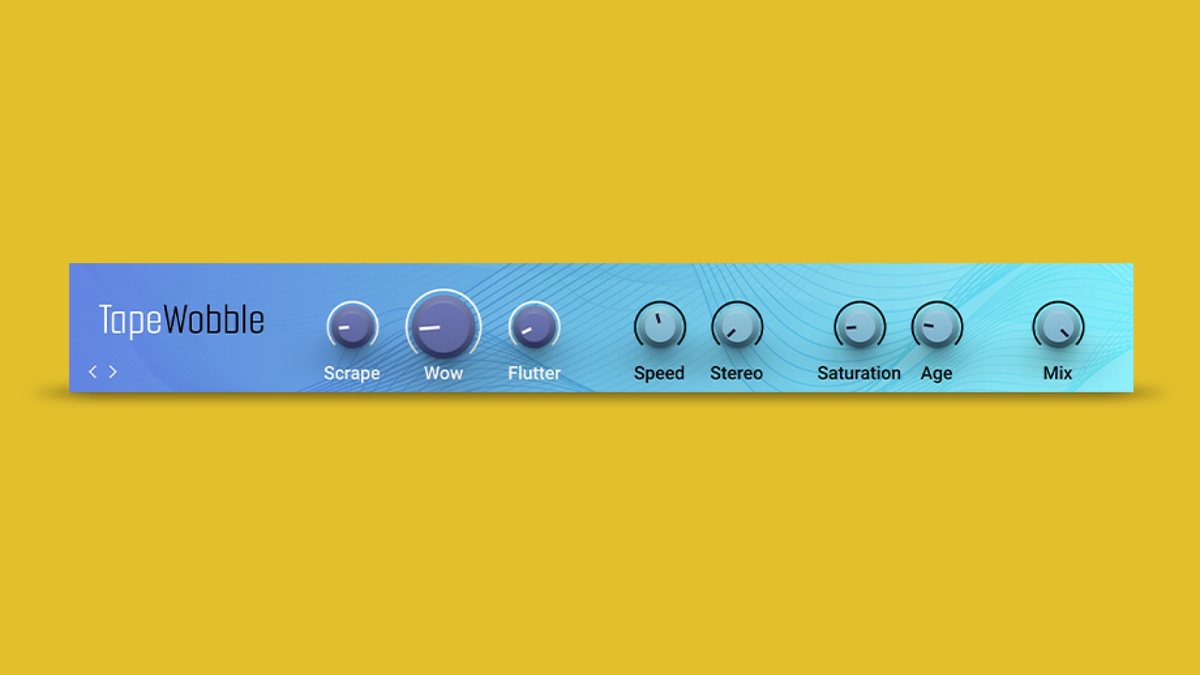
Tape Wobble is a tape-style lo-fi effect from Native Instruments. It is built to add the drift and texture of old tape machines to audio after the fact. According to the official description, it recreates analog tape wow and flutter, saturation, noise, and the natural roll-off of high frequencies.
It started as one of the lo-fi effects inside the company's guitar amp and effects rack Guitar Rig 7 Pro, and it is now offered as a standalone plug-in. You do not need Guitar Rig to buy and use this effect on its own.
The idea is to dial in the amount of wobble, saturation, noise and high-frequency loss you like, and add a sense of nostalgia or a worn-machine character to a sound. It is a natural fit when you want a clean digital recording of drums, keys or vocals to feel as if it passed through an old recorder.
Plugin Boutique's description also stresses that you can set just the right amount of the effect. It supports VST3, AU and AAX on both Windows and macOS, and the list price is the same on the official store and at Plugin Boutique.
Key features
Wow and flutter
Recreates the slow pitch drift (wow) and the faster, finer variation (flutter) caused by uneven tape transport. This adds an unsteady feel that may help on lo-fi tracks or anything that should sound retro.
Saturation
Adds the mild distortion and rounding that comes from recording to tape. Pushed hard it gives a rougher texture, and used lightly it may help a sound sit in the mix by taking the edge off.
Noise
Lets you add the hiss-like noise typical of tape. Because it fills even quiet moments with an old-recording atmosphere, it may suit samples or short loops that need a vintage background feel.
Natural high-frequency roll-off
Mimics the way highs soften on older tape machines. It may be handy for taming digital harshness or brightness and pushing a sound into a softer, more distant tone.
Adjustable amount
The official description says you can dial in just the right amount of retro charm. The same plug-in may cover everything from a light touch of flavor to an obviously lo-fi sound.
Offered as a standalone component
The lo-fi effect from Guitar Rig 7 Pro is sold as an individual component. It may suit people who want just this effect rather than the whole amp-and-effects rack.
Specifications
| Item | Details |
|---|---|
| Maker | Native Instruments |
| Type | Tape-style lo-fi effect |
| Plug-in formats (Windows) | VST3, AAX (64-bit only) |
| Plug-in formats (Mac) | VST3, AU, AAX (64-bit only) |
| macOS | macOS 12, 13 or 14 (latest update). Intel Macs (i5 or higher) and Apple Silicon (via Rosetta 2, or natively in supporting hosts) |
| Windows | Windows 10 or 11 (latest Service Pack), Intel Core i5 or equivalent CPU, 4 GB RAM |
| Graphics | Direct 3D 11.1 (Feature Level 11_1) or higher |
What is included and system requirements
- Tape Wobble plug-in
- Formats: VST3 and AAX on Windows; VST3, AU and AAX on Mac (64-bit only)
- System: Windows 10/11, macOS 12-14 (Intel i5 or higher / Apple Silicon), 4 GB RAM on Windows
How to use it
- Buy Tape Wobble on the Native Instruments site or at Plugin Boutique and receive your license information.
- Run the installer, then start your DAW and rescan plug-ins.
- Load Tape Wobble as an insert effect on the track you want to give some drift.
- Raise the wow and flutter amount little by little until the pitch movement sits in a range you like.
- Add saturation and noise next, listening to how the character of the source changes.
- Adjust the high-frequency roll-off so the digital harshness stops standing out.
- If the effect is too strong, lower the overall amount and compare against the bypassed sound.
- Save the settings you like inside your DAW project and reuse them on similar tracks.
Where it may come in handy
Drums and keys in lo-fi tracks
Adding wobble, noise and softened highs may push a clean sample toward the feel of something recorded on old gear.
Giving vocals or narration a nostalgic texture
A light setting adds some pitch drift and slight saturation, which may give a vocal a retro mood. Too much can make the pitch sound unstable, so a restrained amount may suit better.
Treating sampled material
Putting noise and wobble on short loops or one-shots is one way to make the material feel well used.
Retro touches for games and video
It may help when you need an old-recording atmosphere added to audio after the fact.
Who it may suit
- People making lo-fi tracks or music with a retro feel
- People who want to add old tape-machine character to clean digital recordings
- People who do not need all of Guitar Rig 7 Pro and only want the tape-style effect
- People looking for a simple tape-style effect
Good to know before you buy
- This is a standalone version of an effect found in Guitar Rig 7 Pro. If you already own Guitar Rig 7 Pro, it may already include the same effect, so check the official page before buying.
- The official requirements list macOS 12-14 and Windows 10/11. For newer operating systems, check the latest information from the maker.
- Only 64-bit versions are provided for both Windows and Mac, so it will not run in 32-bit hosts.
- Activation and installation normally go through a Native Instruments account (Native Access).
How it differs from similar products
We do not pick a winner; the official figures are placed side by side.
Native Instruments Kolor
Both are standalone effects taken from Guitar Rig 7 Pro. The official descriptions say Tape Wobble handles tape wobble, saturation, noise and high-frequency roll-off, while Kolor offers analog-style distortion with 10 algorithms. Both are listed at 19 USD.
Price
$19 (Native Instruments official site, checked 2026-10-27). Prices can vary by region and promotion, so check the official page before buying.
See Tape Wobble on the product page
More of the same kind
Other introduction articles of the same kind.
- Slate Digital MetaPitch
- UJAM Finisher BOOST
- Krotos Dehumaniser Simple Monsters
- Fiedler Audio Dolby Atmos Composer
- NUGEN Audio SigMod
- Wave Arts MultiDynamics 7
We have introduced 15 other products from Native Instruments.
- Native Instruments Molekular
- Native Instruments Blocks Primes
- Native Instruments Absynth 6
- Native Instruments Supercharger GT
- Native Instruments Kontour
See the full list in Product database: Effects.
Sources: native-instruments.com pluginboutique.com (checked 2026-10-27)










Comments