
Disclosure: This page may contain affiliate links. Prices were checked on the date shown and may change.
An introduction to NUGEN Audio DialogCheck, based on information from the maker and distributors: what it does, how to use it and who it may suit. It is not scored.
DialogCheck is an AI-powered dialog intelligibility meter, designed to provide an objective measure of speech clarity.
— NUGEN Audio official site
What is DialogCheck?
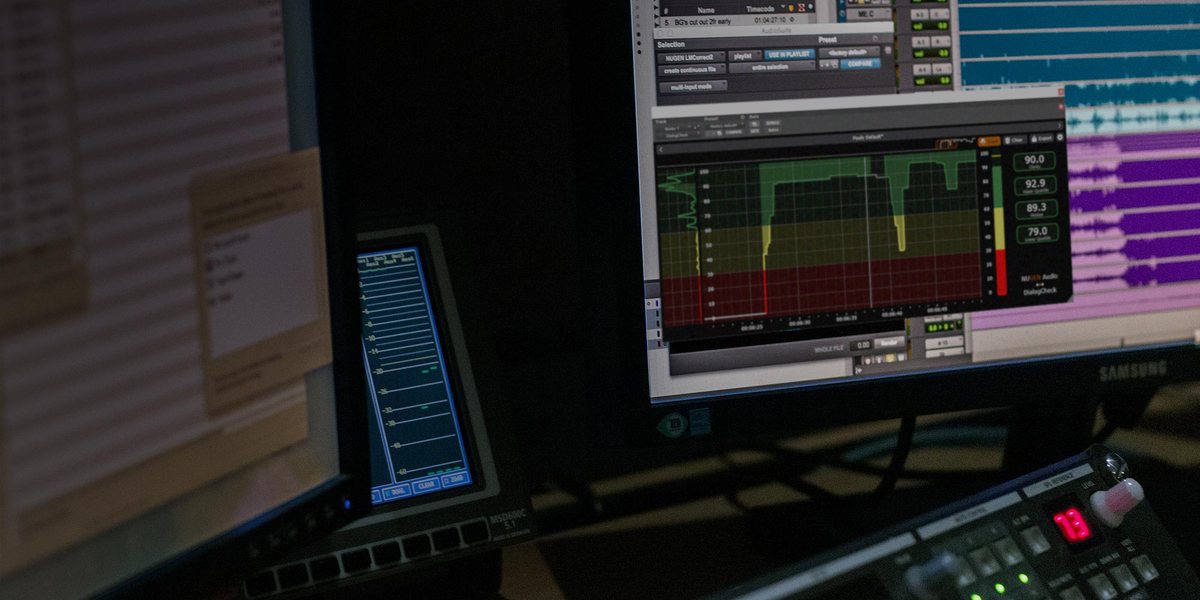
DialogCheck is an AI dialog intelligibility meter plug-in from NUGEN Audio. It does not process audio. It is a measurement tool that shows, in numbers and history, how easy dialog in a mix is to understand.
The official description says it combines the 'Listening Effort' technology developed by Fraunhofer IDMT with a history view inspired by NUGEN's VisLM loudness meter. It is driven by dual neural networks and was developed alongside Netflix.
The display includes a realtime bar meter, a timecode-locked history graph, a momentary clarity readout, a median clarity readout and user-definable upper and lower percentile readouts. It supports up to 9.1.6 channels.
The main applications are film, television, radio, podcasting and game audio. It is meant as a second opinion for engineers who have heard the same dialog many times, giving an objective value for how it may come across to a new listener. It supports 64-bit AAX, VST3 and AU.
Key features
Listening Effort measurement
Using automatic speech recognition and psychoacoustic modeling, it estimates how much effort is needed to follow speech. The technology comes from Fraunhofer IDMT and is described as correlating highly with subjective assessments. It may help locate hard-to-follow passages.
Realtime bar meter
The current moment's clarity is shown as a bar. While adjusting a mix, it may help you watch the change as you move the balance between dialog and music or effects.
Timecode-locked history graph
Clarity history is displayed over time, with session offset support. It may help you review which scenes scored low in a long project.
Median and percentile readouts
Median clarity and upper and lower percentiles are shown numerically. Because the percentiles are user-definable, they may help establish a standard for how many weak moments are acceptable.
Multichannel support
It supports formats up to 9.1.6 channels, so it can be used on surround and immersive projects.
Measurement tool
DialogCheck does not process the signal. It assumes a person adjusts the balance, noise reduction, reverb amount and so on based on the values. It may also inform decisions about ADR.
Pre-production checks
The official page mentions using it in pre-production to check the clarity of source audio. It may also help check the recording quality of podcasts or streams.
Specifications
| Item | Details |
|---|---|
| Type | Dialog intelligibility meter (measurement tool) |
| Channels | Up to 9.1.6 |
| Formats | AAX / VST3 / AU (64-bit) |
| macOS | macOS 11, 512MB RAM |
| Windows | Windows 7, 512MB RAM |
| Display | Bar meter, history graph, momentary value, median, percentiles |
| Demo | Free demo available |
What is included and system requirements
- DialogCheck plug-in
- Formats: AAX / VST3 / AU (64-bit)
How to use it
- Buy DialogCheck or get the free demo with a NUGEN Audio account and install it.
- Rescan plug-ins in your DAW.
- Insert DialogCheck on a track or bus near the final output that carries the dialog.
- Play back and watch the momentary clarity on the bar meter.
- Use the history graph to find passages where clarity drops.
- Set the percentiles to match your own standard.
- Review the balance and processing of dialog and music in those passages.
- Play again after changes and check how the values moved.
Where it may come in handy
Film and TV post-production
It may serve as an objective guide when balancing dialog, music and effects. The official page cites the number of viewers who use subtitles.
Podcasts and radio
It may help check speech clarity numerically, and compare the effect of changes to noise reduction or reverb.
Game audio
Checking the balance between dialog and effects or music is listed as an application. It may suit comparing values between scenes.
Pre-checking recorded material
It may allow you to check the clarity of source recordings before editing, and to judge whether ADR is needed.
Who it may suit
- People finishing dialog for film, TV or streaming
- People who want to check intelligibility numerically
- People checking podcast or radio audio quality
- People who want to manage dialog clarity as well as loudness
Good to know before you buy
- It is a measurement tool and does not change the sound.
- The supported channel count differs between the official site (up to 9.1.6) and a retailer listing.
- A free demo is offered on the official site.
- The values are guides and do not account for the listener's environment or language comprehension.
How it differs from similar products
We do not pick a winner; the official figures are placed side by side.
NUGEN Audio LM-Correct
According to the official page, DialogCheck is a meter that measures dialog clarity, while LM-Correct is presented as a tool for reaching loudness-compliant audio. They address different things.
Price
$399 (NUGEN Audio official site, checked 2026-10-27). Prices can vary by region and promotion, so check the official page before buying.
See DialogCheck on the product page
More of the same kind
We have introduced 14 meters and analyzers. Here are some of the others.
- Blue Cat Audio Blue Cat's FreqAnalyst Pro
- Antelope Audio The Judge
- Waves VU Meter
- Solid State Logic SSL Meter
- MAAT DRMeter MkII
- Blue Cat Audio Blue Cat Audio FreqAnalyst Multi
We have introduced 30 other products from NUGEN Audio.
- NUGEN Audio Paragon ST
- NUGEN Audio Aligner
- NUGEN Audio Visualizer
- NUGEN Audio Surround Suite
- NUGEN Audio NUGEN Audio Paragon
For a side-by-side comparison scored on the same criteria, see our comparison of meters and analyzers.
See the full list in Product database: Effects.
Sources: nugenaudio.com pluginboutique.com (checked 2026-10-27)










Comments