
Disclosure: This page may contain affiliate links. Prices were checked on the date shown and may change.
An introduction to Waves Atlas Reverb, based on information from the maker and distributors: what it does, how to use it and who it may suit. It is not scored.
Atlas is fully algorithmic by design, creating spaces that move and respond musically to the source.
— Waves official site
What is Atlas Reverb?
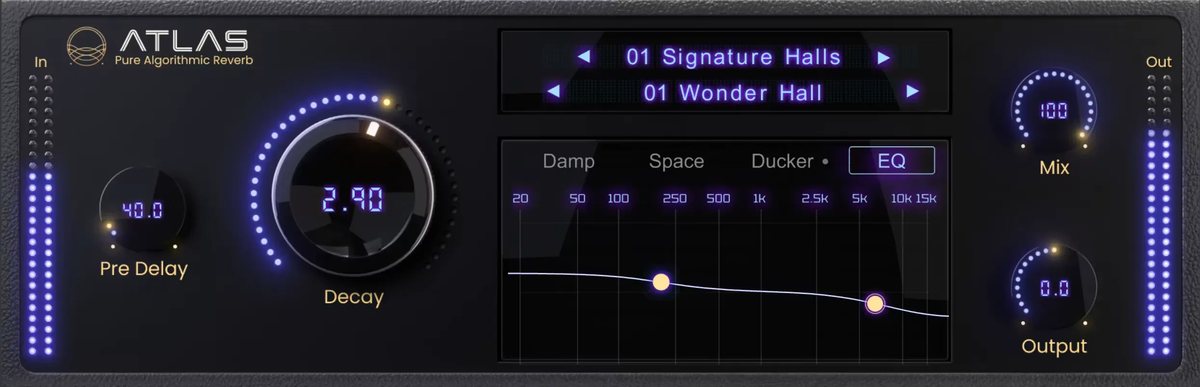
Atlas Reverb is an algorithmic reverb from Waves. Its description says it was tuned by ear to create a sense of space that feels emotional and inseparable from the music.
It offers over 100 original reverb programs, tuned for tone, density, reflections, modulation and depth. The emphasis is on working inside a full mix rather than only sounding good in solo.
It includes programs inspired by classic digital reverbs: lush halls, dense plates, wide chorus spaces, gated effects and 80s-style textures.
A dynamic detection system makes each program react to the input, and it is designed for low latency and low CPU use in studio and live mixing.
Key features
100+ reverb programs
More than 100 original programs let you audition and pick what fits the song.
Fully algorithmic
It generates reverb by calculation rather than impulse responses, creating spaces that respond to the source.
Browse by Feel
A browsing workflow for switching quickly between spaces and judging them in the mix.
DSP-inspired flavors
Programs inspired by classic digital reverbs, such as halls, plates and gated sounds.
Dynamic detection
Programs react differently to the input, so the space is less static.
Low latency, low CPU
Described as practical for large sessions and live mixing, with streamlined musical controls.
Specifications
| Item | Details |
|---|---|
| Type | Algorithmic reverb |
| Programs | 100+ |
| Formats | Mac: VST / AU / AAX, Windows: VST / AAX |
| OS | macOS Monterey 12 to Sequoia 15 / Windows 10+ |
What is included and system requirements
- Atlas Reverb plug-in
- 100+ reverb programs
How to use it
- Buy at Plugin Boutique and find the serial number.
- Create a Waves account and register the serial.
- Install Waves Central.
- Install Atlas Reverb through Waves Central.
- Insert it on a track or send in your DAW.
- Step through programs and judge them in the mix.
- Adjust tone and density.
- Balance it against the dry signal.
Where it may come in handy
Vocal space
Stepping through programs may help find a space that sits with the vocal.
Drum depth
Gated or short hall programs could add depth to drums.
Guitar and synth width
Wide chorus-style spaces might widen guitars and synths.
Live mixing
The low CPU use may make it worth trying live.
Who it may suit
- People looking for classic digital-reverb-flavored spaces
- Those who prefer to audition and choose by ear
- Users wanting one reverb for many jobs
Good to know before you buy
- A Waves account and Waves Central are needed for licensing.
- On Windows the formats are VST and AAX; AU is Mac only.
Price
$149 (Plugin Boutique, checked 2026-10-27). Prices can vary by region and promotion, so check the official page before buying.
See Atlas Reverb on the product page
More of the same kind
We have introduced 112 reverbs. Here are some of the others.
- Eventide UltraReverb
- Arturia Rev OCEAN
- Relab Development REV6000 Essentials
- UJAM UFX Reverb 2
- NUGEN Audio Paragon ST
- LiquidSonics Seventh Heaven Professional
We have introduced 215 other products from Waves.
- Waves IR360 Convolution Reverb
- Waves Manny Marroquin Reverb
- Waves H-Reverb Hybrid Reverb
- Waves IR-L Convolution Reverb
- Waves Renaissance Reverb
For a side-by-side comparison scored on the same criteria, see our comparison of reverbs.
See the full list in Product database: Effects.
Sources: pluginboutique.com (checked 2026-10-27)










Comments