
Disclosure: This page may contain affiliate links. Prices were checked on the date shown and may change.
An introduction to Waves Element 2.0 Virtual Analog Synth, based on information from the maker and distributors: what it does, how to use it and who it may suit. It is not scored.
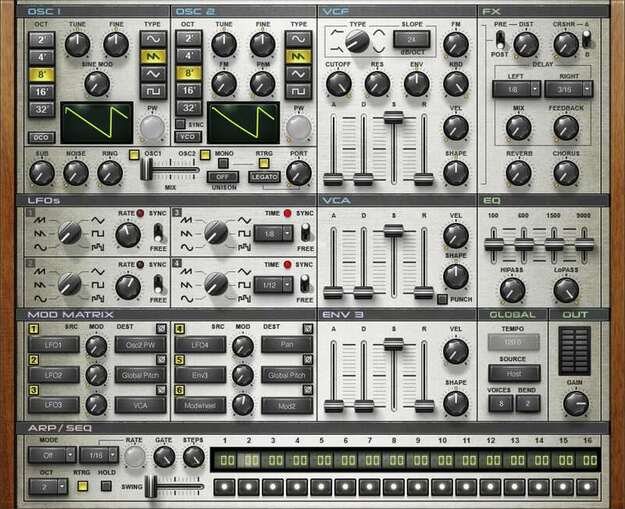
With integrated effects, a 16-step sequencer, MIDI Learn for all controls, multipoint touch response, and a massive preset library, Element 2.0 captures the feel, not only the sound, of classic analog synthesizers.
— Waves official site
What is Element 2.0 Virtual Analog Synth?
Element 2.0 is a virtual analog synthesizer from Waves. It is presented as software that brings the sound and feel of 1970s mono synths and 1980s polysynths into a plugin.
The sound engine is built around a straightforward interface that invites quick tweaking. The product page stresses the hands-on experience of analog synths, not only the sound itself.
Integrated effects, a 16-step sequencer with arpeggiation, MIDI Learn for every control and multipoint touch response are included, so a complete patch can be shaped inside one plugin without loading outside effects.
It can run as a plugin in the studio or as a stand-alone application on stage. Hundreds of presets are included, so you can start from a ready-made sound and adjust it step by step.
Key features
Mono-synth and polysynth character
The sound engine aims at the character of 1970s mono synths and 1980s polysynths. It may be a candidate when you want leads, basses or pads with a thick, warm direction.
Matrix modulation
A matrix-style modulation section links parameters so a sound can move over time. When you want to assign movement to several controls, you can set the connections while watching them on screen.
16-step sequencer and arpeggiator
A 16-step sequencer and an arpeggiator add motion without playing every note by hand. They may help when you want to sketch a short riff or bass line inside the synth.
Built-in effects
A suite of effects sits in the same window as the synth. It may be handy for adding space or texture and judging the direction of a sound before loading separate plugins.
MIDI Learn for all controls
MIDI Learn works on every control. By assigning knobs or faders on your MIDI controller, you can change the sound by hand instead of dragging knobs with the mouse.
Hundreds of presets and multipoint touch
Hundreds of presets are included. Multipoint touch response is also supported, so on a touch screen several controls can be touched at the same time.
Specifications
| Item | Details |
|---|---|
| Type | Virtual analog synthesizer |
| Plugin formats (Mac) | VST / AU / AAX |
| Plugin formats (Windows) | VST / AAX |
| Stand-alone | Supported (presented for stage use) |
| Supported OS (Mac) | macOS Monterey 12, Ventura 13, Sonoma 14, Sequoia 15 |
| Supported OS (Windows) | Windows 10 or later |
| Sequencer | 16 steps, with arpeggiation |
What is included and system requirements
- The synth itself (plugin and stand-alone)
- Built-in effects
- Hundreds of presets
- A license registered to a Waves account and installed through Waves Central
How to use it
- Create a Waves account (or log in if you already have one) and open Register New Products.
- Enter the serial number shown after purchase.
- Download and open the Waves Central app, then log in.
- In the Install Products screen, select Element 2.0 and install it.
- Open your DAW and load Element 2.0 on an instrument track.
- Pick a preset, play some notes and move the filter and envelope controls to hear what changes.
- Assign your MIDI controller to the controls you use most with MIDI Learn.
- Switch on the 16-step sequencer and build a short phrase.
Where it may come in handy
Building a synth bass
Because it targets mono-synth style sounds, it may suit searching for bass tones. You can program a pattern with the sequencer and move the filter to find the weight that fits a track.
Sketching leads and pads
Calling up a preset and adding modulation may let you sketch leads and pads quickly. You can settle the texture with the built-in effects and rebuild it later for the final mix.
Playing live
Since it can run stand-alone, it could also be considered for playing from a keyboard connected to a computer. Assigning your controller with MIDI Learn may make it easier to handle.
Who it may suit
- Someone who wants to try the 1970s-80s analog synth direction in a single plugin.
- Someone who likes finding a sound by moving knobs.
- Someone who wants to build phrases with a sequencer or arpeggiator without playing every note.
- Someone who wants the same synth in a DAW and as a stand-alone application.
Good to know before you buy
- A Waves account and the Waves Central app are needed to register and install the license.
- The listed support is macOS Monterey 12 through Sequoia 15 on Mac and Windows 10 or later on Windows. Check the latest support status before installing.
- Formats are VST / AU / AAX on Mac and VST / AAX on Windows. Check which formats your DAW supports.
Price
$119 (Plugin Boutique, checked 2026-10-27). Prices can vary by region and promotion, so check the official page before buying.
See Element 2.0 Virtual Analog Synth on the product page
More of the same kind
We have introduced 178 synthesizers. Here are some of the others.
- Arturia MiniBrute V
- Rob Papen RAW-Kick 2
- Moog Music Moog Mariana
- Eventide Generate
- AIR Music Technology Odyssey
- LANDR Horizon
We have introduced 215 other products from Waves.
- Waves Codex Wavetable Synth
- Waves Flow Motion FM Synth
- Waves CLA MixDown
- Waves Abbey Road Collection
- Waves Nx Ocean Way Nashville
For a side-by-side comparison scored on the same criteria, see our comparison of synthesizers.
See the full list in Product database: Instruments.
Sources: pluginboutique.com (checked 2026-10-27)










Comments