
Disclosure: This page may contain affiliate links. Prices were checked on the date shown and may change.
An introduction to UJAM Usynth 2080, based on information from the maker and distributors: what it does, how to use it and who it may suit. It is not scored.
Usynth 2080 makes it faster and easier than ever to create a diverse range of synthwave sounds.
— UJAM official site
What is Usynth 2080?
Usynth 2080 is one title in the Usynth series of software synths from the German developer UJAM, aimed at synthwave sounds. UJAM says it is designed so you can make a diverse range of sounds with little effort, without needing synth knowledge.
Inside is a full-featured synth. According to Plugin Boutique, each sound has two layers, with virtual analog, wavetable, FM and multisample synthesis, a multimode filter and a 12-way modulation matrix.
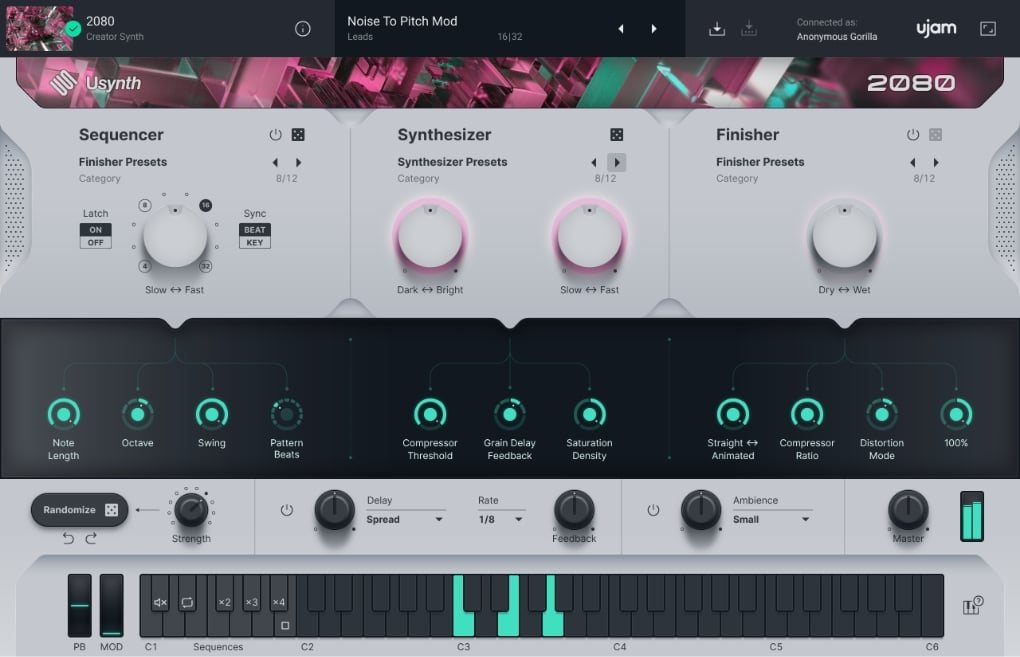
On screen, however, you see two large hardware-style knobs and three software-style knobs. The sound designers have mapped each knob to several destinations inside the engine, so only the musically useful controls are exposed.
You choose a preset and finish it by turning the knobs. A customizable sequencer and a Finisher effect section are included. Installation and authorization go through the UJAM App; it is a one-time purchase and can be tried for free.
Key features
Sounds built from two layers
Each sound is made of two layers stacked for thickness. Because the character comes from the preset, you can start without knowing detailed settings.
Few knobs to operate
You move just two large knobs and three small ones. UJAM compares this to Instagram filters or a steering wheel and two pedals.
Customizable sequencer
A sequencer for building phrases is included and can be edited. Sequencer patterns also come as presets.
Finisher effects
The finishing effects come in three types: Single (one effect with four controls), Dual (two effects with two controls each) and Quad (four effects with one control each). Finisher presets are the same across Usynth titles.
Switching presets via the UJAM App
In the UJAM App you can pick global presets, including ones from other Usynth titles, and send them to the plugin in your DAW. UJAM says this includes presets from titles you do not own yet.
Royalty-free content
According to the official FAQ, the included MIDI phrases and sounds are royalty-free and can be used in commercial productions.
Specifications
| Item | Details |
|---|---|
| Type | Software synth (aimed at synthwave) |
| Presets | Per Plugin Boutique: Synth 100, Finisher 100, Sequencer 30, Global 100 (the official site lists Finisher at 90) |
| Formats | AAX / AU2 / VST2 / VST3 (64-bit only) |
| OS | Windows 10 to 11, macOS Monterey (12) to Tahoe (26), Intel and Apple silicon |
| Minimum | 8 GB RAM, 0.45 GB free disk space, 1280×768 display, internet connection |
| Installation | Automatic install and authorization via the UJAM App |
What is included and system requirements
- Usynth plugin (installed through the UJAM App)
- About 100 Synth presets, about 90 to 100 Finisher presets, 30 Sequencer presets and about 100 Global presets
- Royalty-free MIDI phrases and sounds
- Requirements: the latest UJAM App and an internet connection
How to use it
- Create a UJAM account and install the UJAM App.
- Log in to the app and authorize Usynth 2080.
- Open your DAW and load Usynth on an instrument track.
- Choose a preset and play it first.
- Move the two large knobs to set the direction of the sound.
- Fine-tune with the three small knobs.
- Pick a Finisher and edit the sequencer if needed.
- Try other sounds with global presets in the UJAM App.
Where it may come in handy
Making synthwave tracks
It may suit quickly building 80s-style leads and arpeggios. You could start from a sequencer pattern and fit it to the song's tempo.
A first synth for those not used to synth settings
Since a few knobs are enough to shape the sound without checking detailed parameters, it may be tried by people not used to synths.
Background music for video or streams
With royalty-free MIDI phrases and sounds, you might make background music for videos or streams.
Who it may suit
- People who want to make synthwave-style sounds quickly.
- Those who prefer working with presets and a few knobs over detailed settings.
- Users who may also use other Usynth titles.
Good to know before you buy
- The latest UJAM App is required.
- Installing your first Usynth title also installs the Usynth plugin that hosts all titles.
- The list price is $49; the price may drop considerably during sales.
- If you bought a serial code from a reseller, register it through Partner Checkout in your UJAM account.
How it differs from similar products
We do not pick a winner; the official figures are placed side by side.
Usynth COREUJAM
Usynth 2080 is described as Future retro waves, aimed at synthwave. Usynth CORE is described as All-purpose studio essentials. Both list at $49 and run in the same Usynth plugin.
Price
$49 (UJAM official site, checked 2026-10-27). Prices can vary by region and promotion, so check the official page before buying.
See Usynth 2080 on the product page
More of the same kind
We have introduced 178 synthesizers. Here are some of the others.
- Arturia Arturia Modular V
- Rob Papen SynFeX
- Cherry Audio Mercury-8
- MOK Miniraze
- Arturia Prophet-VS V
- Native Instruments FM8
We have introduced 32 other products from UJAM.
For a side-by-side comparison scored on the same criteria, see our comparison of synthesizers.
See the full list in Product database: Instruments.
Sources: ujam.com pluginboutique.com (checked 2026-10-27)










Comments