
Disclosure: This page may contain affiliate links. Prices were checked on the date shown and may change.
An introduction to Cherry Audio Mercury-8, based on information from the maker and distributors: what it does, how to use it and who it may suit. It is not scored.
Mercury-8 synthesizer builds on Cherry Audio's renowned Mercury legacy with a passionate focus on detail and modern technical advancements.
— Cherry Audio official site
What is Mercury-8?
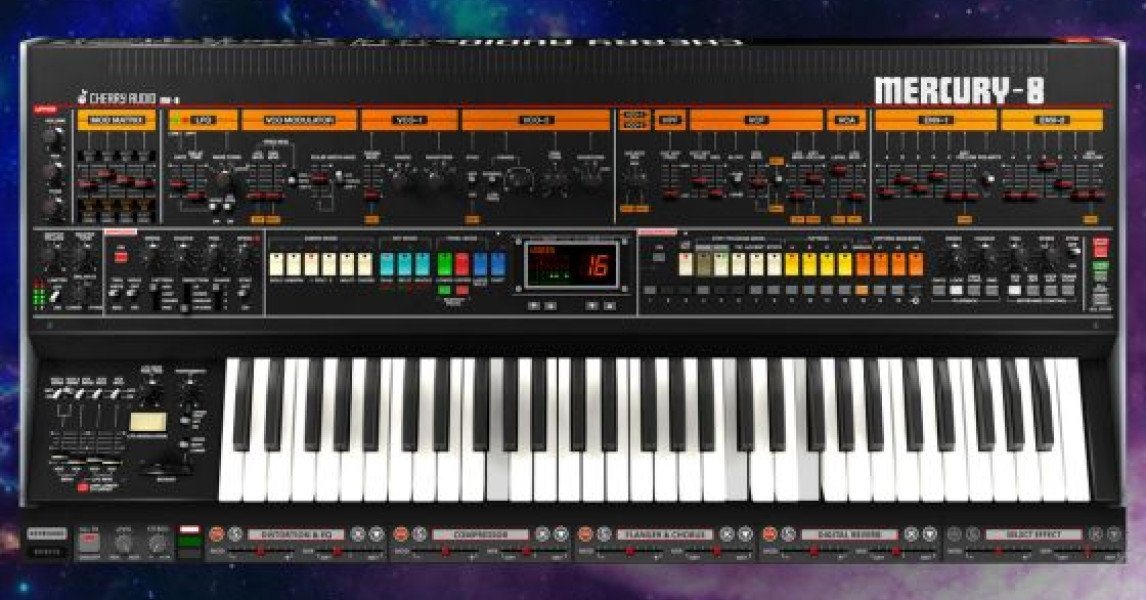
Mercury-8 is a software synthesizer from Cherry Audio, a virtual analog instrument modeled on the analog polysynth JP-8 released in 1981. The maker describes it as reproducing the original hardware in detail while adding extensions for modern production.
The original had eight voices with two oscillators each. Mercury-8 has two layers with 16 voices per layer, and supports keyboard split and stacked layers with separate parameters for each. The voice count and modulation options are extensions beyond the original.
For sound design, each layer has two oscillators, a high-pass and resonant low-pass filter (12 dB or 24 dB slope), two ADSR envelopes and a syncable LFO. It also includes a four-slot modulation matrix, an arpeggiator, a 16×4 step sequencer and 20 effects.
More than 600 presets are included, together with the 64 original JP-8 factory patches, their enhanced Factory Plus versions and the eight factory setups. It runs as AU, VST, VST3, AAX and standalone, and a free 30-day demo is available.
Key features
Two layers with 16 voices each
Two layers support keyboard split and stacked modes. Each layer has its own parameters for synthesis, modulation, patterns and effects.
Drift and Condition controls
Drift and Condition controls let you set the synth's state from pristine to unstable and vintage. VCO, VCF and VCA drift and envelope slop can be adjusted individually.
Modulation matrix
Four slots offer 25 sources and 43 destinations with a simple click-to-assign operation. The integrated effects can also be modulated.
Arpeggiator and 16×4 step sequencer
Each layer has a syncable, transposable arpeggiator and step sequencer. Modes include Arp, Leap, Order and Random, and Swing, Chance and Feel add irregularity.
Three effect chains and 20 effects
There are three chains, one per layer plus a global one. Effects include BBD Flanger, Spring Reverb and Tape Echo, plus the new DCO Chorus, Panner and Pulser. Chains can be saved.
SysEx import and export
Original JP-8 patch bank SysEx data (Encore Electronics format) can be imported by drag and drop, and Mercury-8 presets can be exported. This suits people with MIDI-modified hardware.
Multi-voice mode
Adjustable mini-synth trimmers vary pitch, panning, filter and envelopes, from subtle to extreme. Solo, Unison, Poly-1 and Poly-2, Multi and Chord Memory assign modes are also available.
Specifications
| Item | Details |
|---|---|
| Type | Virtual analog software synthesizer (JP-8 inspired) |
| Voices | 2 layers, 16 voices per layer |
| Oscillators | 2 per layer (sawtooth, triangle, sine, square / variable pulse, noise) |
| Filter | High-pass and resonant low-pass (12 / 24 dB) |
| Modulation | 4 slots (25 sources, 43 destinations) |
| Sequencer | 16×4 polyphonic step sequencer |
| Effects | 20 (3 chains) |
| Presets | 600+ (including 64 original JP-8 factory patches with enhanced versions and 8 factory setups) |
| Plug-in formats | AU / VST / VST3 / AAX, standalone |
| Mac | macOS 10.13 or higher (64-bit, Intel and Apple silicon) |
| Windows | Windows 7 or higher (64-bit) |
| Disk space | 87 MB (official) |
| Trial | 30 days |
What is included and system requirements
- Mercury-8 (standalone and plugin)
- 600+ presets in 16 categories (64 original JP-8 factory patches plus enhanced versions, 8 factory setups, templates)
- MIDI controller mapping compatible with the Jupiter-X hardware synthesizer
- Online documentation (also downloadable as PDF)
- Sold separately: The Grid for Mercury-8 (100 presets, 9.99 USD)
How to use it
- Authorize the product with your Cherry Audio account; an internet connection is required.
- Run the installer and choose the plug-in formats.
- Load Mercury-8 on an instrument track in your DAW.
- Browse the presets, including the JP-8 factory recreations and enhanced versions.
- Use Drift and Condition to bring the stability closer to your taste.
- Assign movement such as LFO modulation in the matrix.
- Create patterns with the arpeggiator or step sequencer.
- Build an effect chain and save it if you like it.
Where it may come in handy
80s-style polysynth sounds
Presets recreating the JP-8 factory sounds are included, so you may look here when a track needs wide chords or pads.
Splitting the keyboard
You may split layers, for example bass with the left hand and a lead with the right.
Using hardware patches
If you own a JP-8 modified for SysEx, you may exchange patches between hardware and software.
Arpeggios and sequences
With a sequencer on each layer, you may layer an arpeggio over a different pattern.
Who it may suit
- People who want JP-8-style polysynth sounds in a DAW
- People who want split and stack performance options
- People looking for a synth with many presets
- People who want to use patches from a JP-8 hardware unit
Good to know before you buy
- An internet connection is required for product activation.
- The maker offers a free 30-day demo.
- The recommended system is a 3.4 GHz quad-core or Apple silicon CPU with 8 GB of RAM.
- The Grid for Mercury-8 (100 presets) is sold separately.
- The presets come from ten sound designers, and effect chains can be shared with Cherry Audio's Trident Mk III synthesizer.
Price
$69 (Cherry Audio official site, checked 2026-10-27). Prices can vary by region and promotion, so check the official page before buying.
See Mercury-8 on the product page
More of the same kind
We have introduced 178 synthesizers. Here are some of the others.
- AIR Music Technology Hybrid 3
- Tracktion SpaceCraft
- Klevgrand Klevgrand Pads
- Waldorf Waldorf Largo 2
- Baby Audio Grainferno
- Tracktion Delta-V SpaceCraft
We have introduced 31 other products from Cherry Audio.
- Cherry Audio Harmonia
- Cherry Audio Pentaphonic
- Cherry Audio P-10 Synthesizer
- Cherry Audio Octave Cat
- Cherry Audio Polymode
For a side-by-side comparison scored on the same criteria, see our comparison of synthesizers.
See the full list in Product database: Instruments.
Sources: cherryaudio.com pluginboutique.com (checked 2026-10-27)










Comments