
Disclosure: This page may contain affiliate links. Prices were checked on the date shown and may change.
An introduction to Universal Audio Anthem Analog Synthesizer, based on information from the maker and distributors: what it does, how to use it and who it may suit. It is not scored.
Put the biggest, baddest analog sounds at your fingertips.
— Universal Audio official site
What is Anthem Analog Synthesizer?
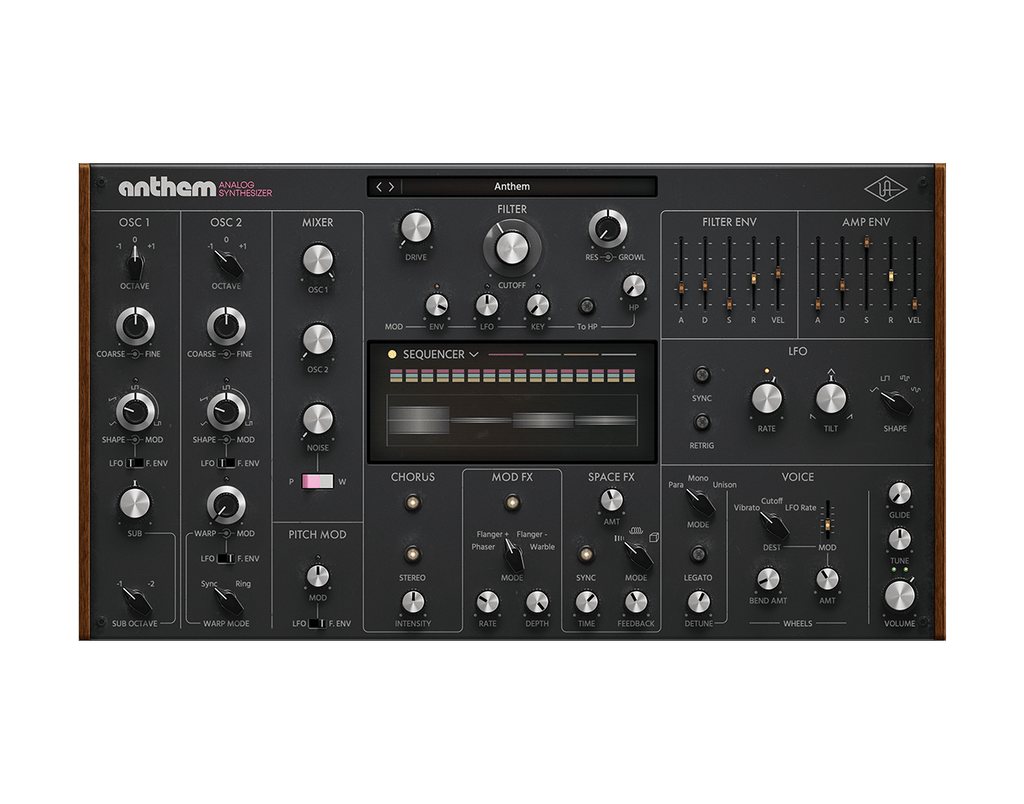
Anthem Analog Synthesizer is a software synthesizer from Universal Audio (UA). The official description presents it as an instrument for thick bass, punchy leads and expressive sequences without layering or complex plug-in chains.
UA says it took inspiration from well-regarded mono-synths of earlier eras and then moved on to something new. It has a filter with analog-style distortion, thick oscillators and lo-fi effects, so it suits sounds that keep some roughness.
The filter can range from subtle warmth to heavy distortion. The effects section offers chorus, flanger, spring reverb and tape echo, each described as modeled from real analog gear, so depth and width can be added without opening another plug-in.
A built-in step sequencer handles polyrhythms, accents and generative patterns, and hundreds of presets are included. It runs natively (UADx) on macOS and Windows in VST3, AU and AAX formats, and no UA hardware is required.
Key features
Analog-modeled filter
The filter ranges from subtle warmth to gritty overdrive, which may help when bass and lead sounds need weight and texture.
Paraphonic chords
Fat mono tones can be combined with poly-style chords, which can be tried for chordal leads and pads.
Step sequencer
The built-in sequencer supports polyrhythms, accents and generative patterns, from simple eighth-note riffs to acid-style basslines.
Lo-fi effects
Chorus, flanger, spring reverb and tape echo are built in, so space and modulation can be added without leaving the instrument.
Hundreds of presets
Hundreds of presets are provided as starting points, and the controls are kept straightforward for custom sounds.
UADx native format
It runs on macOS and Windows without UA hardware in VST3, AU and AAX formats, with authorization through an iLok account.
Specifications
| Item | Details |
|---|---|
| Maker | Universal Audio |
| Type | Analog-modeled software synthesizer |
| Format | UADx native / VST3, AU, AAX |
| OS | macOS Big Sur 11 to Tahoe 26, Windows 10 or 11 (64-bit) |
| Processor | Intel, AMD or Apple silicon |
| Authorization | Free iLok account (iLok USB not required) |
| Manager app | UA Connect (free) |
What is included and system requirements
- Anthem Analog Synthesizer (UADx native)
- Hundreds of presets
- Requirements: internet connection for download and authorization, a free iLok account and the free UA Connect application
- A DAW that supports VST3, AU or AAX
How to use it
- Create a free iLok account.
- Install UA Connect and log in with a UA account.
- After purchase, download Anthem in UA Connect and authorize it.
- Restart the DAW so it detects the installation.
- Load Anthem on an instrument track.
- Play presets first to hear how the filter and oscillators differ.
- Build a phrase in the step sequencer and add accents.
- Layer effects such as chorus and tape echo to finish.
Where it may come in handy
Making basses
The filter distortion may help when a thick bass is wanted from a single instrument.
Leads and chordal phrases
Paraphonic chords could be used for rough-edged leads.
Acid-style sequences
A short riff can be built in the step sequencer and accents added for groove.
Lo-fi textured songs
Spring reverb and tape echo can add a rough atmosphere.
Who it may suit
- People who want to make bass and lead sounds with one synth
- People who like building phrases with a step sequencer
- People who want UA instruments without UA hardware
Good to know before you buy
- An iLok account and an internet connection are required for authorization.
- It is also listed in the UAD Spark subscription.
- Sound preference should be judged by listening.
How it differs from similar products
We do not pick a winner; the official figures are placed side by side.
Opal Morphing Synthesizer UA
Both are UADx native instruments. Anthem is described as having an analog-modeled filter and a step sequencer, while Opal is described as combining analog and wavetable sound with morphing filters.
Price
Please check the official page for the price.
See Anthem Analog Synthesizer on the product page
More of the same kind
We have introduced 178 synthesizers. Here are some of the others.
- AudioThing miniBit
- Klevgrand Baervaag
- Native Instruments FORM
- Applied Acoustics Systems Chromaphone 3
- GForce Software Oberheim OB-1
- Future Audio Workshop SubLab
We have introduced 46 other products from Universal Audio.
- Universal Audio Opal Morphing Synthesizer
- Universal Audio SSL 4000 E Channel Strip
- Universal Audio A-Type Multiband Dynamic Enhancer
- Universal Audio Manley Massive Passive EQ
- Universal Audio Capitol Mastering Compressor
For a side-by-side comparison scored on the same criteria, see our comparison of synthesizers.
See the full list in Product database: Instruments.
Sources: uaudio.com pluginboutique.com (checked 2026-10-27)










Comments