
Disclosure: This page may contain affiliate links. Prices were checked on the date shown and may change.
An introduction to W. A. Production Spectron by Curbi, based on information from the maker and distributors: what it does, how to use it and who it may suit. It is not scored.
Spectron harnesses the power of spectral diffusion, allowing each frequency to have its own delayed path, resulting in intricate and mesmerizing layers of sound.
— W. A. Production official site
What is Spectron by Curbi?
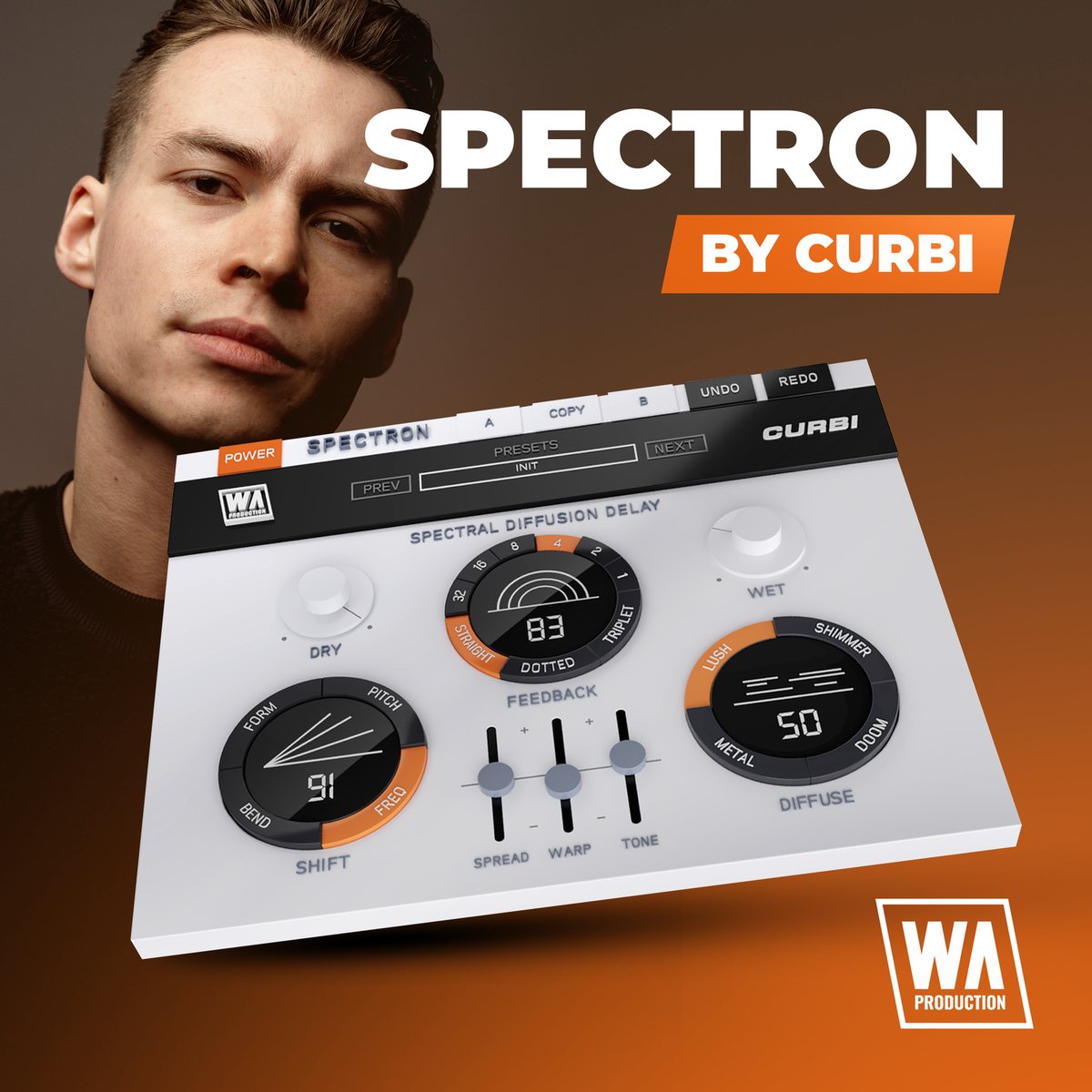
Spectron by Curbi is a spectral delay plug-in made by W. A. Production together with electronic artist Curbi. Where an ordinary delay postpones the whole signal, the maker describes Spectron as giving each frequency its own delayed path, which smears the sound across time and space.
The stated aims are futuristic, alien-like textures and lush atmospheric soundscapes. Rather than simple echoes, it is positioned as a tool for evolving sounds such as smooth transitions and risers.
Global controls include DRY/WET, FEEDBACK, delay time and type (with sync options) and SPREAD, which separates delays spectrally across the left and right channels. The core controls are SHIFT and DIFFUSE. SHIFT covers spectral pitch shifting, frequency shifting and formant manipulation, and its effect grows with each repeat.
DIFFUSE spreads the sound across time like a reverb, with SHIMMER (octave up), DOOM (octave down), METAL and LUSH modes. Presets made by Curbi himself are included, and the maker says it can be used for music production as well as film and game sound design.
Key features
Each frequency has its own delay path
The maker says it is built on spectral diffusion, where each frequency follows a separate delayed path. It targets textures that differ from a normal delay's repeats.
SHIFT for pitch, frequency and formants
This control handles spectral pitch shifting, frequency shifting and formant manipulation, and the effect grows with each repeat. It may suit sounds that keep changing as they repeat.
DIFFUSE with four modes
DIFFUSE spreads the delay like a reverb, with modes such as SHIMMER (an octave up) and DOOM (an octave down). It may let you work somewhere between a delay and a reverb.
SPREAD for stereo width
It separates delays spectrally across left and right channels to add width. It could be worth trying on near-mono material.
Spectrum display, A/B and undo
It shows the frequency spectrum in real time and offers A/B comparison, copy and undo/redo, along with a resizable interface. This helps when comparing settings during sound design.
Presets by Curbi
Presets made by Curbi are included, serving as an entry point to his sound design approach or a starting point for your own. A PDF manual and tutorial video are also provided.
Specifications
| Item | Details |
|---|---|
| Type | Spectral delay (creative effect) |
| Main controls | DRY/WET, FEEDBACK, TIME & TYPE, SPREAD, SHIFT, DIFFUSE |
| DIFFUSE modes | SHIMMER, DOOM, METAL, LUSH |
| OS | Windows 8+ (64-bit), macOS 10.13+ (64-bit) |
| Formats | Windows: VST2 / VST3 / AAX, Mac: VST2 / VST3 / AAX / AU |
| Notes | AAX requires Pro Tools 11 or later. Apple Silicon users should check compatibility before buying |
What is included and system requirements
- Spectron plug-in
- Factory presets by Curbi
- PDF manual and tutorial video
- Formats: VST2 / VST3 / AAX (plus AU on Mac)
How to use it
- After installing, load Spectron as an effect in your DAW.
- Open a preset first to get a sense of the direction.
- Set the balance with the original sound using DRY/WET.
- Choose the delay time and sync option in TIME & TYPE.
- Adjust the amount of repeats with FEEDBACK.
- Move SHIFT and DIFFUSE little by little and listen to how the texture changes.
- Set the stereo width with SPREAD and compare settings using A/B.
Where it may come in handy
Build-ups and transitions
It may be worth trying where the sound needs to keep changing before and after a lift, such as the risers and smooth transitions the maker mentions.
Ambient pads and atmospheres
Using DIFFUSE to spread the delay like a reverb may add a drifting texture to quiet tracks.
Sound design for video and games
The maker says it also suits film and game sound design. Processing everyday sounds into textures that do not exist in real life is one possible use.
Who it may suit
- People who find ordinary delays too plain and want evolving textures
- Electronic producers who make risers and atmospheres
- People looking for an effect for film or game sound design
Good to know before you buy
- It is geared toward heavily transforming sound rather than adding a natural echo.
- If you use an Apple Silicon Mac, check the maker's compatibility status before buying.
- AAX is supported on Pro Tools 11 and later.
How it differs from similar products
We do not pick a winner; the official figures are placed side by side.
Waves Lofi Space
Spectron is a spectral delay with per-frequency delay paths, built around SHIFT and DIFFUSE. Lofi Space combines a saturated delay of up to 3500 ms with a spring or plate reverb with decay from 0.5 to 20 seconds, and includes 133 presets.
Price
$49.90 (W. A. Production official site, checked 2026-10-27). Prices can vary by region and promotion, so check the official page before buying.
See Spectron by Curbi on the product page
More of the same kind
We have introduced 62 delays. Here are some of the others.
- Native Instruments REPLIKA XT
- BABY Audio Spaced Out
- Baby Audio Comeback Kid
- Native Instruments Psyche Delay
- Slate Digital Stellar Echo SD-201
- United Plugins Mirror
We have introduced 42 other products from W. A. Production.
- W. A. Production Mutant Delay
- W. A. Production SphereDelay 2
- W. A. Production MultiBender
- W. A. Production Delay Rings
- W. A. Production Satyrus
For a side-by-side comparison scored on the same criteria, see our comparison of delays.
See the full list in Product database: Effects.
Sources: waproduction.com pluginboutique.com (checked 2026-10-27)










Comments