
Disclosure: This page may contain affiliate links. Prices were checked on the date shown and may change.
An introduction to Waves Nx Ocean Way Nashville, based on information from the maker and distributors: what it does, how to use it and who it may suit. It is not scored.
The Nx Ocean Way plugin replicates the acoustics and monitoring systems of the stellar Ocean Way Nashville control rooms, over any headphones
— Waves official site
What is Nx Ocean Way Nashville?
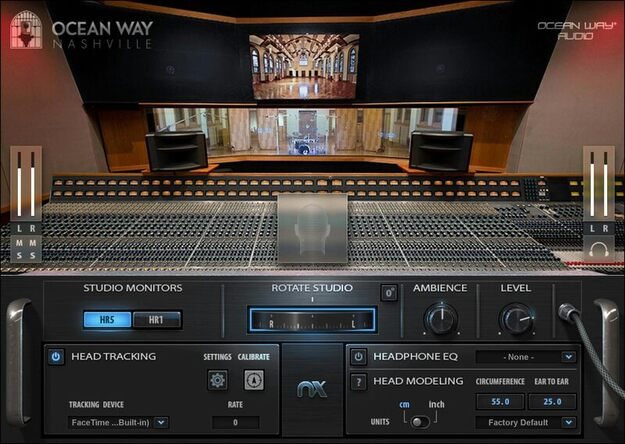
Nx Ocean Way Nashville is a headphone monitoring plugin from Waves. It aims to reproduce, over the headphones you already own, the acoustics and monitor speakers of the Ocean Way Nashville control rooms.
According to the description, it lets someone who cannot easily use speakers check depth and balance with a speaker-like sense of space. The studio's acoustics were designed by Allen Sides, and the product is described as supervised by him.
You can switch between Ocean Way's HR1 and HR5 monitors, the far-field and near-field pair. Correction EQ curves are provided for more than 270 headphone models, and choosing your pair applies the compensation.
It also supports personalizing the response to your head anatomy and optional head tracking via a webcam or the separately sold Nx Head Tracker. It is part of the series built on Waves Nx technology.
Key features
Control room acoustics over headphones
It reproduces the acoustics of Ocean Way Nashville on your headphones, so you may be able to check mix depth, balance, stereo image and reverb without speakers.
Compare HR1 and HR5 monitors
You can switch between the HR1 and HR5, the far-field and near-field monitors. It may help you see how the balance sounds on each.
Correction for 270+ headphone models
EQ curves correct the characteristics of many popular headphones. This may help when you want to check mixes with less of each pair's coloration.
Adjustable studio ambience
The amount of studio ambience added to the headphones can be adjusted, so you can try different amounts to reduce the closed-in feel of headphone mixing.
Head anatomy personalization
You can personalize the response to your head anatomy so that the result fits you better.
Head tracking
Head orientation can be tracked with a webcam or the separately sold Nx Head Tracker, as an option for added realism.
Specifications
| Item | Details |
|---|---|
| Type | Headphone monitoring plugin |
| Space modeled | Ocean Way Nashville control room |
| Monitors | Ocean Way HR1 / HR5 |
| Headphone correction | 270+ models |
| Head tracking | Webcam or Nx Head Tracker (sold separately) |
| Formats (Mac) | VST / AU / AAX |
| Formats (Windows) | VST / AAX |
| OS (Mac) | macOS Monterey 12 to Sequoia 15 |
| OS (Windows) | Windows 10 or later |
What is included and system requirements
- Mac: macOS Monterey 12 / Ventura 13 / Sonoma 14 / Sequoia 15 (VST / AU / AAX)
- Windows: Windows 10 or later (VST / AAX)
- A Waves account and installation and license registration via the Waves Central app (per Plugin Boutique)
How to use it
- Create a Waves account (or log in) and activate it with the confirmation email.
- Register the serial number shown in your Plugin Boutique account under "Register New Products" at Waves.
- Download and install the Waves Central app and log in.
- Choose this product on the "Install Products" screen and install it.
- Insert it on the master channel of your DAW and choose your headphone model.
- Adjust ambience and head personalization if needed.
- Switch between HR1 and HR5 and check the balance.
- When exporting, bypass or remove the monitoring plugin before bouncing.
Where it may come in handy
Mixing on headphones only
It may help check depth and reverb amount in a room where you cannot place speakers.
Remote collaboration
The description says everyone can mix in the same acoustic space, which suits collaboration.
Reducing your headphones' coloration
You could use the correction EQ to check mixes with less influence from the headphones' own character.
Who it may suit
- Home-studio users who mix on headphones
- People who want a speaker-like reference
- People who want to try Waves headphone monitoring
Good to know before you buy
- No listening evaluation is given here; results vary with the headphone model.
- The Nx Head Tracker is sold separately.
- Remove or bypass the monitoring plugin before bouncing.
How it differs from similar products
We do not pick a winner; the official figures are placed side by side.
Waves Nx Germano Studios New York
Nx Ocean Way Nashville offers the Ocean Way HR1 and HR5 monitors; Nx Germano Studios New York offers three sets, the Exigy S412G, NS10 and Germano A2. The latter also mentions 5.1 surround.
Price
Please check the official page for the price.
See Nx Ocean Way Nashville on the product page
More of the same kind
Other introduction articles of the same kind.
- LEWITT Space Replicator Free
- W. A. Production Biggifier by Aden
- Blue Cat Audio Blue Cat's Remote Control
- accentize dxLevel
- Boz Digital Labs Pan Knob
- IK Multimedia T-RackS Sunset Sound Studio Reverb
We have introduced 215 other products from Waves.
- Waves MultiMod Rack
- Waves TRACT System Calibration
- Waves Renaissance Bass
- Waves Key Detector
- Waves Abbey Road Reel ADT
See the full list in Product database: Effects.
Sources: pluginboutique.com (checked 2026-10-27)










Comments