
Disclosure: This page may contain affiliate links. Prices were checked on the date shown and may change.
An introduction to Waves GTR3, based on information from the maker and distributors: what it does, how to use it and who it may suit. It is not scored.
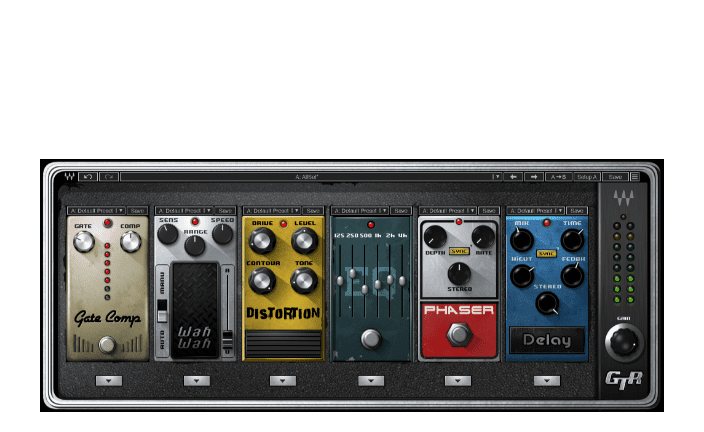
25 pedal effects, based on Waves’ high-end studio processors, fill out your virtual pedalboard.
— Waves official site
What is GTR3?
GTR3 is Waves' amp simulator for guitar and bass. It models amps from vintage to modern designs, including custom models made with PRS and Neil Citron. The Japanese distributor describes coverage from clean and crunch to heavy metal and djent.
There are 30 guitar amps and 7 bass amps, with 16 guitar and 6 bass cabinets that can be miked in 12 ways. Two amps can be stacked in series or parallel, in phase or out of phase.
The 25 stompboxes are derived from Waves' studio-grade algorithms. The ToolRack module is optimized for standalone live use, and tap tempo and tempo sync are included.
The Japanese distributor's page also mentions switching between authentic amp sound and a clean DI, and NKS support for Komplete Kontrol and Maschine. The components are GTR3 Amps, Stomps, ToolRack and Tuner.
Key features
30 guitar and 7 bass amps
The amps range from vintage to modern designs, with 30 guitar and 7 bass models, including custom models from PRS and Neil Citron. The wide lineup lets you explore across genres.
Stacking two amps
Two amps can be connected in series or parallel, in phase or out of phase. It is a way to build a thicker sound from a combination.
Cabinets and miking
Sixteen guitar and six bass cabinets can be miked in twelve ways, which suits comparing the effect of mic type and position.
25 stompboxes
Twenty-five pedals derived from Waves' studio algorithms are included. You can line up distortion, modulation and ambience effects like a pedalboard.
ToolRack and standalone use
ToolRack is described as optimized for standalone live performance. If you plan to play on stage, it helps you check whether you can run without a DAW.
Clean DI switching and NKS support
The Japanese distributor's page says you can switch between amp sound and a clean DI, which is worth checking if you want a DI for reamping. NKS is also supported.
Tap tempo and tempo sync
Tap tempo and tempo sync let delays follow the song tempo, which helps when setting up tempo-matched delays quickly.
Specifications
| Item | Details |
|---|---|
| Maker | Waves |
| Type | Guitar and bass amp simulator |
| Amps | 30 guitar, 7 bass |
| Cabinets | 16 guitar, 6 bass (the Japanese distributor lists 23) |
| Miking | 12 options |
| Effects | 25 stompboxes (the Japanese distributor lists 26) |
| Formats | Windows: VST / AAX; Mac: VST / AU / AAX (per Plugin Boutique) |
| OS | Windows 10 or later; macOS Monterey 12 to Sequoia 15 (per Plugin Boutique) |
What is included and system requirements
- Components: GTR3 Amps, GTR3 Stomps, GTR3 ToolRack and GTR3 Tuner
- 30 guitar amps, 7 bass amps, cabinets, stomps and a tuner
- Windows 10 or later (VST / AAX); macOS 12 to 15 (VST / AU / AAX, per Plugin Boutique)
- Also included in bundles such as Waves Diamond, Gold, Horizon and Platinum (per Media Integration)
How to use it
- Create a Waves account and register the serial number.
- Download and start Waves Central.
- On Install Products, select GTR3 and click Install & Activate.
- Insert GTR3 on a guitar track in your DAW.
- Choose an amp and, if needed, connect a second amp in series or parallel.
- Select a cabinet and miking option.
- Place stompboxes and adjust their order and tempo settings.
- If you will use it on stage, check operation in the standalone ToolRack.
Where it may come in handy
Recording across genres
With a range from clean to high gain, it may suit someone who records songs in several genres with a single plugin.
Bass recording
Bass amps and cabinets are included, so it can be tried when you want to add amp character to a DI bass recording.
Building thickness with two amps
Series and parallel connections and phase switching let you explore sounds that combine two amps.
Live use
The standalone ToolRack is described as designed for live use.
Who it may suit
- People who want to handle both guitar and bass in one plugin
- Those who want to try many amp types across genres
- Anyone who wants to try stacking two amps
- Owners of a Waves bundle that includes GTR3
Good to know before you buy
- GTR3 is included in several Waves bundles, so you may already own it.
- The Japanese distributor's numbers (23 cabinets, 26 stomps) differ from Plugin Boutique's (16 plus 6 cabinets, 25 stomps).
- Waves holds frequent sales and prices change substantially over time.
How it differs from similar products
We do not pick a winner; the official figures are placed side by side.
Waves GTR Solo
GTR3 has 30 guitar amps, 7 bass amps and 25 stompboxes. GTR Solo has 9 amps and about a dozen stomps, and Media Integration says it shares GTR3's sound quality.
Price
Please check the official page for the price.
More of the same kind
We have introduced 28 guitar amp simulators. Here are some of the others.
- Bogren Digital Ampknob BDH 5169
- Kuassa Amplifikation Lancaster
- Bogren Digital Ampknob BDE 120
- MeldaProduction MTurboAmp
- Kuassa Amplifikation Caliburn
- Universal Audio UAD Enigmatic '82 Overdrive Special Amp
We have introduced 215 other products from Waves.
For a side-by-side comparison scored on the same criteria, see our comparison of guitar amp simulators.
See the full list in Product database: Effects.
Sources: pluginboutique.com minet.jp (checked 2026-10-27)










Comments