
Disclosure: This page may contain affiliate links. Prices were checked on the date shown and may change.
An introduction to MeldaProduction MTurboAmp, based on information from the maker and distributors: what it does, how to use it and who it may suit. It is not scored.
MTurboAmp comes with almost 30 amp heads and a dozen distortion pedals.
— MeldaProduction official site
What is MTurboAmp?
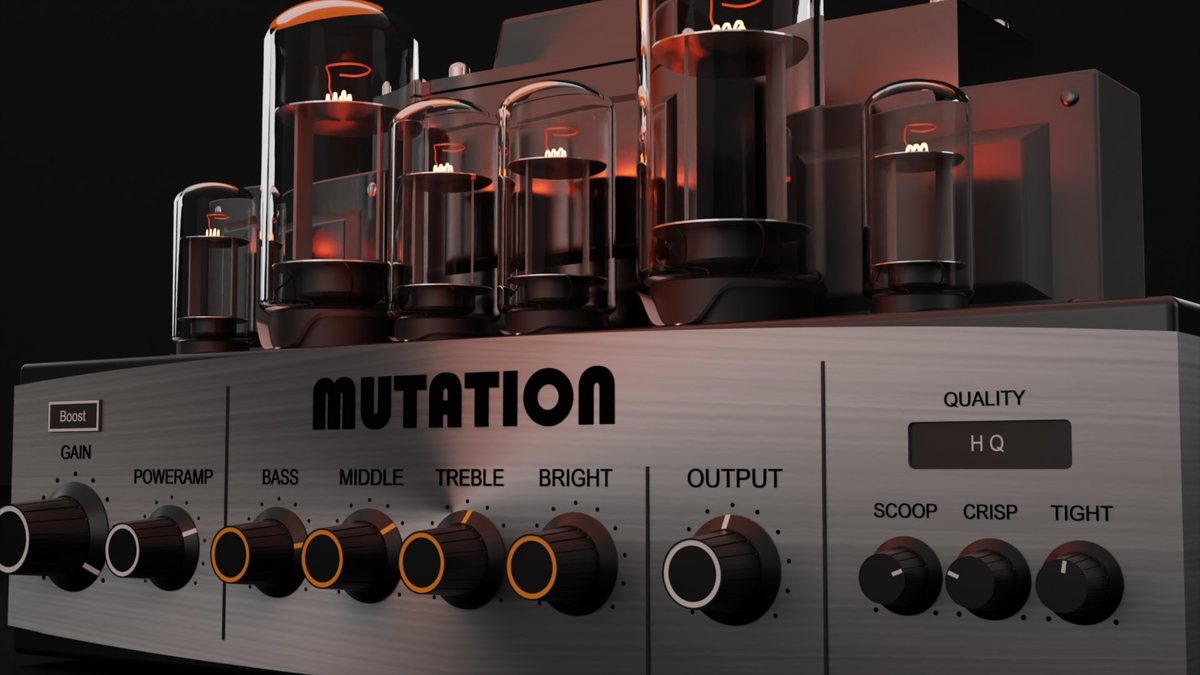
MTurboAmp is a guitar amp and distortion pedal plugin from MeldaProduction. According to the maker, it contains almost 30 amp heads and about a dozen distortion pedals, and that number changes as new devices are added in updates.
What sets it apart is that you can open up the internals and change parameters, not just turn the front-panel knobs. You can adjust EQ base frequencies, ranges and gains in detail, which the maker describes as using the mouse like a virtual soldering iron.
You can also build an amp from scratch. The building blocks are two ten-band dynamic EQs (for input and output, with high-pass and low-pass filters) and a distortion creator with up to nine stages. A Custom GUI Designer for making your own look is included.
It does not include a cabinet simulation; the maker designs it to be used with its MCabinet. It supports VST, VST3, AU and AAX, and a trial version can be tried on the official site.
Key features
Almost 30 amps and a dozen pedals
Many amp heads and pedals are included, from clean to heavy distortion. The maker says the number changes with each release, so check the official page for the current contents.
Editable down to the internals
You can change the EQ frequencies, ranges and gains inside each model. Because small tweaks change the sound, it suits cases where you want to start from an existing amp and move toward your own preference.
Build your own amps and pedals
Using ten-band dynamic EQs and a distortion creator with up to nine stages, you can assemble original amps and pedals. It is meant for people who want to try combinations unlike existing designs.
Input and output EQ with filters
Ten-band EQs with high-pass and low-pass filters are provided for input and output. You can shape the frequency range before and after the distortion without inserting a separate EQ plugin.
Custom GUI Designer
You can choose knobs, switches, LEDs, sliders and buttons to design the look of your own amp. The maker says you can use either predesigned parts or imported ones.
Designed to pair with MCabinet
An amp head or pedal alone does not complete a guitar tone, so the maker assumes use with its MCabinet cabinet simulation. MCabinet is a separate product.
Specifications
| Item | Details |
|---|---|
| Type | Guitar amp / distortion pedal |
| Contents | About 30 amp heads and a dozen pedals (changes with updates) |
| Plugin formats | VST, VST3, AU, AAX |
| Supported environment | Windows: Intel / AMD with SSE2; macOS: Intel / AMD / M1, native Apple Silicon |
| EQ | Two ten-band dynamic EQs (input and output) with high-pass / low-pass |
| Maker | MeldaProduction |
What is included and system requirements
- Plugin (VST / VST3 / AU / AAX)
- About 30 amp heads and a dozen distortion pedals
- Ten-band dynamic EQs for input and output, and a distortion creator with up to nine stages
- Custom GUI Designer
- The official page lists MGuitarArchitect as an upgrade option (a separate product)
How to use it
- Download the installer from the MeldaProduction site and install it.
- Sign in with MPluginManager and activate the trial or your purchased licence.
- Load MTurboAmp on a guitar track in your DAW.
- Pick an amp head from the list that is close to the mood you want, such as clean or crunch.
- Add a pedal in front and adjust the amount of distortion.
- Shape the frequency range with the EQ, and open the internal parameters if needed.
- If you need a cabinet, place MCabinet or a similar plugin after it.
- Save settings you like as presets.
Where it may come in handy
Building a guitar tone in a single plugin
Because amps and pedals are together, you may be able to develop a guitar tone in one plugin. It can be simpler to manage than switching between several products.
Making your own distortion
With the internal parameters and the nine-stage distortion creator, you may try distortion that existing amps do not offer. It suits people who enjoy the sound design itself.
Distorting synths or bass
You could also route non-guitar tracks through it and choose the type of distortion in detail. Combining a pedal with the EQ lets you shape the frequency range while distorting.
Who it may suit
- People who want amps and pedals together in one place
- Users who like to dig into internal settings to shape a tone
- Anyone who wants to build their own amp
- People who plan to pair it with MeldaProduction's MCabinet
Good to know before you buy
- The cabinet simulation is a separate product (MCabinet).
- The maker says the number of amps and pedals changes with updates.
- If you buy at Plugin Boutique, activate it by entering the serial from your account page in MPluginManager.
- Prices on the official site can change for limited periods, so please check before buying.
Price
$95 (Plugin Boutique, checked 2026-10-27). Prices can vary by region and promotion, so check the official page before buying.
See MTurboAmp on the product page
More of the same kind
We have introduced 28 guitar amp simulators. Here are some of the others.
- Blue Cat Audio Blue Cat's Axiom 2
- Waves PRS SuperModels
- Bogren Digital Ampknob Trivium Lead
- Kuassa Amplifikation Lancaster
- Bogren Digital AmpKnob BH4
- Kuassa Amplifikation Caliburn
We have introduced 32 other products from MeldaProduction.
- MeldaProduction MFilter
- MeldaProduction MeldaProduction MDelayMB
- MeldaProduction MDistortionMB
- MeldaProduction MTrackAlign
- MeldaProduction MMatcher
For a side-by-side comparison scored on the same criteria, see our comparison of guitar amp simulators.
See the full list in Product database: Effects.
Sources: meldaproduction.com pluginboutique.com (checked 2026-10-27)










Comments