
Disclosure: This page may contain affiliate links. Prices were checked on the date shown and may change.
An introduction to Waves SuperRack Performer, based on information from the maker and distributors: what it does, how to use it and who it may suit. It is not scored.
Get the exact live sound you want: All you need are Waves or ANY VST3 plugins running on a Mac or PC connected to the mixer (Core Audio / ASIO)—no extra hardware required.
— Waves official site
What is SuperRack Performer?
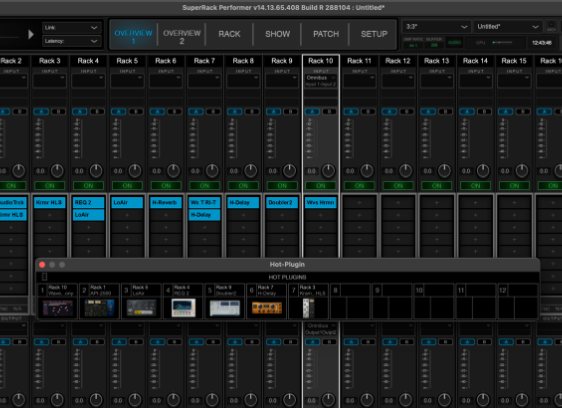
SuperRack Performer is a plug-in host for live sound from Waves. It runs on a Mac or Windows computer connected to a mixer, and lets you use Waves plug-ins and third-party VST3 plug-ins as the effects rack for a live show.
According to Waves, what you need is an ASIO or Core Audio audio I/O connected to the mixer plus the plug-ins on the computer; no dedicated hardware is required. It is designed to serve as a rack for many types of mixing console, digital or analog.
The aim is to bring the kind of plug-in chains you use in recording to the stage: vocal tuning and space effects, tighter drums, feedback control, analog-style chains on the bus and so on. You can store snapshots per song and recall them during the show.
A related product is SuperRack SoundGrid, which processes on a DSP server, whereas Performer processes on the computer's own CPU. Performer is positioned for small venues or modest budgets where you want to start with a computer.
Key features
A rack for Waves and VST3
Waves plug-ins and third-party VST3 plug-ins can be loaded into the live rack. It may help when you want to use plug-ins from your normal production work on stage.
Snapshots per song
Plug-in settings can be saved for each song and recalled during the show. The Waves mRecall app lets you recall snapshots remotely.
Up to 64 stereo racks
Up to 64 stereo plug-in racks can be run, which makes it easier to assign a rack to each input in a channel-heavy show.
Console integration
USB sync with digital consoles is described, so no extra cabling is needed. For DiGiCo and LAWO consoles, ProLink integration is listed as a new feature.
Plug-ins for room problems
Waves lists live-oriented plug-ins such as X-FDBK, PSE, F6 and the eMo series for dealing with feedback and room issues.
MIDI control and multi-control
Plug-in parameters can be controlled externally over MIDI, and several plug-ins can be controlled at once.
Dugan Speech compatibility
The page states compatibility with Dugan Speech, automatic real-time gain control for up to 64 mics.
Specifications
| Item | Details |
|---|---|
| Type | Plug-in host application for live use |
| OS | Mac: macOS 12 Monterey to 15 Sequoia, Windows: Windows 10 or later |
| Plug-in formats | Mac: VST / AU / AAX, Windows: VST / AAX (as listed by Waves) |
| Racks | Up to 64 stereo plug-in racks |
| Sample rates | 44.1 kHz to 96 kHz |
| Processing | Computer CPU (via ASIO / Core Audio) |
| License | Perpetual license |
What is included and system requirements
- SuperRack Performer application
- What you need: a Mac or Windows PC and an ASIO / Core Audio I/O that connects to the mixer (a USB cable if the mixer has USB I/O)
- Supported OS: macOS Monterey 12, Ventura 13, Sonoma 14, Sequoia 15 / Windows 10 or later
- Latency depends on the buffer setting (at 48 kHz and 256 samples, 512 samples in total for input and output, about 5.3 ms)
How to use it
- Install SuperRack Performer and activate it (for example through Waves Central).
- Connect the computer to the mixer using USB or an ASIO / Core Audio interface.
- Choose the audio device in the app and set the buffer size.
- Create a rack for each input and insert the Waves or VST3 plug-ins you want.
- Build chains such as EQ and compression for each vocal or instrument.
- Save the settings for each song as a snapshot.
- During the show, recall snapshots to switch. The mRecall app can be used for remote recall.
Where it may come in handy
PA in a small live venue
You may be able to add vocal and drum processing with a computer and an audio interface, without adding outboard racks.
A band's own touring system
You may be able to bring the plug-in chains from your recordings to the stage.
Events where each room sounds different
Plug-ins for feedback and room tuning could be inserted to cope with differences between venues.
Shows where settings change per song
One could prepare a snapshot per song and switch between them as the set goes on.
Who it may suit
- PA engineers who want to add plug-ins to live mixing
- Bands who want the same plug-in chains on stage as in the studio
- People who want to try their own VST3 plug-ins in live use
- People building a small computer-based live setup
Good to know before you buy
- Processing runs on the computer's CPU, so the number of plug-ins depends on CPU power and buffer settings.
- Latency depends on the ASIO / Core Audio buffer setting.
- You need to prepare the plug-ins (Waves products or third-party VST3) separately.
- If the mixer has no USB I/O, an ASIO / Core Audio audio interface is required.
- SuperRack SoundGrid is listed as the option for more plug-ins and lower latency.
- Waves prices change over time, so check the store page before buying.
How it differs from similar products
We do not pick a winner; the official figures are placed side by side.
Waves SuperRack SoundGrid
In Waves' comparison table, SuperRack Performer processes on the computer's CPU via ASIO / Core Audio. SuperRack SoundGrid processes on a SoundGrid DSP server and needs a SoundGrid-compatible I/O. Both list sample rates of 44.1 kHz to 96 kHz.
Price
Please check the official page for the price.
See SuperRack Performer on the product page
More of the same kind
Other introduction articles of the same kind.
- Auphonic Auphonic
- Parakeet Paravo
- Adobe Adobe Audition
- Shark LabsBogdan Sharkov Clownfish Voice Changer
- Krotos Krotos Studio MAX
- Sonnox ListenHub
We have introduced 215 other products from Waves.
- Waves COSMOS Sample Finder
- Waves Waves SuperRack SoundGrid
- Waves SoundGrid Rack for VENUE
- Waves Flow Motion FM Synth
- Waves CLA-76
See the full list in Product database: Streaming and recording software and others.
Sources: wavesjapan.jp pluginboutique.com (checked 2026-10-27)










Comments