
Disclosure: This page may contain affiliate links. Prices were checked on the date shown and may change.
An introduction to BLEASS BLEASS Tides, based on information from the maker and distributors: what it does, how to use it and who it may suit. It is not scored.
BLEASS Tides washes away the dry, uninspiring echoes of conventional delay processors with wave after wave of richly characterful reflections.
— BLEASS official site
What is BLEASS Tides?
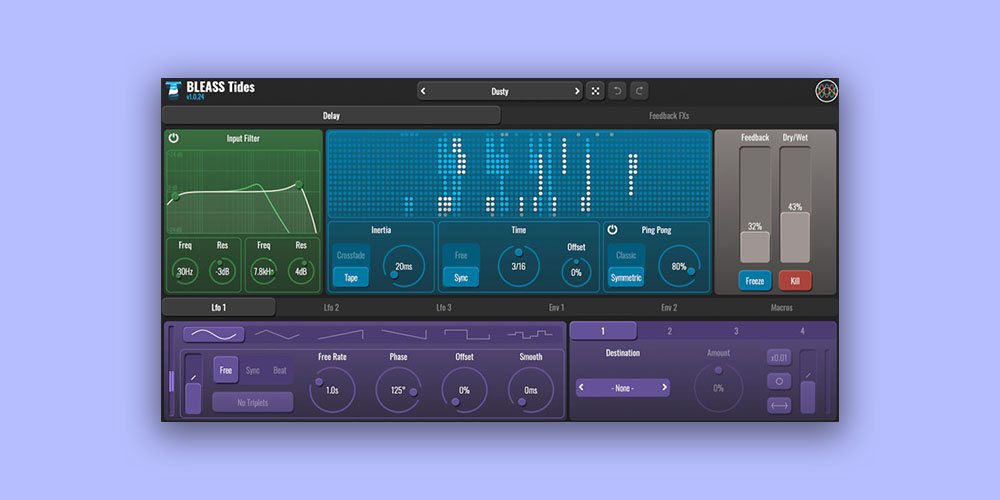
BLEASS Tides is a delay plug-in from BLEASS. The maker describes it as replacing the dry, uninspiring repeats of conventional delays with wave after wave of characterful reflections. Besides the desktop version for Mac and Windows, there is also a version for iPhone and iPad (AUv3).
A key idea is that changing the delay time does not produce unpleasant warping. You can choose between a crossfade method and a tape-style method in which the virtual tape speed changes, and the Inertia dial sets how quickly the change happens. For modulation, stereo LFOs, envelope followers and macro controllers are available.
On the input side, resonant low-pass and high-pass filters shape the signal entering the echoes. The feedback path has five insert slots, filled from 11 processors including distortion, dust, bit crush, frequency shifter, pitch shifter, ring modulator, delay and several filters. Their effects accumulate with each repeat.
The display shows incoming sound and repeats as dots in a spectral readout, and clicking or touching it activates a frequency shifter in the feedback path. Momentary Freeze and Kill buttons allow live-style control. Formats are VST3, AU and AAX (VST3 / AAX on Windows), with Apple silicon support.
Key features
Delay-time changes without warping
The design is described as avoiding unpleasant warping when delay time changes. You pick crossfade or tape mode and use Inertia to set the speed of the change.
Input filter
Resonant low-pass and high-pass filters on the input narrow the band that goes into the echoes. Adjust by dragging nodes or using the dials below.
Five feedback insert slots
The feedback path has five slots, and 11 processors can be loaded and rearranged. Only one of each can be inserted, and the effects accumulate with each repeat.
Modulation system
Three LFOs, two envelope followers and two macros are provided, and each modulator can be routed to up to four destinations.
Interactive spectral display
Incoming sound appears as white dots and repeats as light-blue dots. Touching the left produces a negative frequency shift and the right a positive one, larger as you move away from the center.
Freeze and Kill
Freeze holds and repeats the current delay signal, and Kill instantly mutes it and resets the processor. The maker also notes that Kill stops a runaway feedback loop.
Specifications
| Item | Details |
|---|---|
| Maker | BLEASS |
| Type | Delay |
| Feedback insert slots | 5 |
| Processors | 11 |
| LFOs | 3 |
| Envelope followers | 2 |
| Macros | 2 |
| Formats (Windows) | VST3 (64-bit) / AAX |
| Formats (Mac) | VST3 / AU / AAX (64-bit) |
| Supported OS | Windows 10 or later / macOS 10.9 or later (64-bit, M1/M2 supported) |
| iOS version | AUv3 (sold separately) |
| Standalone | No (host software required) |
| Regular price | $39 (official) |
What is included and system requirements
- BLEASS Tides plug-in (desktop version)
- Formats: VST3 and AAX on Windows; VST3, AU and AAX on Mac
- Installer links and a serial number are emailed after purchase
- A demo is offered on the official site
How to use it
- After purchase, download the installers from the links sent by email and install.
- Open your DAW and insert Tides on a track or aux track that needs delay.
- Click “UNREGISTERED” at the top left, enter your serial and email address, and authorize (an internet connection is needed).
- Set the delay time with the Time dial and choose whether it syncs.
- Choose crossfade or tape with Inertia and adjust the speed of change.
- Open the Feedback FXs tab and try distortion, filters and other processors.
- Assign LFOs or envelope followers, and use Freeze and Kill as needed.
Where it may come in handy
Delay with movement
LFOs and envelope followers can move delay time and the processors, which may create delays that change with every repeat.
Sound design
Putting a pitch shifter or ring modulator in the feedback path may let you design sounds in which the repeats transform.
Live-style control
The Freeze and Kill buttons can stop or hold the effect during playing or programming.
Using with iPhone and iPad
An iOS version also exists, so it may be worth considering if you want the same kind of delay on mobile (sold separately).
Who it may suit
- People looking for a delay that handles time changes naturally
- People who want effects that evolve inside the feedback path
- People who want detailed modulation with LFOs and envelopes
- People interested in a delay that also exists on iPhone and iPad
Good to know before you buy
- It is not a standalone program; host software such as a DAW is required.
- Adding distortion or delay in the feedback path can cause a runaway loop. A 0 dB limiter on the wet signal protects equipment, and the Kill button stops the loop.
- The iOS (AUv3) version is offered separately on the App Store.
How it differs from similar products
We do not pick a winner; the official figures are placed side by side.
W. A. Production MultiBender
Tides has five insert slots in its feedback path filled from 11 processors and driven by LFOs and envelope followers. MultiBender splits the input into three bands and applies a separate delay and three kinds of effect per band.
Price
$39 (BLEASS official site, checked 2026-10-27). Prices can vary by region and promotion, so check the official page before buying.
See BLEASS Tides on the product page
More of the same kind
We have introduced 62 delays. Here are some of the others.
- AudioThing Echo Cube
- Waves SuperTap
- Universal Audio Capitol Chambers
- Native Instruments REPLIKA XT
- D16 Group Tekturon
- Arturia Delay ETERNITY
We have introduced 16 other products from BLEASS.
For a side-by-side comparison scored on the same criteria, see our comparison of delays.
See the full list in Product database: Effects.
Sources: bleass.com pluginboutique.com (checked 2026-10-27)










Comments