
This guide is for people who buy DTM plug-ins in Japan, or from Japan. Plug-ins can be bought at “overseas stores”, such as Plugin Boutique and the makers’ own sites, and at “Japanese distributors and stores” such as Rock oN, Media Integration, beatcloud and SONICWIRE. This article sorts out the differences between the two, and what to check before you buy, in terms of price and exchange rate, payment methods, Japanese-language support, license management and the treatment of consumption tax, based on official information as of September 24, 2026.
Disclosure: This article contains affiliate links. If you buy through them, SoundBounty may earn a commission at no extra cost to you. Information is as of the date we checked it and can change.
What is the difference between overseas stores and Japanese distributors and stores?
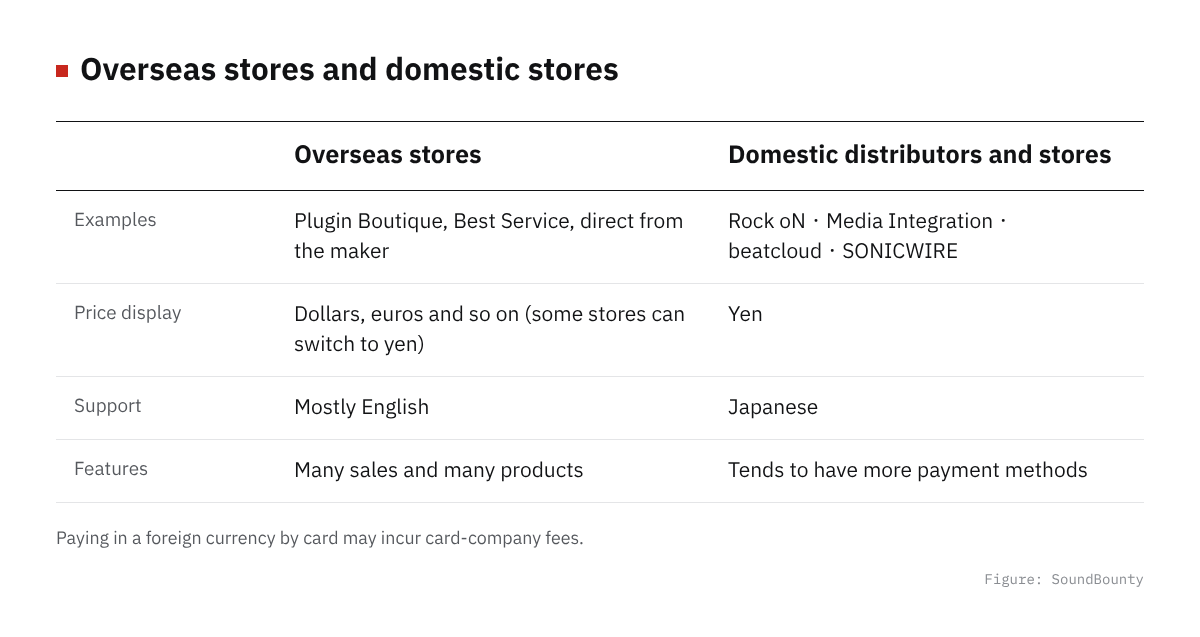
Figure: SoundBounty
Overseas stores (Plugin Boutique, Best Service, direct from the maker)
Plugin Boutique is a major plug-in retail site in the UK, a “store type” that handles products from many makers together. Best Service is a sample library and plug-in retailer based in Munich, Germany. Like the online shops of makers such as Steinberg, iZotope and Native Instruments, both are “overseas stores” where you buy directly without going through a Japanese distributor. They are known for frequent sales and a large number of products.
Japanese distributors and stores (Rock oN, Media Integration, beatcloud, SONICWIRE)
Rock oN (Rock oN Company), Media Integration (MI), beatcloud and SONICWIRE are all retailers and distributors that handle plug-ins of overseas brands in Japan. Media Integration has taken over sales and support from Native Instruments Japan as Native Instruments’ authorized distributor in Japan since August 4, 2023. SONICWIRE also gives Japanese-language support across makers, such as checking compatibility before purchase and providing Japanese manuals. The big difference from overseas stores is that buying through a Japanese distributor assumes yen pricing, Japanese-language service and domestic support.
Price and exchange rate: watch the display currency and the rate
On Plugin Boutique, you can switch the display currency, such as GBP, USD, EUR and JPY, by hand in your account settings (choose from the flag icon). But even if you change the display to JPY, which currency you are charged in at payment can depend on the card company’s processing, so check the currency shown on the order confirmation screen. Best Service is a Munich-based company and shows prices in EUR and USD. We could not confirm whether a JPY display is available as of 9/24.
SONICWIRE, on the other hand, officially explains that “it strives not to create a price difference from overseas prices”, updating prices every day according to the exchange rate and showing yen prices rounded to under 10 yen. Japanese distributors and stores basically show yen prices, so an advantage is that you do not have to keep minding exchange-rate changes. For reference, the dollar-yen rate as of September 24, 2026 was about 158 yen to the dollar (per OANDA). When you see a dollar price at an overseas store, you can roughly convert it to yen with this guide.
Differences in payment methods
Plugin Boutique supports VISA, Mastercard, AMEX, Maestro, JCB, Apple Pay, Google Pay, PayPal (including PayPal Credit / Pay Later) and Klarna (cash, bank transfer and gift cards are not supported). JCB support is reassuring for Japanese card users.
Japanese stores tend to offer more payment methods. Rock oN eStore supports Visa, Mastercard, JCB, American Express, Amazon Pay, PayPal, installments, PayPay, Paidy and Rakuten Pay. beatcloud supports credit cards, cash on delivery and online bank payment, and license products arrive by email right after card payment is completed (cash on delivery is excluded). If you want to use installments or convenience-store-type payment, Japanese stores have more choices.
Paying by an overseas card may incur an “overseas transaction fee (foreign exchange fee)” on the card company’s side. The amount you pay can differ between paying in dollars or euros as they are and using the store’s yen conversion, so if unsure, check your card statement.
How much Japanese-language support can you get?
Overseas stores are basically English-language support. Plugin Boutique and the makers’ direct-sales sites do not provide a Japanese-language contact desk. When there is trouble, you will need to communicate in English.
Japanese distributors and stores, on the other hand, assume Japanese-language support. SONICWIRE says it checks compatibility on its own and provides Japanese manuals, and handles important update notices and various procedures in Japanese. But note at the same time that for products bought on overseas sites or as parallel imports, Japanese manuals and support do not apply, and it tells you to contact the place you bought from directly. beatcloud also states that its support is “within Japan only”. In other words, the rough difference is that if you buy cheaply at an overseas store, solving problems yourself is the basis, and if you buy through a Japanese distributor, you can leave support to them too.
License management: iLok, vendor accounts and activation
With most plug-ins, you need to “activate the license somewhere” after purchase. The representative system is iLok from PACE Anti-Piracy. An iLok account is where purchased licenses first arrive, and to actually use them you activate them with “iLok License Manager” to one of an iLok USB key, the computer itself or iLok Cloud (which needs a constant internet connection). A license once activated stays there unless you deactivate it, so when you replace your computer you need to do the procedure beforehand. The mechanism is explained in detail in What is iLok?
Besides iLok, each maker has its own license management, such as Native Access (Native Instruments), iZotope’s account activation and Plugin Alliance’s account-based activation. Whether you buy at an overseas store or a Japanese distributor, the license itself is tied to the maker’s account, so it is easier to understand if you think the only difference is “which store’s account you paid with”.
How is consumption tax (JCT) handled?
According to the National Tax Agency, “provision of telecommunications services” (which includes software sold by download) that an overseas business offers to Japanese consumers is a domestic transaction subject to consumption tax, and in principle the overseas business files and pays it. The “reverse charge method”, where an individual buyer files separately, applies to business-to-business transactions and basically does not apply to individual purchases by ordinary consumers. How consumption tax is treated at overseas stores differs by store in how they display it and make invoices, so it is reassuring to check the breakdown on the checkout screen. At Japanese distributors and stores, tax-inclusive prices are shown clearly, as in ordinary domestic transactions.
Pitfalls to check before you buy
Crossgrade eligibility
For crossgrade sales, where you get a discount for switching from another product, it is common to be asked to upload proof that you actually own the eligible product (such as a receipt or a screenshot of the serial number). Steinberg’s guidance explains that review takes one to two business days, that you must reapply after the review result expires, and that licenses of subscription versions may be excluded. A last-minute application during a sale may not be reviewed in time, so allow yourself some margin.
Differences by region and language version
A license bought at an overseas store is not always exactly the same in features as the Japanese distributor’s version. Parallel imports and overseas versions may come without a Japanese manual, or be excluded from the Japanese distributor’s campaigns and bundles. Before you buy, check which version it is.
Refund policy
Plugin Boutique says that even when it agrees to a refund, it is “only to the original payment method, and cannot be changed to store credit”, and that many makers have a policy of “no refund after the license is registered or activated”. If a product has a trial version, it is safer to try it before you buy. At Japanese stores too, cancellation is generally conditional, as at beatcloud, where it is possible only if the product is “unused, unregistered and untransferred”.
So where should you buy? A guide by purpose
| How to buy | Who it suits | Advantages | Points to note |
|---|---|---|---|
| Overseas stores (Plugin Boutique, direct from makers and so on) | People who can check sales often, and do not mind communicating in English | Many products, and often more frequent and larger sales | Support is basically in English, you are affected by exchange rates and card fees, and the treatment of consumption tax depends on the store |
| Japanese distributors and stores (Rock oN, Media Integration, beatcloud, SONICWIRE) | People buying a product from an overseas brand for the first time, and people who value Japanese-language support | Yen pricing, Japanese-language support, and more payment methods such as installments | The timing and eligible products of sales can differ from the home country |
Contacts for each store
- Plugin Boutique: View at Plugin Boutique
Frequently asked questions
Q. Can I get a Japanese distributor’s updates and support for a plug-in I bought at an overseas store?
It depends on the maker. If the license is registered to the maker’s account, you can often get ordinary version updates, but some Japanese distributors, such as SONICWIRE, state clearly that purchases not made through them are not covered by support. Check the scope of support before you buy.
Q. Can I use a JCB card at overseas stores?
It depends on the store. Plugin Boutique supports JCB, but not every overseas store does. Check the card brand icons on the payment screen.
Q. Should I change when I buy depending on a weak or strong yen?
Dollar and euro prices at overseas stores are directly affected by exchange rates, but yen prices at Japanese stores can also change when the exchange rate is reflected (SONICWIRE explains that it updates prices every day according to the exchange rate). Whichever you buy from, check the final price on the checkout screen right before you buy.
Q. Do I always need an iLok USB key?
It depends on the product. More and more products can be used without a USB key if they support iLok Cloud or direct activation to the computer. But if you move between several computers or use it where the internet is unstable, a USB key is reassuring. See our iLok article for details.
Summary
For plug-ins from overseas, the basic way to choose is an overseas store if you put the size of sales first, and a Japanese distributor or store if you put Japanese-language support and a wide range of payment methods first. Whichever you buy from, checking beforehand the display currency and the currency actually charged, how consumption tax is treated, the conditions for refunds and crossgrades, and where the license is activated helps you avoid trouble. Prices and rules can change, so check each store’s latest information right before you buy.
How to receive, install and activate what you bought is summarized in How to install plug-ins you bought in a sale or got as a free giveaway.


Comments