
“iLok” is an authorization system you often see when you buy plug-ins and software instruments for DTM. Many people find it unclear whether you need a USB dongle or whether the cloud alone is enough. This article sorts out the basic mechanism of iLok, the differences between the three ways to activate, how to move licenses and common pitfalls.
Disclosure: This article contains affiliate links. If you buy through them, SoundBounty may earn a commission at no extra cost to you. Information is as of the date we checked it and can change.
What iLok is
iLok is a software license activation platform provided by PACE Anti-Piracy in the US. PACE was founded in 1985, is based in Silicon Valley, and specializes in software protection and license management. According to the company, the platform as a whole, including iLok, covers more than 300 million licenses, more than 13 million users and more than 100 countries.
iLok is not a product of a particular maker; it is a shared foundation that many plug-in and DAW makers, such as Avid, Native Instruments, Waves and Arturia, adopt as “a mechanism for copy protection and license management of their own products”. So if you create one iLok account, you can manage licenses from several makers together.
Three ways to activate
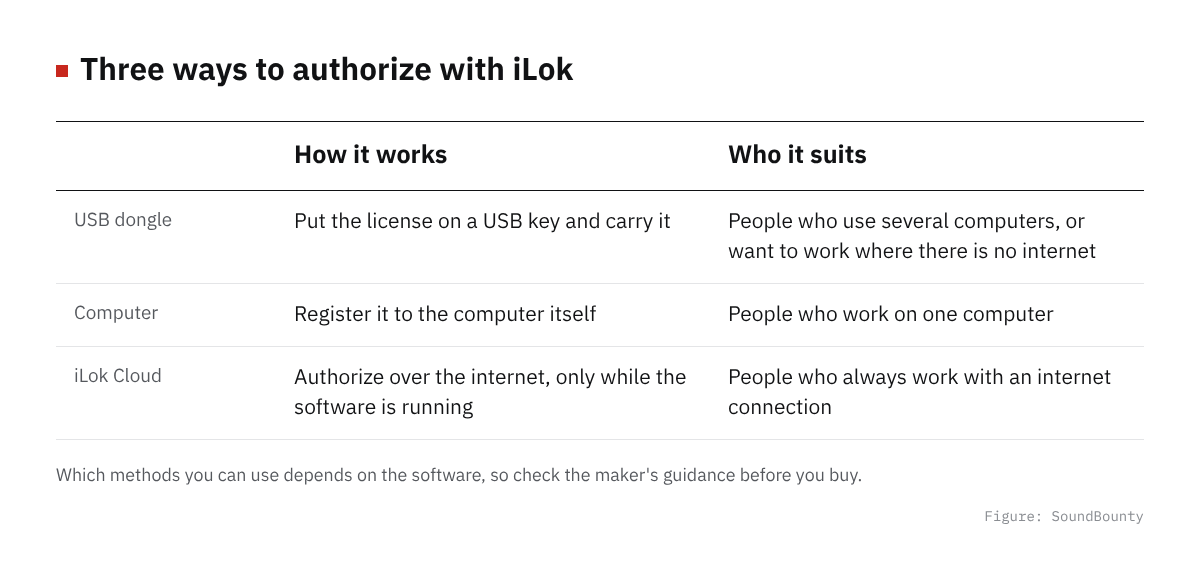
Figure: SoundBounty
The license of iLok-compatible software can be “activated” in any of the following three places. The method supported differs by software, so it is safest to check the maker’s compatibility table before you buy.
| Method | Overview | Who it suits |
|---|---|---|
| iLok USB dongle | Stores the license on a dedicated USB key made by PACE. One dongle can store up to 1,500 licenses, and you can carry it to another computer just by plugging it in | People who use several computers, or want to use it where there is no internet connection |
| Computer activation | Ties the license to the computer itself, without a dongle. You enable it through iLok License Manager | People who work on only one computer, or do not want to buy a dongle |
| iLok Cloud | Establishes a session with PACE’s license activation server over the internet and keeps the authorization only while the software is running. Needs neither a dongle nor tying to a computer | People who move between several environments, or always have an internet connection |
iLok Cloud establishes encrypted communication with PACE’s activation server when the software starts, and keeps checking at regular intervals that the license is valid. According to the official site, there is a mechanism for when communication is briefly cut, but basically a stable internet connection is assumed. There is no risk of losing or breaking a dongle, but it is not suited to long work in an offline environment.
How to use iLok License Manager
To manage licenses, you use a free application called “iLok License Manager”. The basic flow is as follows.
- Create an iLok account at ilok.com
- Download and install iLok License Manager from ilok.com
- If the software you bought comes with a redeem code, enter the code from “Redeem” in License Manager to get the license
- On the “Available Licenses” screen, choose the license, then right-click or drag and drop to specify where to activate it (USB dongle / this computer / iLok Cloud)
- Check the destination and wait for it to finish
When you want to move a license to another computer or dongle, you can do so in the same License Manager by deactivating the license once and then activating it again at the destination. Most software lets you move licenses for free, but some makers limit how many times or how often you can move, so it is reassuring to check beforehand if you change environments often.
Is a USB dongle required?
In conclusion, the reality is that “more and more software does not require” an iLok USB dongle. Among long-established plug-ins, some still support only activation to a USB dongle, but recently more products support computer activation and iLok Cloud, and it is now common to be able to use them without owning a dongle.
But a dongle is more reassuring in cases like these.
- You move between several computers (home, a studio and so on) and work where the internet connection is not stable each time
- The software you plan to buy does not support computer activation or iLok Cloud and supports only activation to a dongle
- You plan to replace your computer and want to carry the licenses physically
Before you buy, we recommend checking each maker’s product page or FAQ for wording such as “iLok USB required” or “iLok USB optional”.
Common pitfalls
Forgetting your account information
If you forget the ID and password of your iLok account, moving or reissuing licenses will not go smoothly. In particular, recovery after losing or breaking a dongle requires checking your account information, so you need to keep it where you will not lose it.
Keeping on using a dongle without syncing it
According to iLok’s official help, when an iLok USB is lost or stolen, what PACE can replace is “the licenses that were on that iLok when PACE’s server last checked”. It is reassuring to connect the iLok USB to a computer from time to time and open iLok License Manager so that the server checks the latest state.
Panicking when it is lost or broken
If an iLok USB breaks or is lost, you apply for an “RMA” (a replacement request) at ilok.com. According to iLok’s official help, a broken iLok USB is not repaired and returned; at the time of the request a replacement iLok USB is sent (if you wish), and you send the broken unit to the address given in the RMA email. PACE takes the licenses out of the unit that arrives and prepares replacement licenses in your account. If the warranty period has passed, it is paid.
PACE has an optional paid service called “Zero Downtime (ZDT)” that issues you a temporary license you can use at once in place of a broken or lost iLok. On iLoks (2nd and 3rd generation) enrolled in ZDT, you can enable a feature called “Theft & Loss Coverage (TLC)”, and once enabled, PACE can replace the licenses even if the iLok is lost or stolen (usually in about two business days). TLC must be enabled before you lose it, and you need to “Refresh” (renew the term) in iLok License Manager about every 90 days (all per the official help).
Exceeding the activation limit
Much software sets an upper limit on the number of machines or places where one license can be activated at the same time. When you reach the limit, you need to deactivate in some environment before you activate in a new one. If you use several environments often, it goes more smoothly to check the limit beforehand.
Frequently asked questions
Q. Can I create an iLok account for free?
Yes. Creating an account at ilok.com and downloading iLok License Manager are both free. Costs arise when you buy the software itself, or enroll in additional support such as Zero Downtime.
Q. Where can I buy an iLok USB dongle?
You can buy one from PACE’s authorized dealers and from music stores and DTM gear retailers. USB Type-A and USB Type-C models are offered.
Q. If software supports iLok Cloud, do I need neither a dongle nor computer activation?
If the software supports iLok Cloud, you can use it without a dongle. But as noted above, a stable internet connection is assumed, so if you work offline a lot, it is reassuring to check whether you can also choose computer activation or activation to a dongle.
Q. What happens to my licenses if I replace my computer?
The basic flow is to deactivate the license on the old computer and then activate it again on the new one. If you cannot deactivate, for example because the old computer will not start, you will need to consult the maker’s support.
Summary
iLok is a software license activation platform provided by PACE Anti-Piracy, and you choose, from three ways to activate (USB dongle, computer activation and iLok Cloud), the one your software supports. A USB dongle is no longer as essential as before, but support differs by software, so checking before you buy is essential. Managing your account information, and syncing regularly if you use a dongle, is the best measure for avoiding trouble when it is lost or broken.
How to receive, install and activate what you bought is summarized in How to install plug-ins you bought in a sale or got as a free giveaway.


Comments