
A MIDI keyboard, essential for programming in a DAW, changes a lot in ease of use and in price with the number of keys, key feel, whether it has pads and bundled software. In this article we sort out the points for choosing while comparing eight standard models, from mini keyboards to full size. We do not give prices; check the current price at the store you buy from.
Disclosure: This article contains affiliate links. If you buy through them, SoundBounty may earn a commission at no extra cost to you. Information is as of the date we checked it and can change.
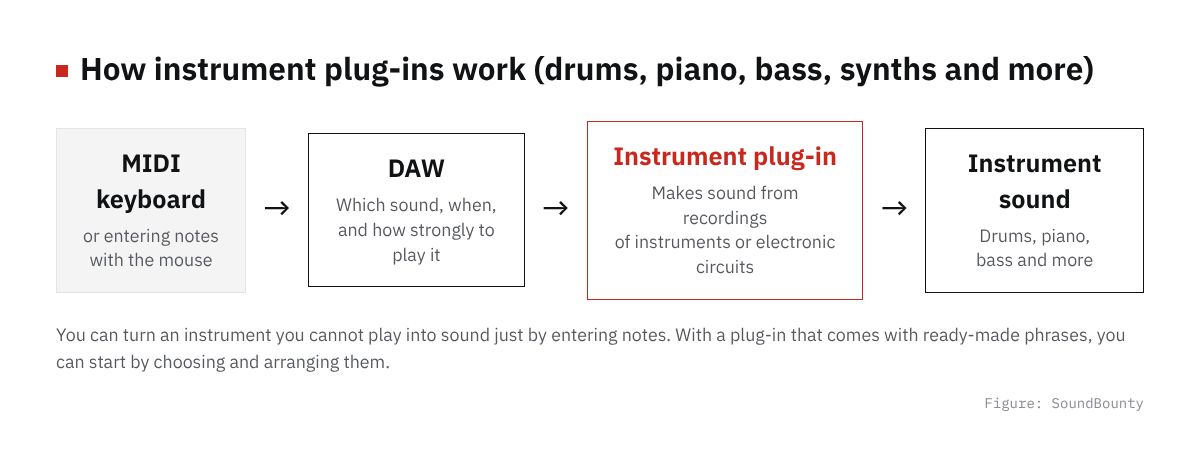
Figure: SoundBounty
Four points for choosing a MIDI keyboard
1. Decide the number of keys by “where you put it” and “the phrases you play”
The mainstream MIDI keyboards are around 25, 49 and 61 keys. A 25-key unit is easy to carry and takes little room on a desk, but one hand covers only a bit over one octave, so for playing chords with both hands and phrases that cross octaves, 49 keys or more are easier to handle. If you keep it next to a desktop computer, you can include up to 61 keys in the choices. The eight models introduced here are split into 25 keys (AKAI MPK mini MK3, Arturia MiniLab 3, Novation Launchkey Mini 25 MK4), 49 keys (Roland A-49, Arturia KeyLab Essential 49 mk3, Novation Launchkey 49 MK4) and 61 keys (KORG microKEY2-61, M-Audio Keystation 61 MK3).
2. Key feel: mini keys and full-size
Many 25-key units use “mini keys”, keys shallower in depth than ordinary piano keys. They save space, but people used to a piano need to take note that the sense of finger width changes. Many 49- and 61-key models use standard-size keys (mainly semi-weighted or non-weighted synth-type), so the finger movement is closer to a piano. None of the models introduced here have the heavy hammer action of a piano; they all have a light, synth-leaning touch.
3. Whether it has pads, knobs and faders
The AKAI MPK mini MK3, Arturia MiniLab 3 and Novation Launchkey series have MPC-style drum pads and knobs, which you can use for beat making and for controlling an instrument’s parameters. On the other hand, the KORG microKEY2-61 and M-Audio Keystation 61 MK3 are keys only, which keeps them compact and affordable. If you do not plan to use pads, a keys-only model is enough.
4. Bundled software and DAW integration
Most MIDI keyboards come with a lite version of a DAW and software instruments. The value of the bundled software differs greatly by model; the Arturia MiniLab 3 bundles the software synth “Analog Lab Intro”, a Steinway piano instrument and Ableton Live Lite together. The Novation Launchkey series comes with bundled versions of Ableton Live and Cubase and more than 20 plug-ins such as those from Klevgrand, and is distinguished by letting you operate the transport and mixer from the hardware through integration with its own DAWs (Ableton Live and Cubase). The Arturia KeyLab Essential 49 mk3 likewise has command functions for the main DAWs and “Analog Lab V” with more than 2,000 presets. If you have already decided on the DAW you use, there is no problem choosing by how easy the keys are to play rather than by integration functions.
A comparison of eight models
| Model | Features | Who it suits |
|---|---|---|
| AKAI MPK mini MK3 | 25 mini keys, 8 MPC-style pads and 8 knobs. AKAI’s MPC3 software and Native Instruments’ Komplete Select (one of three) are included | People who want to start beat making cheaply |
| Arturia MiniLab 3 [Black] | 25 mini keys, 2 rows of 8 RGB pads, 8 encoders and 4 sliders. Analog Lab Intro (500+ sounds), Ableton Live Lite, a Steinway piano instrument, Loopcloud (2 months) and Melodics are included | Beginners who want to get software synths together |
| Novation Launchkey Mini 25 MK4 | 25 mini keys with pads. Bundled versions of Ableton Live and Cubase, Novation Play, more than 20 plug-ins such as Klevgrand, and Melodics lessons are included | People who want compact integration with Ableton and Cubase |
| KORG microKEY2-61 | 61 ultra-thin mini keys (Natural Touch), no pads. The “KORG Software Bundle”, including KORG Collection M1 Le and Ableton Live 11 Lite, is included | People who want more keys while valuing portability |
| M-Audio Keystation 61 MK3 | 61 full-size semi-weighted keys, no pads, USB bus-powered | People who want 61 keys with a full-size feel |
| Roland A-49-BK | 49 keys with a touch-type D-BEAM controller. Ableton Live Lite is included | People who want to use Roland-style performance aids |
| Arturia KeyLab Essential 49 mk3 [Black] | 49 keys with pads, knobs, faders and a 2.5-inch display. DAW commands for Ableton, Logic, FL Studio, Cubase and Bitwig, Analog Lab (2,000+ sounds) and Ableton Live Lite are included | People who want to operate the DAW seriously from the hardware |
| Novation Launchkey 49 MK4 | 49 keys with pads and DAW integration. Bundled versions of Ableton Live and Cubase, more than 20 plug-ins such as Klevgrand, and Melodics lessons are included | People who want full-size keys with serious integration with Ableton and Cubase |
How to choose by use
If saving space and portability matter, a 25-key mini
For people who carry it with a laptop, or do not want to leave it on the desk all the time, a 25-key mini keyboard suits. The AKAI MPK mini MK3 is a 25-key unit for beat making with pads and knobs. The Arturia MiniLab 3 has generous bundled software synths and samples, and suits people who value “getting a production environment together in one go”. The Novation Launchkey Mini 25 MK4 is a candidate if you value integration with Ableton Live and Cubase.
If feel and number of keys matter, full-size 49 to 61 keys
If you play chords with both hands and value the feel of operating a keyboard instrument, 49 keys or more are easier to handle. If you do not need pads and knobs and want to balance the number of keys against price, the KORG microKEY2-61 (61 keys) and M-Audio Keystation 61 MK3 (61 semi-weighted keys) are candidates. The Roland A-49 is a 49-key model with Roland’s own performance aid, the D-BEAM controller.
Choosing by DAW integration and richness of bundled software
People who want to operate the DAW’s mixer and transport with pads and knobs, and also value the bundled software, can consider the Arturia KeyLab Essential 49 mk3 and Novation Launchkey 49 MK4. Both have 49 keys with pads and knobs, and command functions that support several DAWs. They cost more than other 49-key models, but suit people who choose on overall strength including software instruments and DAW integration.
Frequently asked questions
Q. Can I make sound with just a MIDI keyboard?
A MIDI keyboard alone makes no sound. It sends performance information (MIDI signals) to a DAW or software instrument (plug-in) installed on the computer. With the lite DAW and software instruments that come with many models, you can start making sound without buying anything more.
Q. Will mini keys get in the way of improving?
For production centered on programming, mini keys are said to be no big problem. But if you also want to use it for serious piano practice, a full-size or semi-weighted model whose key depth and weight are closer to a piano has less gap in finger feel.
Q. Do I need pads?
If you do not plan to program drums or beats, you can produce without pads. Models that leave out pads to be compact and low-priced, such as the KORG microKEY2-61 and M-Audio Keystation 61 MK3 introduced here, are also choices.
Q. Are there connections other than USB (such as Bluetooth)?
All eight models introduced here connect by USB as the basis. KORG’s microKEY series also has a separate lineup, “microKEY Air”, that supports Bluetooth, so if you want to use it without a cable, check the support on the maker’s product page.
Summary
The order least likely to fail in choosing a MIDI keyboard is to decide the number of keys (25, 49 or 61) first by “where you put it and the phrases you play”, and then narrow down by “do I need pads and knobs” and “how much do I value bundled software and DAW integration”. To start easily, the AKAI MPK mini MK3 or Arturia MiniLab 3; if the number of keys comes first, the KORG microKEY2-61 or Keystation 61 MK3; and if you choose seriously including DAW integration, the KeyLab Essential 49 mk3 or Launchkey 49 MK4 are candidates. Prices change, so check the latest price before you buy.


Comments