
A compressor is a tool that reduces loud sounds to narrow the spread in the volume of a voice. In a cover-song mix you use it to make the lyrics easy to hear and the voice steady against the backing track. But it has many knobs and can be hard to get into at first. This article explains the basics of vocal compression, starting with what the knobs mean.
Disclosure: This article contains affiliate links. If you buy through them, SoundBounty may earn a commission at no extra cost to you. Information is as of the date we checked it and can change.
Key points
- A compressor reduces loud parts of the voice to narrow the spread in volume.
- Threshold decides “where it starts reducing”, and ratio decides “how strongly it reduces”.
- Decide attack and release by ear, not by numbers.
- If you overdo it, the voice goes flat and breaths and noise stand out.
- Manufacturers’ materials do not give fixed values for vocals either.
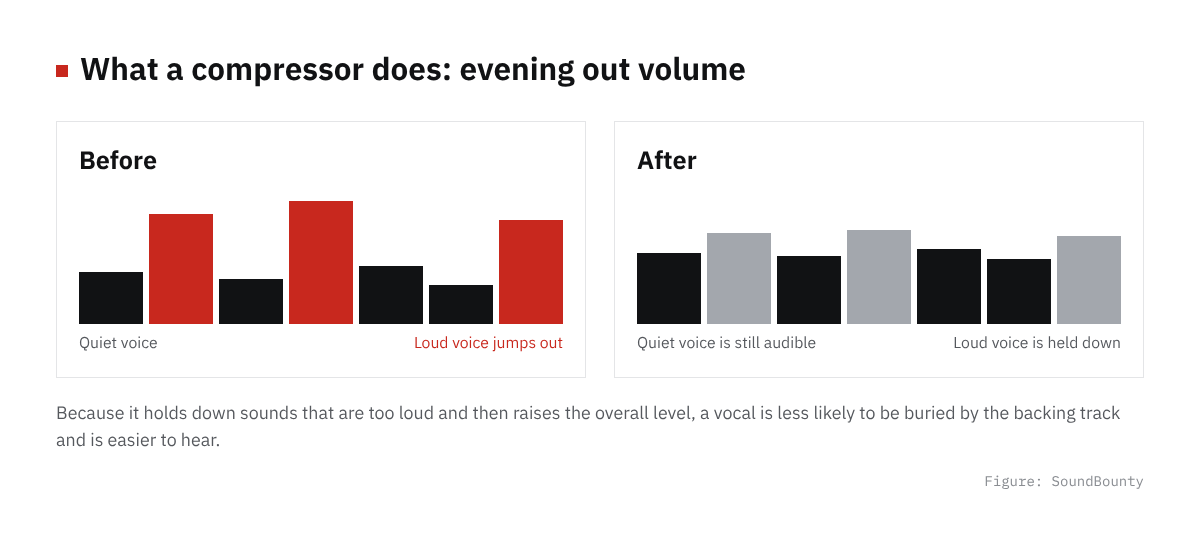
Figure: SoundBounty
What a compressor does
A compressor watches the level of the incoming sound, and lowers the volume (gain) only when it goes over a level you set. Most compressors have the same basic knobs. FabFilter explains that once you learn the basics, you can handle most compressors.
On vocals, its main job is to reduce the places where the voice gets loud, such as in the chorus, a little, and narrow the gap with the quiet places. When the gap is smaller, quiet voice is less likely to be buried when you raise the overall volume.
Source: FabFilter Learn
What the knobs mean
| Knob | Meaning | How to think about it for vocals |
|---|---|---|
| Threshold | The level at which it starts reducing | Lower it little by little so it reacts only on the loud parts of the voice |
| Ratio | How strongly it reduces | Try a low one first, and raise it if it is not enough |
| Attack | How fast it starts reacting | Too fast crushes the start of words, and too slow lets loud voice slip through |
| Release | How fast it stops reducing | Make sure the reduction is not left over at the start of the next word |
| Makeup gain | Brings back the volume that was reduced | Set it so the volume matches with it on and off |
How threshold and ratio relate
The threshold is the level at which reduction starts (only the part above it is reduced). The ratio is how much of the part above it is reduced. In FabFilter’s example, with a ratio of 4:1, even if the input goes 4 dB above the threshold, the output goes up only 1 dB. If the input is -30 dB and the threshold is -38 dB, the input is 8 dB over. The output goes over by only 2 dB, to -36 dB, so 6 dB has been reduced.
You can see this “amount reduced” on the compressor’s gain reduction (GR) meter. On vocals, it is less likely to sound unnatural if you start where the meter moves a little on the loud parts of the voice rather than swinging far.
Decide attack and release by ear
Attack is “how fast the compressor reacts”, and release is “how fast it lets go”. FabFilter introduces an order for setting them: attack first, then release. If the attack is too fast, the start of a sound (the transient) is reduced and it loses energy. If the release is too long, the compressor is still reducing when the start of the next sound arrives.
Numbers in milliseconds are a reference, but how they work differs with the type of compressor (the algorithm). FabFilter also recommends not obsessing over numbers and finding by ear the place where the sound is least unnatural. That is why this article gives no “correct values” for vocals.
Source: FabFilter Learn
Basic steps
- Set the ratio low.
- Lower the threshold until the gain reduction meter moves a little on the loud parts of the voice.
- Move the attack and find where the start of words is not crushed. Then move the release and find where the volume swings do not sound unnatural.
- Bring the volume back with makeup gain and compare on and off at the same volume. A louder sound tends to seem better, so always match the volume when comparing.
- Finally, listen together with the backing track and check that the voice is not buried or flat.
Signs of overdoing it
- Breaths and lip noise have become noticeable
- The voice sounds flat and lifeless
- Room sound and noise get lifted in the parts where you are not singing
- The start of words is crushed and has lost energy
If this happens, raise the threshold or lower the ratio to reduce less. If the attack is too fast, the start of sounds is reduced and it loses energy.
Source: FabFilter Learn
Commonly used techniques
Two-stage compression
Instead of compressing hard with one unit, you chain two compressors that each work lightly. The first reduces the big peaks and the second evens out the whole gently, which makes it easier to finish naturally. This is a commonly used idea, not a method set by a manufacturer.
Parallel compression
This is a method of mixing a heavily compressed sound with the original, uncompressed sound. FabFilter describes it as mixing a strongly compressed sound with the uncompressed original. You can lift the fine detail of the quiet parts while keeping the start of the original sound. With a compressor that has a Mix (Dry/Wet) knob, one unit can do the same. It suits when you want to add presence while keeping the core of the voice.
Why put an EQ before the compressor
FabFilter explains that when a bus has a lot of lows, the compressor can react to them and reduce the other sounds. It is the same for vocals: if you cut unwanted lows and muddiness with an EQ before the compressor, the compressor reacts more to the voice itself. The order is explained in The order of plug-ins for a cover-song mix.
Source: FabFilter Learn
Frequently asked questions
Q. After which plug-in should the compressor go?
The common order is after the EQ that cuts unwanted lows and muddiness. The reason is explained in The order of plug-ins for a cover-song mix.
Q. The settings are hard and I do not understand them
Some compressors listen to the voice with AI and suggest settings. Using the suggestion as a starting point and fixing it little by little while you listen makes it easier to learn. We introduce them in our compressor plug-in comparison.
Q. How is it different from a limiter?
A limiter is a tool that reduces strongly so the sound never exceeds a ceiling, and it is mainly used for the final touch of a song. See our limiter comparison for details.
Q. Are there guide numbers?
Manufacturers’ materials give examples by source, such as drums and the whole mix, but they do not give fixed values for a cover-song vocal. How a compressor works differs by type, so deciding by the gain reduction meter and by ear is more reliable than looking for numbers.
Read next
- How to mix a cover song (overall flow)
- Compressor plug-in comparison
- How to EQ vocals
- De-esser comparison


Comments