
In a cover-song mix, you finish the recorded vocal by putting several plug-ins on it in order. Even with the same plug-ins, the result changes if the order changes. This article gently explains the common order of plug-ins on a vocal, and the reasons for it.
Disclosure: This article contains affiliate links. If you buy through them, SoundBounty may earn a commission at no extra cost to you. Information is as of the date we checked it and can change.
Key points
- The commonly used order is noise reduction, pitch correction, EQ, compressor, de-esser, then reverb and delay.
- If you cut the lows with an EQ before the compressor, the compressor reacts to the voice itself.
- Put reverb and delay last, or on a separate track.
- This order was not set by a manufacturer. Swap things as you listen.
The standard order
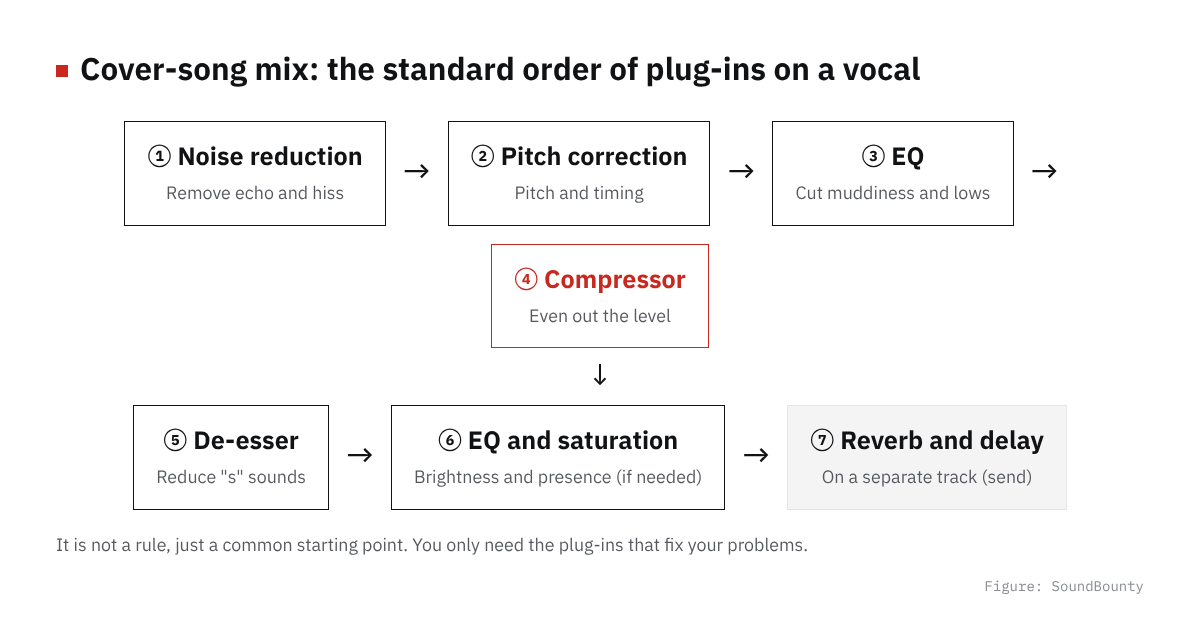
Figure: SoundBounty
- Noise reduction: remove room echo, hiss and clicks first
- Pitch correction: tidy pitch and timing
- EQ (tidying): cut muddiness and unwanted lows
- Compressor: even out the spread in the volume of the voice
- De-esser: reduce the harshness of “s” sounds
- EQ (flavor) and saturation: add brightness and presence (if needed)
- Reverb and delay: add ambience and width (commonly put on an auxiliary track)
This is not a rule, just a common starting point. It is not an order set by a manufacturer, so line things up in this order first and swap them as you listen.
Where it fits in the mix
For how to approach a mix, FabFilter recommends first deciding the role of each part (lead or support). After that you move on to volume balance and processing. In a cover song the vocal is the lead, so getting a rough balance with the backing track first and then refining the vocal processing helps you avoid overdoing it.
Source: FabFilter Learn
The reason for each
1. Why noise reduction comes first
If you apply a compressor while noise and room echo remain, the noise is lifted along with the voice. This is because a compressor brings back the reduced volume with makeup gain, so quiet sounds are lifted too. Removing noise first makes the later processing work cleanly. See our noise reduction and audio repair comparison for details.
2. Why pitch correction comes early
Pitch correction is thought to work better when it analyzes the shape of the voice as unchanged as possible. So it is generally applied before the shape changes with EQ and compression. A type that edits the recorded audio directly (a type you use after recording) may be worked on before you line up the plug-ins. See our pitch correction comparison for details.
3. Why you cut with an EQ before the compressor
A compressor reacts to loud sounds and lowers the volume. FabFilter explains that when there are many lows, the compressor can react to them and reduce the other sounds. It is the same on vocals: if unwanted lows and muddiness remain, it reacts to them and reduces even the important parts of the voice. If you cut them first with an EQ, the compressor reacts more to the voice itself.
4. Why the de-esser goes after the compressor
Sibilance such as “s” sounds is, in FabFilter’s explanation, a band that is plentiful around 6 to 9 kHz. It is needed for clarity, but too strong and it hurts the ear. When you even out the volume with a compressor, the sibilance that was quiet gets lifted and stands out more. Putting the de-esser after the compressor lets you reduce the sibilance that stands out all at once. There is also a way of putting it before the compressor, and which is better depends on the voice.
FabFilter’s Pro-DS is a dedicated tool that finds vocal sibilance and reduces only that, and it works only when the level goes over the amount you set. Its advantage over cutting the highs overall with an EQ is that the voice is less likely to get dark. See our de-esser comparison for details.
5. Why reverb and delay come last
If you add ambience and then apply a compressor, the ambience is lifted too and the voice tends to blur. Putting reverb on an auxiliary track (a separate track) and sending to it from each track is introduced in FabFilter’s explanation as a commonly used method. With this method it is easier to adjust the blend of ambience and original sound, and the load on the computer is lighter. See How to use reverb and delay on vocals for details.
Source: FabFilter Learn
Checking after you decide the order
Once you have lined them up, switch each plug-in on and off one at a time and compare. Check whether the effect you applied matches the purpose (reducing muddiness, evening out the volume and so on). You can boldly remove a plug-in whose effect you cannot hear. Using fewer plug-ins makes the sound more natural and the load on the computer lighter. Finally, always listen together with the backing track and check that the voice does not stand apart or get buried.
You can also do it with one plug-in
Some vocal processing plug-ins bundle EQ, compressor, de-esser, reverb and more into one, with the order already built in. If you do not know where to start, beginning with such a plug-in is one way. See our vocal processing plug-in comparison for details.
Frequently asked questions
Q. What happens if I get the order wrong?
The sound does not break, but the compressor tends to react to noise, and the ambience is lifted so the voice blurs. If something bothers you, swap the order and compare.
Q. Do I need all of the plug-ins?
No. If the recording is clean you do not need noise reduction, and if sibilance does not bother you, you do not need a de-esser either. The basic approach is to use only the plug-ins that fix your problems.
Q. Do I use the same order on harmonies?
Basically yes. Harmonies are often kept a little quieter than the main vocal so they blend in. For plug-ins that make harmonies, see our harmony and doubling comparison.
Q. Did the manufacturers decide this order?
No. This order is a commonly used idea, not one set by a manufacturer. The parts of this article that say “FabFilter’s explanation” are the basis for individual reasons, such as the relationship between compression and lows, the sibilance band and reverb on an auxiliary track. Decide the order as a whole by listening.
Read next
- How to mix a cover song (overall flow)
- How to EQ vocals
- How to use a compressor on vocals
- How to use reverb and delay on vocals
- How to use a de-esser on vocals
- How to make harmonies and doubling for a cover song
- The basics of loudness for a cover song
- Basic steps for recording vocals at home
If you want to start with free plug-ins, see Free plug-ins for a cover-song mix.


Comments