
Solid State Logic’s 24-band EQ SSL Native X-EQ 2 is 89% off at Plugin Boutique: $15 instead of $149 (USD). The product page says the offer runs until November 1.
Disclosure: This article contains affiliate links. If you buy through them, SoundBounty may earn a commission at no extra cost to you. Prices are as of the date we checked them and can change.
The deal
| Product | Regular price | Sale price | Discount | Ends |
|---|---|---|---|---|
| SSL Native X-EQ 2 | $149 | $15 | 89% off | Nov 1 |
Prices are in US dollars as shown on Plugin Boutique, checked on October 24, 2026. The discount and end date come from the Plugin Boutique product page. Taxes, fees and availability can vary by country, so check the checkout page.
Where to buy
- SSL Native X-EQ 2: View at Plugin Boutique
What is X-EQ 2?
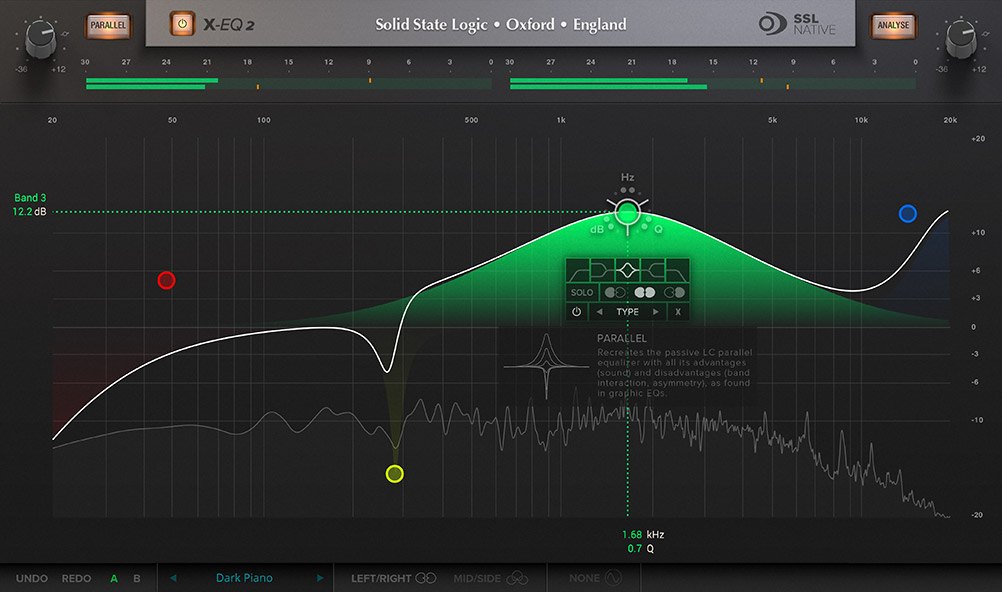
SSL Native X-EQ 2 is an EQ plug-in from Solid State Logic (SSL). It is a 24-band parametric EQ with 17 EQ types and filter shapes. The manufacturer explains that SSL’s proprietary “anti-cramping” algorithms (which keep the high end from being squeezed) give an open, transparent sound (per the manufacturer).
Requirements: on Mac, macOS 11 to 13 (64-bit only, M1 Macs supported) in AU, VST2, VST3 and AAX Native formats; on Windows, Windows 10 to 11 (64-bit only) in VST2, VST3 and AAX Native formats. A free iLok account is required for authorization (per the manufacturer, from the Plugin Boutique product page).
Features
24 bands and 17 EQ types
Each band can be switched between bell, shelf, low-pass and high-pass, with classic and customizable shapes (per the manufacturer).
Anti-cramping algorithms
They preserve high-frequency information that can be lost in a digital environment, according to the manufacturer.
Mid/side and separate left/right processing
You can process the center and sides separately, or the left and right channels independently. New spatial processing options, band soloing and the “Parallel” mode, which recreates the sound of old parallel passive EQ circuits, are also included (per the manufacturer).
Real-time frequency display and light CPU load
A real-time frequency analysis display is included, and the plug-in is DSP-optimized for light CPU use (per the manufacturer).
After you buy: installation and activation
This is the general flow for products bought at Plugin Boutique. Activation differs by product (serial number, a manufacturer account, iLok and so on), so check the instructions in your library after purchase.
- Log in to your Plugin Boutique account and find the product in “Library”.
- Download the installer (you can switch between the Windows and Mac versions). Depending on the product, you also get a serial number, an unlock code or a key file.
- Product-specific steps are under “…” → “Installation Instructions” next to the product in your library, and also near the bottom of the product page.
Before you buy
- The end date is the one shown on Plugin Boutique. Offers can change, so confirm on the product page before you buy.
- Check the supported operating systems, plug-in formats (VST3, AU, AAX and so on) and the licensing method on the product page before buying.
Where to buy
- SSL Native X-EQ 2: View at Plugin Boutique









Comments