
Disclosure: This page may contain affiliate links. Prices were checked on the date shown and may change.
An introduction to Synchro Arts VocAlign 7, based on information from the maker and distributors: what it does, how to use it and who it may suit. It is not scored.
VocAlign 7 does not require iLok and each license allows for activation on up to two machines.
— Synchro Arts official site
What is VocAlign 7?
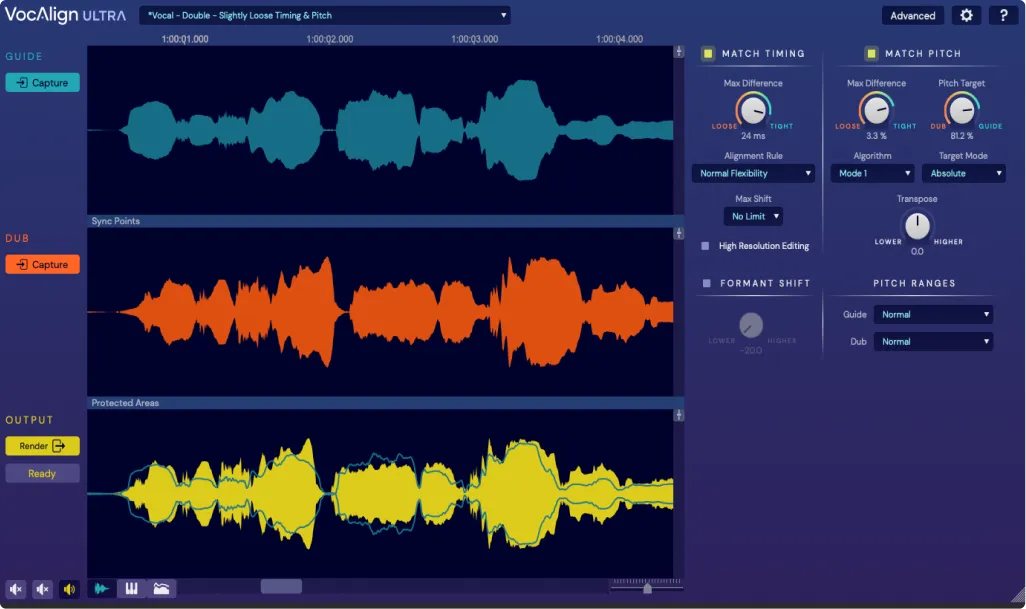
VocAlign 7 is a vocal alignment plugin from Synchro Arts. It places leads, doubles, harmonies and backing vocals in one workspace so timing and pitch can be matched.
Its multi-track workspace lets you assign guide and dub tracks flexibly.
It comes in Standard and Pro. Standard centers on SmartAlign timing; Pro adds SmartPitch, formant and transpose, Sync Points and Protected Areas.
No iLok is needed and each license activates on up to two machines. Pro supports SynchroLink 2.0 with RePitch 2.
Key features
Multi-track workspace
Line up leads, doubles and harmonies and assign guides and dubs freely. This may suit large vocal stacks.
SmartAlign
Aligns clips to a guide without pre-editing, with presets, a tightness control and Protected Areas.
SmartPitch (Pro)
Applies pitch correction to backing vocals only where needed, keeping intentional harmony differences.
Formant and transpose (Pro)
Global and clip-based formant and transpose control may help match vocal character.
Sync Points (Pro)
Specify positions to guide the alignment, which may help where automatic results need direction.
SynchroLink 2.0 (Pro)
Links with RePitch 2 Standard so tuning and alignment edits follow each other. RePitch 2 is required.
Specifications
| Item | Details |
|---|---|
| Editions | Standard / Pro |
| Formats (Mac) | AU, VST3, AAX (64-bit) |
| Formats (Windows) | VST3, AAX (64-bit) |
| ARA | Supported in compatible hosts (Pro Tools, Logic Pro, Studio One, Cubase, Nuendo, etc.) |
| Activation | No iLok, up to two machines per license |
| OS | macOS 12 or later (Intel/Apple Silicon), Windows 10 or later |
What is included and system requirements
- OS: macOS 12 or later, Windows 10 or later
- 3-day trial (converts to a paid subscription unless cancelled)
- Apple Silicon Logic Pro does not support ARA plugins
How to use it
- Install and activate with your Synchro Arts account.
- Prepare your vocal tracks in the DAW.
- Choose the guide track.
- Assign the doubles and harmonies to align.
- Pick a SmartAlign preset and tightness.
- Run the alignment and check the result.
- Use Pro features such as SmartPitch if needed.
Where it may come in handy
Doubles and harmonies
It might tighten stacked vocals against the lead.
Backing vocal cleanup
SmartPitch might correct only what is needed.
Post-production sync
It might help match re-recorded lines to a reference.
Who it may suit
- People who stack many doubles and choruses
- People looking to cut vocal editing time
- People pairing it with RePitch
Good to know before you buy
- Page shows $198 in tables but 'from $149' elsewhere.
- Upgrade pricing starts at $69 (Standard) or $99 (Pro) from VocAlign 3-6.
- The table and FAQ disagree on pitch tools in Standard; the FAQ says timing only.
How it differs from similar products
We do not pick a winner; the official figures are placed side by side.
RePitch 2
VocAlign 7 focuses on timing and pitch alignment; RePitch 2 on pitch correction. They link via SynchroLink 2.0.
Price
Please check the official page for the price.
See VocAlign 7 on the product page
More of the same kind
We have introduced 35 vocal processors. Here are some of the others.
- Waves OVox Vocal ReSynthesis
- Maciel Audio VxBx Vocal Processor
- Bogren Digital A-Class Vocal
- W. A. Production VocalShaper
- Polyverse Music Polyverse Manipulator
- Waves Renaissance Vox
We have introduced 1 other product from Synchro Arts.
For a side-by-side comparison scored on the same criteria, see our comparison of vocal processors.
See the full list in Product database: Effects.
Sources: synchroarts.com (checked 2026-10-27)









Comments