
Disclosure: This page may contain affiliate links. Prices were checked on the date shown and may change.
An introduction to Waves OVox Vocal ReSynthesis, based on information from the maker and distributors: what it does, how to use it and who it may suit. It is not scored.
Your voice is an amazing instrument—now, OVox turns it into a production playground.
— Waves official site
What is OVox Vocal ReSynthesis?
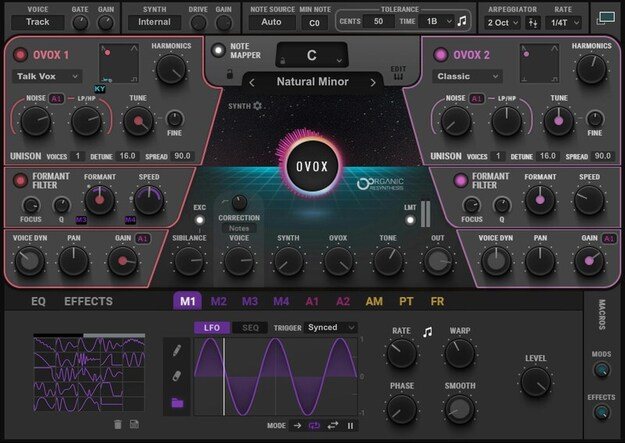
OVox Vocal ReSynthesis is a vocal transformation plug-in from Waves that uses a sung or spoken voice as the source for other sounds, chords and effects. A built-in synth reacts to the input voice, and vocoder and talkbox style effects, pitch and tuning effects, arpeggiation and chord generation are handled in one window.
At its core is a voice-controlled synthesizer with eight voices and two high-resolution engines. The pitch and strength of the voice shape the sound. An automatic note mapper can trigger chords, harmonies or scale notes that follow the melody being sung.
The plug-in can also convert the voice to MIDI in real time. That MIDI can be sent to other instruments, so singing can play a synth. Beyond voice, the description also mentions synthesizing drums, bass and other sounds. Modulation comes from nine LFO/sequencer sources, ADSR and ORS envelopes, and six built-in effects are included: Autopan, Chorus, Comp, Delay, Distortion and Reverb.
There are two ways to work: start from one of 500 presets, or open the expanded view for detailed editing. It runs as a DAW plug-in or as a standalone application, supports NKS for Native Instruments Komplete Kontrol and Maschine, and is compatible with SoundGrid for live use.
Key features
Voice-controlled synth
Eight voices and two high-resolution engines respond to the incoming voice. The sound can stay close to the voice or move far from it, which may help when a recorded vocal needs to become a different timbre.
Note mapper for chords and harmonies
The automatic note mapper triggers chords, harmonies or scale notes in step with the melody. It may be useful for building a layered texture from a single vocal line.
Voice to MIDI
The voice is converted to MIDI in real time and can be routed to other instruments. It is an option when a melody is easier to sing in than to play.
Vocoder, talkbox and pitch effects
Classic vocoder and talkbox style effects sit alongside pitch and tuning effects and arpeggiation. They can be tried for robotic voices or deliberately emphasized pitch movement.
Modulation and built-in effects
Nine LFO/sequencer sources, ADSR and ORS envelopes move the sound, and six built-in effects (Autopan, Chorus, Comp, Delay, Distortion, Reverb) allow finishing inside the plug-in.
500 presets and expanded view
A library of 500 presets is the starting point, and the expanded view opens detailed editing when needed. A user can pick something close and then adjust it.
Standalone, NKS and SoundGrid
Besides running as a DAW plug-in, it works as a standalone app. NKS support allows use from Komplete Kontrol and Maschine, and SoundGrid compatibility extends it to live setups.
Specifications
| Item | Details |
|---|---|
| Type | Vocal transformation / resynthesis |
| Voices | 8 |
| Engines | 2 high-resolution engines |
| Presets | 500 |
| Built-in effects | Autopan, Chorus, Comp, Delay, Distortion, Reverb |
| Formats (Mac) | VST, AU, AAX |
| Formats (Windows) | VST, AAX |
| macOS | Monterey 12 to Sequoia 15 |
| Windows | Windows 10 or later |
| Other | Standalone, NKS, SoundGrid |
What is included and system requirements
- OVox Vocal ReSynthesis (plug-in and standalone)
- 500 presets
- Formats: VST, AU and AAX on Mac; VST and AAX on Windows
- Requirements: macOS Monterey 12 to Sequoia 15, Windows 10 or later
How to use it
- Buy through a Waves account and install the license.
- Load OVox at the start of an audio track in the DAW.
- Feed in a vocal track and pick a preset close to the desired mood.
- Try the note mapper to play chords or scale notes along with the voice.
- Open the expanded view when finer control of the voices and engines is needed.
- To use voice-to-MIDI, set the MIDI output destination to another instrument.
- Add movement with LFOs and envelopes, then finish with the built-in effects.
- For live use, test operation in a SoundGrid setup beforehand.
Where it may come in handy
Vocoder-style voices
It may be tried to turn a voice into a synth timbre with a robotic character.
Harmonies from a single take
The note mapper may help build layers that follow a chord or scale.
Humming to play a synth
Voice-to-MIDI could be used to enter melodies into external instruments.
Live voice processing
SoundGrid compatibility may suit a stage setup that processes the voice live.
Who it may suit
- Users who want to build synth, chord or vocoder-style sounds from a voice
- Users who want to turn singing or humming into MIDI for other instruments
- Users who like to start from presets and dig deeper when needed
- Users planning a live voice-processing setup
Good to know before you buy
- Reviewers mention that the large feature set takes time to learn.
- This summary is based on the retailer's product information rather than the Waves product page.
Price
Please check the official page for the price.
See OVox Vocal ReSynthesis on the product page
More of the same kind
We have introduced 35 vocal processors. Here are some of the others.
- DOTEC-AUDIO DeeField
- Bogren Digital A-Class Vocal
- Techivation T-De-Breather
- LANDR LANDR VoxChain / VoxTune / VoxVerb / VoxDeEss
- Baby Audio Humanoid
- BLEASS BLEASS Vox
We have introduced 215 other products from Waves.
- Waves Butch Vig Vocals
- Waves Greg Wells VoiceCentric
- Waves Renaissance Vox
- Waves Manny Marroquin Triple D
- Waves Sync Vx
For a side-by-side comparison scored on the same criteria, see our comparison of vocal processors.
See the full list in Product database: Effects.
Sources: pluginboutique.com (checked 2026-10-27)










Comments