
Disclosure: This page may contain affiliate links. Prices were checked on the date shown and may change.
An introduction to McDSP Analog Channel HD v7, based on information from the maker and distributors: what it does, how to use it and who it may suit. It is not scored.
Analog Channel emulates the sounds of high-end analog tape machines, tape, and channel amplifiers.
— McDSP official site
What is Analog Channel HD v7?
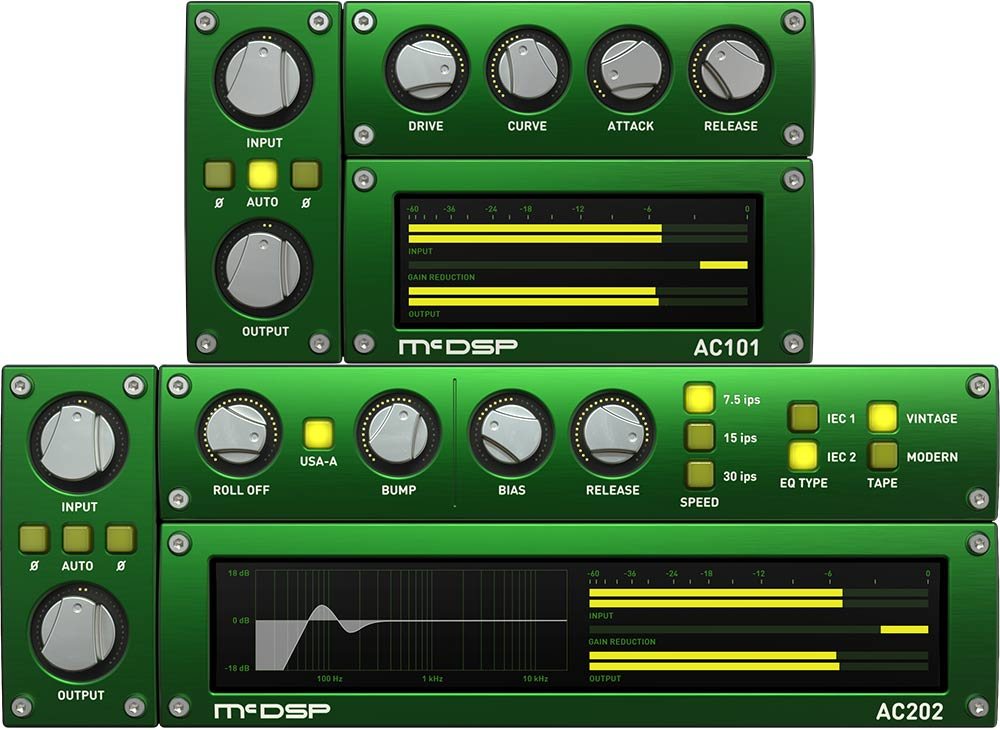
Analog Channel is an analog-emulation plug-in from McDSP that aims to reproduce high-end analog tape machines, tape and channel amplifiers. It consists of two plug-ins, AC101 and AC202. This entry is the HD version (v7) for AAX DSP users; a Native version is sold separately.
AC101 emulates channel amplifier circuits and acts like a digital preamp that can take large amounts of gain without digital distortion. A Drive control sets where the signal sits in the saturation/compression region, and the attack and release times of the distortion character are adjustable.
AC202 emulates analog tape machines. Besides standard controls such as bias, playback speed (7.5, 15 or 30 ips) and IEC1/IEC2 equalization, it has low-frequency roll-off and head bump adjustable independently of speed. Playback head type, tape formulation and saturation recovery time can also be set.
v7 is optimized for Apple silicon and current Intel processors. The HD version supports AAX DSP, AAX Native, AU and VST3, with zero-latency algorithms, double-precision processing, phase buttons and real-time saturation-curve display.
Key features
AC101 channel amplifier
It acts as a digital preamp that stays clean under heavy gain. Drive sets where the audio sits in the saturation/compression region.
AC202 tape machine
Standard tape controls such as bias, playback speed and IEC1/IEC2 EQ are provided. Speeds of 7.5, 15 and 30 ips change high-end clarity, saturation, dynamic range and low-frequency roll-off.
Roll-off and head bump
Low-frequency roll-off and head bump are controlled independent of tape speed. McDSP says this ends the debate between 15 ips for low-end response and 30 ips for high-frequency response.
Playback head and tape types
Playback head and tape formulations can be chosen, and the playback head response is shown in a display.
Auto level
Auto updates the output level based on the other AC202 controls, helping keep levels consistent while you adjust saturation and drive.
Presets and displays
A library of presets emulating analog mixing systems and real-time displays of saturation curves and calibrations are included, in mono and stereo versions.
Specifications
| Item | Details |
|---|---|
| Components | AC101 (channel amplifier), AC202 (tape machine) |
| Tape speeds | 7.5 / 15 / 30 ips |
| Formats (HD) | AAX DSP, AAX Native, AU, VST3 |
| OS | macOS 10.13 or later (64-bit only), Windows 7/8/10 (64-bit only) |
| Authorization | iLok2/iLok3, or free iLok License Manager with iLok Cloud |
| Activations | Two per license |
| Processing | Double precision, zero latency |
What is included and system requirements
- AC101 (channel amplifier)
- AC202 (tape machine)
- Preset library emulating analog mixing systems
- Phase buttons
- Mono and stereo versions
- Compatible DAWs include Pro Tools, Logic Pro, Cubase, Nuendo, Ableton Live, LUNA, Reaper, Sonar and Studio One
How to use it
- Create a free iLok account and install iLok License Manager.
- Enter the code shown after purchase and assign the license to iLok Cloud or a USB key.
- Download and run the installer from your account.
- In your DAW, load AC101 or AC202 as an insert on a track.
- With AC101, start with a low Drive and raise it gradually to explore saturation.
- With AC202, pick a tape speed and set bias and IEC equalization.
- Adjust roll-off and head bump, and turn on Auto to keep levels steady.
Where it may come in handy
Tidying drums
McDSP lists using AC202 to remove extremely low rumble and to separate bass and snare drum sounds.
Shaping guitar tone
The playback-head settings of AC202 may help shape distorted or clean guitar.
Warming vocals and acoustic sources
A light touch of AC101 or AC202 could add warmth to vocals and acoustic instruments.
Who it may suit
- People who want to adjust tape machine settings such as speed and bias
- Users who want to try channel amplifier saturation digitally
- Pro Tools users who want McDSP on AAX DSP
- Those who want tape-style processing on masters and buses
Good to know before you buy
- This is the HD version for AAX DSP users; a Native version (AAX Native, AU, VST3) is sold separately.
- Authorization needs an iLok2/iLok3 USB key or a free iLok account with iLok Cloud.
- Each license can be authorized on two computers.
- The older VST format is not supported in v7.
- A 14-day demo is offered on the official site.
How it differs from similar products
We do not pick a winner; the official figures are placed side by side.
McDSP 6060 Ultimate Module Collection
Analog Channel focuses on AC101 (channel amplifier) and AC202 (tape machine). 6060 lets you place up to six of over 30 modules, and its TAPE module builds on AC202.
Price
$149 (Plugin Boutique, checked 2026-10-27). Prices can vary by region and promotion, so check the official page before buying.
See Analog Channel HD v7 on the product page
More of the same kind
Other introduction articles of the same kind.
- MeldaProduction MVintageRotary
- IK Multimedia Mic Room
- United Plugins Electrum Core
- Slate Digital Infinity Horizon
- W. A. Production SphereQuad
- United Plugins Cryostasis
We have introduced 53 other products from McDSP.
- McDSP 6034 Multi-Band Compressor
- McDSP Analog Channel
- McDSP SA-2 Dialog Processor HD v7
- McDSP SA-2 Dialog Processor v7
- McDSP 6034 Ultimate Multi-band Native v7
See the full list in Product database: Effects.
Sources: mcdsp.com pluginboutique.com (checked 2026-10-27)










Comments