
Disclosure: This page may contain affiliate links. Prices were checked on the date shown and may change.
An introduction to Native Instruments Kolor, based on information from the maker and distributors: what it does, how to use it and who it may suit. It is not scored.
Kolor is a powerhouse distortion plugin featuring 10 distinct algorithms designed to shape and elevate your sound.
— Native Instruments official site
What is Kolor?
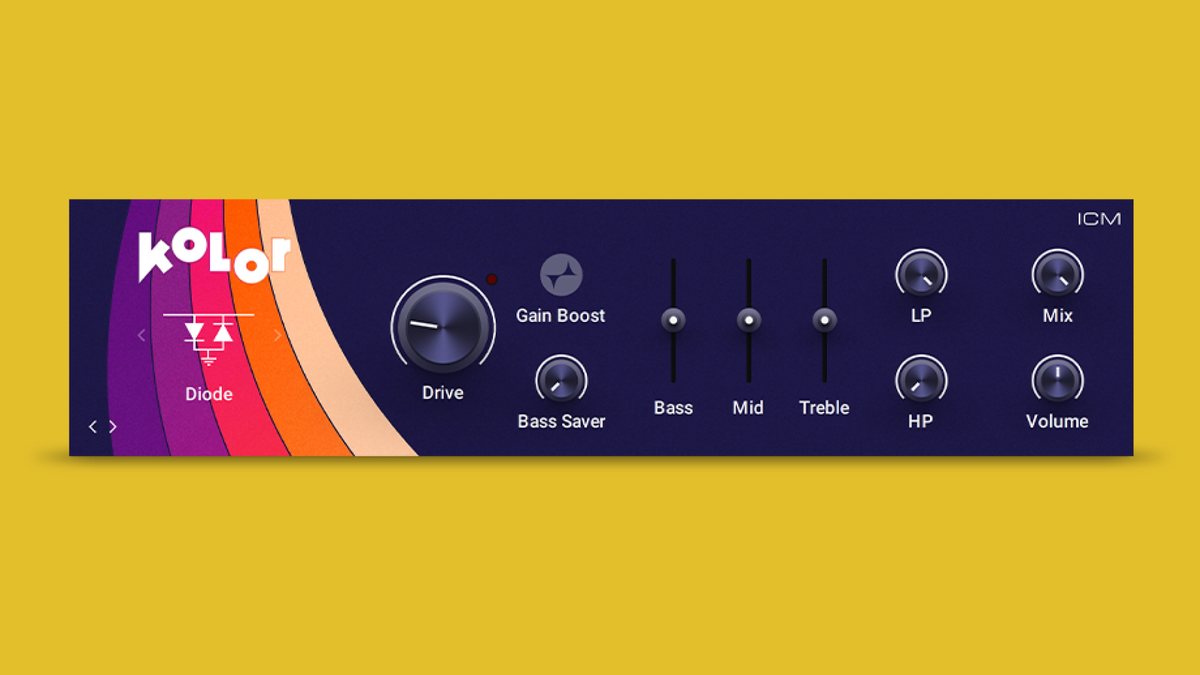
Kolor is a distortion plug-in from Native Instruments. According to the official description, it has 10 distinct algorithms and can produce anything from subtle saturation to aggressive crunch.
The algorithms are presented as capturing the character of vintage gear's distortion circuits, while giving modern flexibility and control.
It was originally an effect inside the company's guitar amp and effects rack Guitar Rig 7 Pro, and it can now be bought as a standalone component. That suits people who only want a distortion effect and not the whole rack.
It supports VST3 and AAX on Windows and VST3, AU and AAX on Mac (64-bit only). Prices are in dollars, and the official store and Plugin Boutique list the same amount.
Key features
10 distinct algorithms
The maker says Kolor includes 10 different distortion types. Being able to switch the character to suit each track may be useful when you want to try several kinds of distortion in one plug-in.
From subtle to aggressive
The official text covers a range from gentle saturation to aggressive crunch. It may let you try both a bit of added weight on drums and obvious distortion in the same plug-in.
Vintage-inspired distortion circuits
The algorithms are described as capturing the essence of hardware distortion circuits. It may suit people who want to try hardware-style texture without owning the gear.
Modern flexibility and control
Besides vintage character, the maker says Kolor offers modern flexibility and control. How easy it is to fine-tune is best checked on the actual interface.
Offered as a standalone component
It is sold as an individual effect taken from Guitar Rig 7 Pro. It may suit people who just want a distortion on a DAW track without the full amp rack.
Specifications
| Item | Details |
|---|---|
| Maker | Native Instruments |
| Type | Distortion / saturation |
| Algorithms | 10 |
| Plug-in formats (Windows) | VST3, AAX (64-bit only) |
| Plug-in formats (Mac) | VST3, AU, AAX (64-bit only) |
| macOS | macOS 12, 13 or 14 (latest update). Intel Macs (i5 or higher) and Apple Silicon (via Rosetta 2, or natively in supporting hosts) |
| Windows | Windows 10 or 11 (latest Service Pack), Intel Core i5 or equivalent CPU, 4 GB RAM |
| Graphics | Direct 3D 11.1 (Feature Level 11_1) or higher |
What is included and system requirements
- Kolor plug-in
- Formats: VST3 and AAX on Windows; VST3, AU and AAX on Mac (64-bit only)
- System: Windows 10/11, macOS 12-14 (Intel i5 or higher / Apple Silicon), 4 GB RAM on Windows
How to use it
- Buy Kolor on the Native Instruments site or at Plugin Boutique and receive your license.
- Run the installer and rescan plug-ins in your DAW.
- Load Kolor as an insert effect on the track you want to distort.
- Step through the 10 algorithms first to find a direction that suits the source.
- Raise the amount of distortion gradually while watching input and output levels.
- Compare with the bypassed sound to make sure it is not just sounding better because it is louder.
- If it is too strong, blend it with the original sound using the mix control or similar.
- Save settings you like and reuse them on similar tracks.
Where it may come in handy
Adding weight to drums or bass
A light saturation setting may raise density and presence.
Distortion on synths or guitars
A heavier setting can build a clear distorted tone. Comparing the 10 algorithms may help you choose.
A light touch on vocals
A very small amount may add some harmonics to a voice. Too much can hurt intelligibility, so a restrained amount may suit better.
Who it may suit
- People who want to try several kinds of distortion in one plug-in
- People who want an easy way to try vintage-style distortion
- People who do not need all of Guitar Rig 7 Pro and just want the distortion
Good to know before you buy
- This is a standalone version of an effect from Guitar Rig 7 Pro. If you already own Guitar Rig 7 Pro, check the official page first, since it may already include the same function.
- The official requirements list macOS 12-14 and Windows 10/11. For newer operating systems, check the maker's latest information.
- Only 64-bit versions are provided, so it will not work in 32-bit hosts.
- The names of the algorithms and the details of the controls are not described on the official page, so you will need to check them on screen after installing.
How it differs from similar products
We do not pick a winner; the official figures are placed side by side.
Native Instruments Tape Wobble
Both are standalone effects from Guitar Rig 7 Pro. The official descriptions say Kolor offers distortion with 10 algorithms and Tape Wobble offers tape wobble, saturation, noise and high-frequency roll-off. Both are priced at 19 USD.
Price
$19 (Plugin Boutique, checked 2026-10-27). Prices can vary by region and promotion, so check the official page before buying.
More of the same kind
We have introduced 82 saturation and distortion effects. Here are some of the others.
- Kuassa Efektor Blues River
- Eventide MangledVerb
- MNTRA Instruments BRUITAGE
- Three-Body Technology Tape Vibe
- Safari Audio Gorilla Drive V2
- Three-Body Technology Transformer X
We have introduced 15 other products from Native Instruments.
- Native Instruments Driver
- Native Instruments Supercharger GT
- Native Instruments FM8
- Native Instruments KOMPLETE START
- Native Instruments Kontour
For a side-by-side comparison scored on the same criteria, see our comparison of saturation and distortion effects.
See the full list in Product database: Effects.
Sources: native-instruments.com pluginboutique.com (checked 2026-10-27)










Comments