
Disclosure: This page may contain affiliate links. Prices were checked on the date shown and may change.
An introduction to Relab Development Color Drive, based on information from the maker and distributors: what it does, how to use it and who it may suit. It is not scored.
Color Drive doesn’t stack algorithms or approximate “warmth.” It solves the Relab 176 tube stage, with the input transformer, 6BC8 variable-gain tube, calibration bias, and output transformer, as a single, living circuit.
— Relab Development official site
What is Color Drive?
Color Drive is a tube saturator from Relab Development of Denmark. It is built on the variable-gain tube circuit of the company's Relab 176 (a recreation of a tube limiting amplifier). The official description says it computes the input transformer, the 6BC8 variable-gain tube, the calibration bias and the output transformer in real time as a single circuit.
The maker says it does not stack several algorithms or approximate warmth. In other words, it aims for hardware-like behavior in which drive, tone and transient shape affect one another.
Its range runs from barely-there warmth to clear tube crunch, and the maker says it can add presence and harmonic weight without pushing instruments forward in level.
Authorization uses an iLok account (a dongle is optional). It runs on Windows and Mac, in AU, VST3 and AAX (VST3 and AAX on Windows). Prices are listed in dollars.
Key features
Drive (pushing the tube stage)
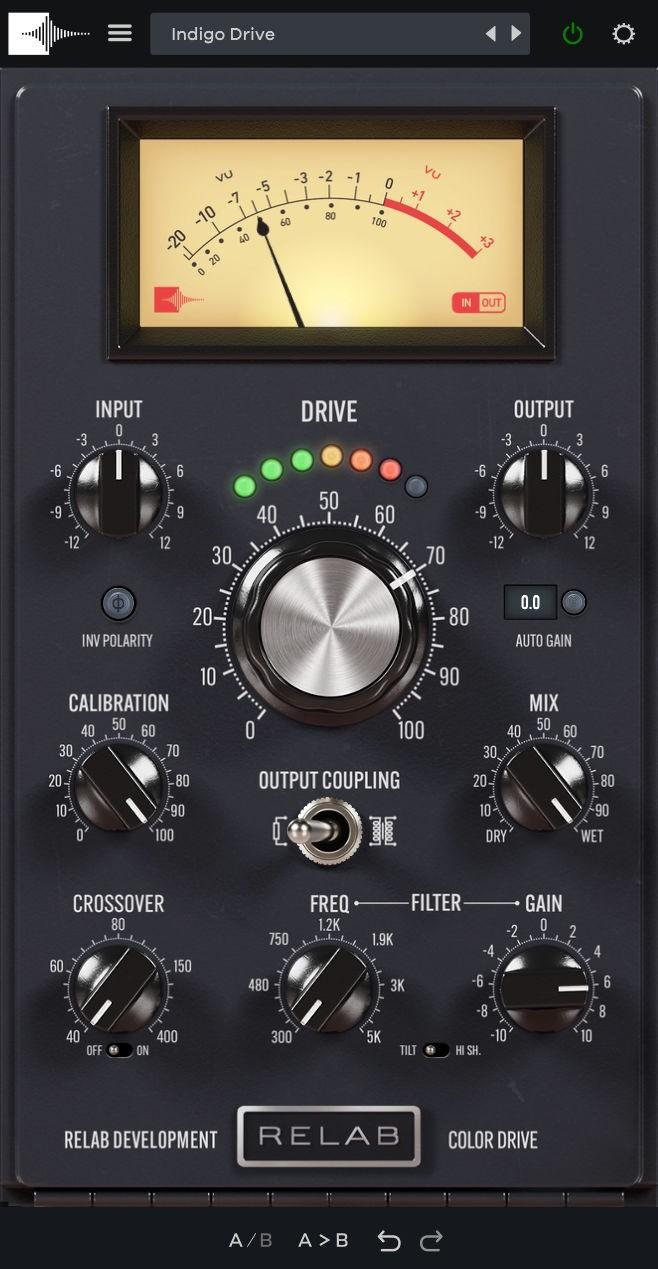
Raising Drive pushes harder into the whole circuit, including the 6BC8 tube and a switchable output transformer. The maker says harmonics build naturally and transients round off in a controlled way, which may help when a sound needs weight and glow.
Transformer switching
Switching to transformer coupling puts the Relab 176 output transformer back into the signal path. The maker says that with Calibration centered the stage mainly produces odd-order harmonics, adding focus and punch.
Calibration (bias adjustment)
Moves the tube's bias point so you can introduce even-order harmonics. It may suit fine control over warmth and contour, and combined with the output transformer it lets you tune how the harmonics mix.
Low-end crossover
Routes the deep bass around the drive circuit so the weight stays while harmonics are generated. The maker says this avoids muddying the low end, which may help on bass or kick-heavy material.
Pre/post tilt and high-shelf emphasis
Tilt and high-shelf emphasis filters let you steer which frequencies push the tube harder, shaping the harmonic profile before any drive is added.
From subtle warmth to crunch
The maker says it can tuck transients and give presence without raising level. It may be worth trying when you want to add thickness without pushing a part forward in the mix.
Specifications
| Item | Details |
|---|---|
| Maker | Relab Development |
| Type | Tube saturator |
| Based on | The variable-gain tube circuit of the Relab 176 (6BC8 tube, input transformer, output transformer) |
| Formats (Mac) | AU, VST3, AAX (64-bit) |
| Formats (Windows) | VST3, AAX (64-bit) |
| macOS | macOS 12 Monterey or higher, Apple Silicon M1 or newer |
| Windows | Windows 10 or higher (64-bit) |
| CPU (Windows) | Intel Core i7 (8th gen+) or AMD Ryzen 5 (3000 series+) with AVX2 |
| RAM | 8 GB minimum, 16 GB+ recommended |
| Authorization | iLok account (dongle optional) |
What is included and system requirements
- Color Drive plug-in
- Formats: AU, VST3 and AAX on Mac; VST3 and AAX on Windows (64-bit)
- Listed hosts: Pro Tools 2020.11+, Cubase 9.5+, Nuendo 8+, Ableton Live 10+, Reaper 7+
- Authorization: iLok account required (dongle optional)
How to use it
- Buy Color Drive on the Relab Development site or at Plugin Boutique.
- Prepare an iLok account and authorize the purchased license.
- Run the installer and rescan plug-ins in your DAW.
- Insert Color Drive on the track you want to saturate.
- Raise Drive gradually and listen to how harmonics build and transients round off.
- Switch the transformer and move Calibration to compare how odd and even harmonics change.
- If the low end gets too heavy, use the low-end crossover to route the bass around the drive.
- Finally compare with the bypassed sound to check it is not just sounding better because it is louder.
Where it may come in handy
Adding thickness to drum buses or bass
Using the low-end crossover while adding harmonics for presence is one approach. Since the design keeps low-end weight, it may be easy to try on buses that include bass.
Adding warmth to vocals
A light drive that adds harmonics may give a voice a little glow.
Finishing touch on the mix bus
A very restrained setting may help glue the whole mix, though overdoing it needs care.
Texturing synths and keys
It may help when you want to add a tube character to digitally made sounds.
Who it may suit
- People who want to try tube saturation
- People who want to explore how transformer and bias settings change the harmonics
- People who want to distort while keeping the low end
- People interested in the Relab 176 circuit
Good to know before you buy
- An iLok account is required for authorization; a dongle is optional according to the maker.
- On Windows, a relatively recent CPU with AVX2 (Intel Core i7 8th gen or newer / Ryzen 5 3000 series or newer) is required.
- The official site mentions a 30-day money-back guarantee. Check the conditions on the official site at purchase.
How it differs from similar products
We do not pick a winner; the official figures are placed side by side.
Audified U78 Saturator
Both are tube-style saturators. The maker says Color Drive solves the Relab 176's 6BC8 tube and input/output transformer as one circuit, with transformer switching and bias adjustment. U78 Saturator is built on the saturation circuit of the U73b Compressor and has high-pass and low-pass filters, Tone, Mix and Auto Output.
Price
$79 (Plugin Boutique, checked 2026-10-27). Prices can vary by region and promotion, so check the official page before buying.
See Color Drive on the product page
More of the same kind
We have introduced 82 saturation and distortion effects. Here are some of the others.
- PSP Audioware PSP BinAmp
- Universal Audio Studer A800 Multichannel Tape Recorder
- Eventide MangledVerb
- Newfangled Audio Saturate
- MeldaProduction MWaveFolderMB
- United Plugins WideFire
We have introduced 5 other products from Relab Development.
- Relab Development LX480 Dual-Engine Reverb V4
- Relab Development REV6000 Essentials
- Relab Development Pro Reverb Bundle
- Relab Development Sonsig Pro Bundle
- Relab Development LX480 Essentials
For a side-by-side comparison scored on the same criteria, see our comparison of saturation and distortion effects.
See the full list in Product database: Effects.
Sources: relabdevelopment.com pluginboutique.com (checked 2026-10-27)










Comments