
Disclosure: This page may contain affiliate links. Prices were checked on the date shown and may change.
An introduction to Newfangled Audio Saturate, based on information from the maker and distributors: what it does, how to use it and who it may suit. It is not scored.
Add some loudness and grit to your instrument or mix. Transparently reduce the dynamic range, or overdrive it and make it gel.
— Newfangled Audio official site
What is Saturate?
Saturate is a clipper and saturation plug-in from Newfangled Audio. It brings the Spectral Clipper algorithm known from the Elevate Mastering Limiter to a stand-alone plug-in.
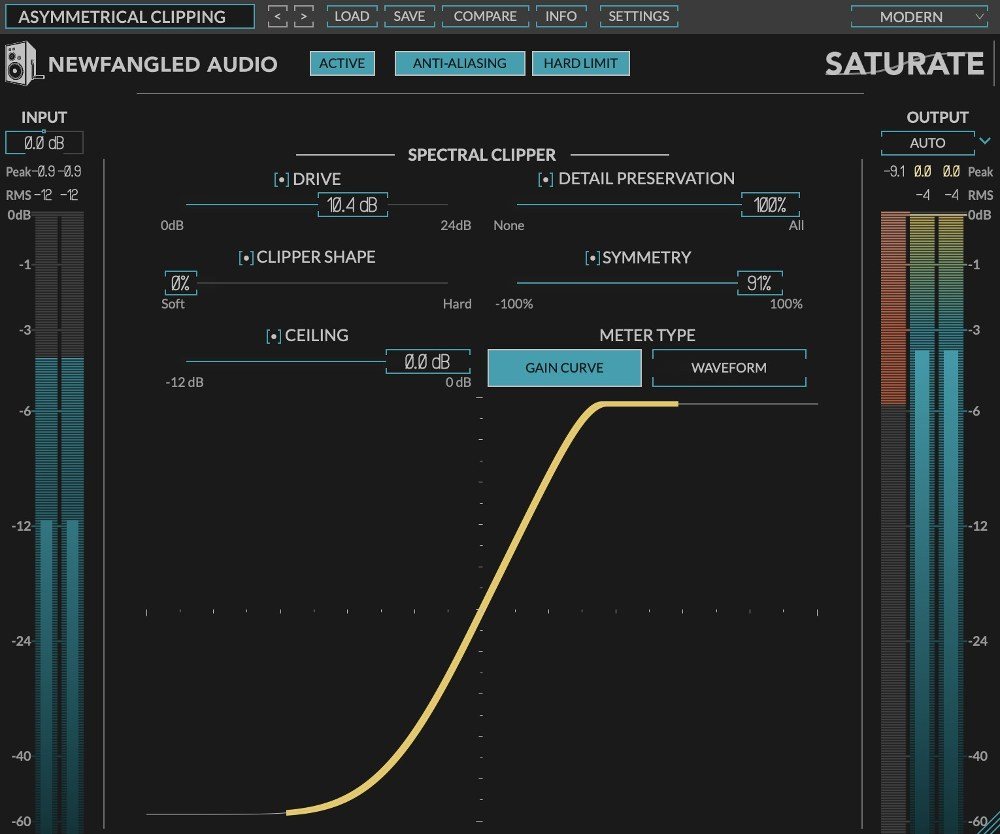
With ordinary distortion, strong low frequencies can swamp finer detail and make the sound muddy. Saturate uses a Detail Preservation approach that treats frequencies independently so that fine detail is maintained. Up to 24 dB of overdrive can be added.
The main controls are input and output levels and Shape, which morphs smoothly from hard clipping to a smooth curve. Version 1.10 added an anti-aliasing mode, a Symmetry control for even harmonics, and a Ceiling control for the clipping threshold.
It supports macOS 10.9 or later, including Apple silicon, and Windows 10 or later in AAX, AU, VST and VST3. 24 presets are included, and a 14-day trial is offered.
Key features
Detail Preservation
Detail Preservation keeps tonal balance even under heavy overdrive. It may be useful when you want to limit changes across a full mix.
Shape control
Shape morphs from hard clipping to a smooth curve, so you can choose how rough the result is for each source.
Symmetry
This adds even harmonics for a richer tone and lets you alter the harmonic character.
Ceiling
Ceiling sets the clipping threshold, which helps when you need to fix an output limit.
Anti-aliasing mode
This mode reduces aliasing artifacts with less CPU than heavy oversampling.
Meters and curve display
Input and output peak and RMS meters and a saturation curve display show how the signal hits the clipping shape.
Specifications
| Item | Details |
|---|---|
| Maker | Newfangled Audio |
| Type | Clipper / saturation |
| Max overdrive | 24 dB |
| Presets | 24 |
| Formats | AAX / AU / VST / VST3 (no AU on Windows) |
| OS | macOS 10.9 or later / Windows 10 or later |
| Trial | 14 days |
What is included and system requirements
- Plug-in
- 24 presets
- 14-day trial (one per customer)
How to use it
- Obtain it from the official site or a retailer and authorize with an iLok account.
- Insert it on a track or the master in your DAW.
- Raise the input level to set the amount of overdrive.
- Use Shape to choose how hard the clipping is.
- Adjust Symmetry for harmonic character.
- Set the threshold with Ceiling.
- Balance the output level, for example with AUTO.
- Compare against the original.
Where it may come in handy
Adding impact to drums
The official page shows using it on sampled drums to add impact and grit.
Bass texture
It may add texture to low sounds such as Reese bass.
Guitar thickness
The official page lists using it to thicken guitars.
Full mix
It can also be used across a whole mix to add loudness.
Who it may suit
- People who want to preserve detail while clipping
- Those who want to try a clipper
- Anyone who clips in mastering
Good to know before you buy
- A free iLok account is required; no dongle is needed.
- The official page lists it in the Elevate Mastering Bundle too.
- Plugin Boutique notes AAX is compatible with Intel Macs only.
How it differs from similar products
We do not pick a winner; the official figures are placed side by side.
W. A. Production Satyrus
Saturate uses a continuous Shape control, while Satyrus offers eight selectable modules.
Price
$49 (Newfangled Audio official site, checked 2026-10-27). Prices can vary by region and promotion, so check the official page before buying.
See Saturate on the product page
More of the same kind
We have introduced 82 saturation and distortion effects. Here are some of the others.
- Universal Audio Oxide Tape Recorder
- MeldaProduction MPolySaturator
- MNTRA Instruments BRUITAGE
- Kuassa Efektor Moon Muffin
- Waves OneKnob Driver
- Three-Body Technology Tape Vibe
We have introduced 1 other product from Newfangled Audio.
For a side-by-side comparison scored on the same criteria, see our comparison of saturation and distortion effects.
See the full list in Product database: Effects.
Sources: newfangledaudio.com pluginboutique.com (checked 2026-10-27)










Comments