
Disclosure: This page may contain affiliate links. Prices were checked on the date shown and may change.
An introduction to United Plugins WideFire, based on information from the maker and distributors: what it does, how to use it and who it may suit. It is not scored.
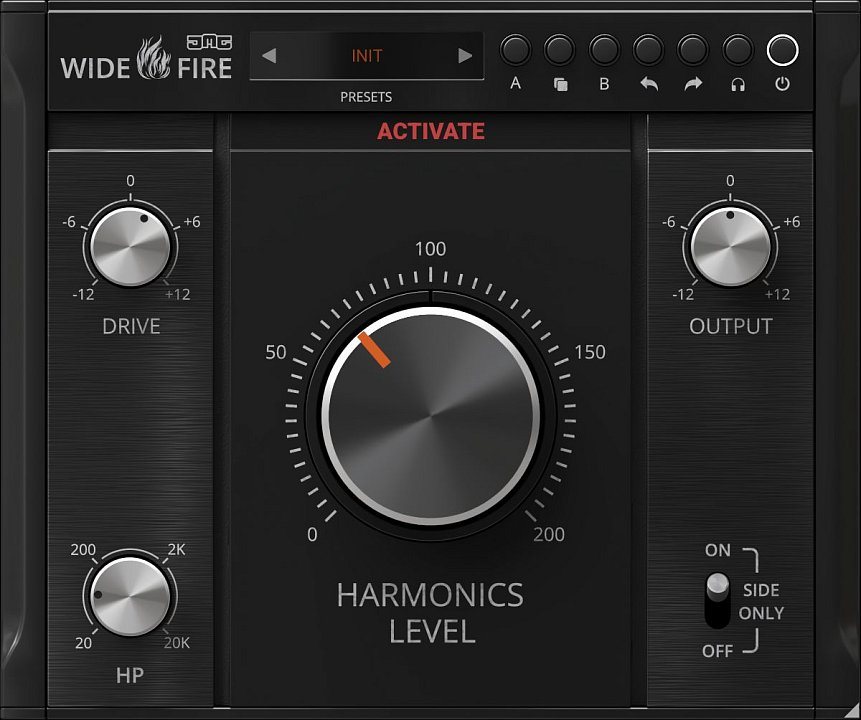
after saturating your signal, the added harmonics are detached, a widening algorithm is applied to them, and then they are blended back with the original audio signal.
— United Plugins official site
What is WideFire?
WideFire is an analog-style saturator from United Plugins (also shown with the JMG Sound name). Unlike a typical saturator, it spreads the harmonics created by the distortion across the stereo field and blends them back into the original sound, so thickness and width are handled in a single plug-in.
It grew out of the company's DarkFire saturator. According to the official description, the central feature of DarkFire was extracted at users' request and released on its own as WideFire. The widening process is the main role, and the maker also states that it can create stereo content from mono sources.
The signal path is: saturate the input, separate the added harmonics from the main signal, apply a widening algorithm only to those harmonics, and blend them back with the original. Because the main signal itself is not widened directly, the maker says it keeps good mono compatibility.
It supports VST, VST3 and AAX on Windows, and VST, VST3, AU and AAX on Mac. Processing is 64-bit internally and works at any sample rate. A free 15-day trial is offered, and licensing uses license files with no iLok and no constant internet connection.
Key features
Widening applied to the harmonics
Harmonics created by saturation are separated, widened and blended back. Since the core of the original signal is not spread directly, it may be a way to add width while keeping the center of a vocal or bass in place.
Mono compatibility
The maker states that mono compatibility is good. This is worth checking for listeners who are concerned about playback on mono systems such as phone speakers.
Mono to stereo
It can be used on mono sources to produce stereo content. It may help when a mono guitar or synth should sound more spacious.
Analog-style saturation
Like DarkFire, it has an analog-style saturator stage. It adds harmonics ahead of the widening stage, and the two are designed to work together.
Resizable photorealistic GUI
The hardware-like interface can be resized by dragging the arrow at the bottom right, either to save screen space or to make controls easier to handle.
Smart bypass and sleep on silence
Bypass switching is designed to avoid clicks and compensates for latency. During silence the plug-in sleeps and uses virtually no CPU, according to the maker, which suits large sessions.
Free trial and free updates
A 15-day unrestricted trial is available, and the maker states that updates after purchase are free.
Specifications
| Item | Details |
|---|---|
| Type | Saturator with stereo widener |
| Processing | Internal 64-bit, any sample rate |
| macOS | macOS 10.10 or later (Intel / Apple Silicon) |
| Windows | Windows 8 or later (Windows 11 supported) |
| Formats (Mac) | VST, VST3, AU, AAX |
| Formats (Windows) | VST, VST3, AAX |
| Authorization | License file (no iLok) |
| Trial | 15 days, unrestricted |
What is included and system requirements
- WideFire plug-in (single product)
- Mac: macOS 10.10 or later, Intel / AMD / M1 processor with SSE2
- Windows: Windows 8 or later, Intel / AMD processor with SSE2
- Formats: VST, VST3, AAX (Windows); VST, VST3, AU, AAX (Mac)
- Upgrade path to DarkFire listed on the official page
How to use it
- Buy WideFire from the official site or Plugin Boutique, or start with the official 15-day trial.
- Receive the license file and authorize following the official steps (no iLok needed).
- Insert WideFire on a stereo track or bus in the DAW.
- Set the input level, then raise the saturation gradually and check how the harmonics change.
- Raise the widening amount and listen to how the stereo image changes.
- Switch to mono playback and check that the sound does not thin out.
- Toggle bypass to compare with the original and adjust the amounts.
- Save settings you like as a DAW preset.
Where it may come in handy
Mono guitars and synths
It may be used to give a mono recording a stereo feel, which the maker lists as an intended use.
Vocal and backing-vocal width
It may be tried when width is wanted while keeping the center of a vocal. Setting the amount together with a mono check suits this use.
Thickening synths and pads
It may help when a flat pad needs both added harmonics and width in one step.
Mix bus
It could be used lightly on a bus to add a little width, checking the change against the bypassed signal.
Who it may suit
- People who want to turn mono material into a stereo-feeling sound
- People who prefer saturation and widening in one plug-in
- People who want added width while watching mono playback
- People who want to try the plug-in for 15 days before buying
Good to know before you buy
- The price varies by store and period, so check the official store or Plugin Boutique before buying.
- Requires macOS 10.10 or later, or Windows 8 or later (official).
- AU is Mac only; Windows supports VST, VST3 and AAX.
- How the width is perceived depends on the material, so checking in mono is useful.
How it differs from similar products
We do not pick a winner; the official figures are placed side by side.
United Plugins DarkFire
The official description says WideFire was made by extracting the central feature of DarkFire, the harmonic-widening process, while DarkFire is presented as a saturation harmonic sculpting and enhancing tool. An upgrade path from WideFire to DarkFire is listed officially.
Price
Please check the official page for the price.
See WideFire on the product page
More of the same kind
We have introduced 82 saturation and distortion effects. Here are some of the others.
- Metric Halo MH Character v4
- Eventide CrushStation
- Universal Audio Studer A800 Multichannel Tape Recorder
- Klevgrand SquashIt
- D16 Group Devastor 2
- Klevgrand Klevgrand LUXE
We have introduced 34 other products from United Plugins.
- United Plugins Cyberdrive Core
- United Plugins Cyberdrive
- United Plugins Front DAW
- United Plugins DarkFire
- United Plugins Plamen
For a side-by-side comparison scored on the same criteria, see our comparison of saturation and distortion effects.
See the full list in Product database: Effects.
Sources: unitedplugins.com pluginboutique.com (checked 2026-10-27)










Comments