
Disclosure: This page may contain affiliate links. Prices were checked on the date shown and may change.
An introduction to Acon Digital Verberate 2, based on information from the maker and distributors: what it does, how to use it and who it may suit. It is not scored.
Verberate 2 is an algorithmic reverb plugin that simulates real acoustic spaces with a new degree of realism.
— Acon Digital official site
What is Verberate 2?
Verberate 2 is an algorithmic reverb from Acon Digital. Algorithmic reverbs compute the reverberation rather than using recordings as convolution does, aiming for dense, realistic acoustic spaces.
The headline of version 2 is the Vivid Hall algorithm, which adds time variance to avoid the stiffness the maker associates with convolution reverbs. The Legacy Hall from version 1 is still available.
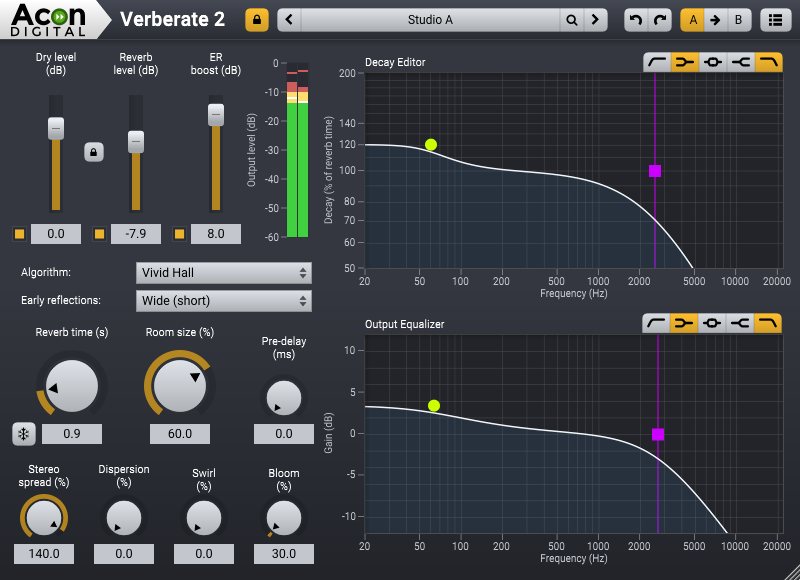
Early reflections and the late tail are handled by independent processors, with 15 early reflection patterns. A decay editor sets frequency-dependent reverb times, and an output equalizer is built in.
New Dispersion models high-frequency behaviour of mechanical plates, and Swirl adds the character of vintage digital reverbs. A large set of factory presets is included.
Key features
Vivid Hall
A time-variant late-reverb algorithm that adds natural variation without chorus-like or pitch artifacts, according to the maker.
Decay editor
Set reverb times per frequency range, for example shorter lows and longer highs.
15 early reflection patterns
Early reflections are calculated in real time and applied by convolution, designed to blend into a mix.
Dispersion
Models frequency dispersion in metal plates; combined with the decay editor it can imitate plate reverbs.
Swirl
Adds the feedback modulation, cloud-like quality found in vintage digital reverbs.
Presets and graphs
A preset manager with many factory presets, plus graphs of EQ response and reverb times.
Specifications
| Item | Details |
|---|---|
| Type | Algorithmic reverb |
| Formats | VST / VST3 / AAX (AU on Mac) |
| Channels | Mono and stereo (surround/immersive: Verberate Immersive) |
| Mac | 64-bit, native ARM and Intel |
| Windows | 32-bit and 64-bit versions |
What is included and system requirements
- Verberate 2 plugin
- Factory presets
- Vivid Hall and Legacy Hall algorithms
- Free trial available (no credit card)
How to use it
- Create an Acon Digital account and buy or get the trial.
- Install the plugin.
- Insert it on a send or insert in your DAW.
- Pick a preset close to the sound you want.
- Adjust early reflections and the decay editor.
- Add Dispersion or Swirl if needed.
Where it may come in handy
Vocal mixing
It may be a candidate for hall or chamber-style space.
Guitars and instruments
It could add a natural hall-like spread.
Plate-style reverb
Dispersion with the decay editor may let you build plate-style sounds.
Who it may suit
- People looking for a natural-sounding algorithmic reverb
- People who want per-frequency control of decay
- People who want halls and plates in one plugin
Good to know before you buy
- For surround or immersive formats, see the separate Verberate Immersive.
- A free trial is offered.
Price
$99 (Acon Digital official site, checked 2026-10-27). Prices can vary by region and promotion, so check the official page before buying.
See Verberate 2 on the product page
More of the same kind
We have introduced 112 reverbs. Here are some of the others.
- Sonnox Oxford Reverb
- Universal Audio Hitsville Reverb Chambers
- Lexicon PCM Native Reverb Plug-in Bundle
- United Plugins Biverb
- Waves IR-L Convolution Reverb
- Solid State Logic SSL PlateVerb
We have introduced 8 other products from Acon Digital.
- Acon Digital DeVerberate 3
- Acon Digital Verberate Immersive 2
- Acon Digital Extract:Dialogue 2
- Acon Digital Drum Production Suite
- Acon Digital Multiply 2
For a side-by-side comparison scored on the same criteria, see our comparison of reverbs.
See the full list in Product database: Effects.
Sources: acondigital.com pluginboutique.com (checked 2026-10-27)










Comments