
Disclosure: This page may contain affiliate links. Prices were checked on the date shown and may change.
An introduction to iZotope Aurora, based on information from the maker and distributors: what it does, how to use it and who it may suit. It is not scored.
Aurora reacts to your audio to easily and dynamically unmask instruments and vocals, creating lush, three-dimensional space that won't drown out your tracks.
— iZotope official site
What is Aurora?
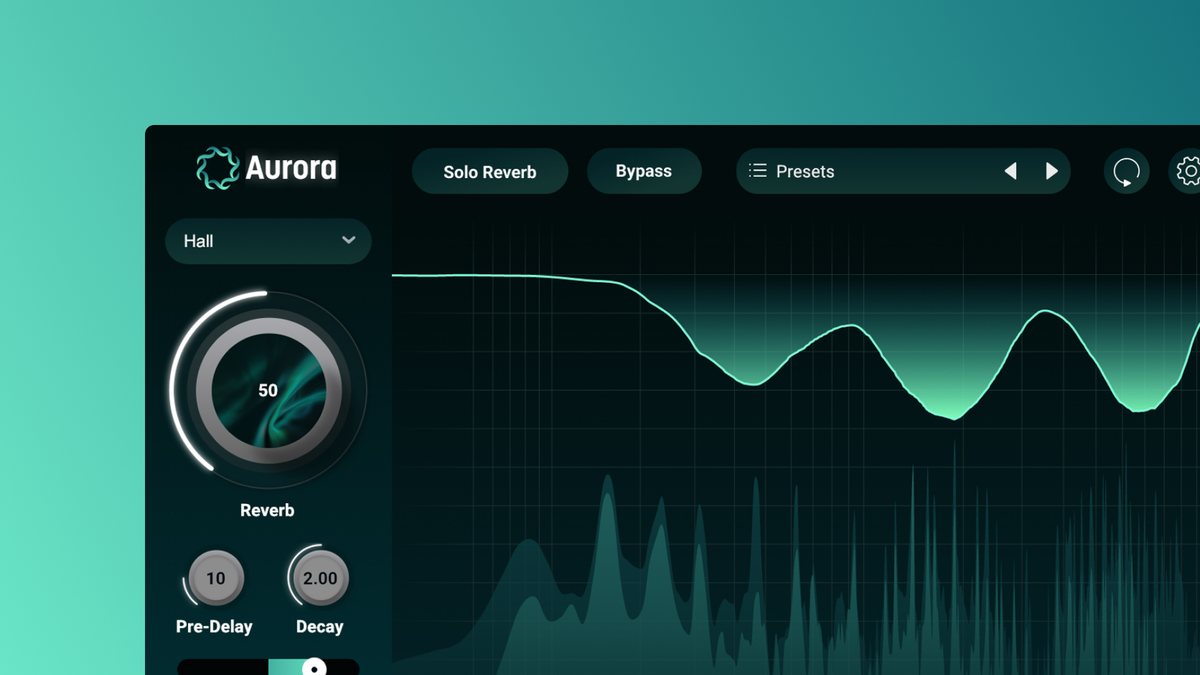
Aurora is a reverb in iZotope's Catalyst Series. Its main idea is to react to incoming audio and carve space out of the reverb signal so that instruments and vocals are less likely to be buried.
The maker says it is powered by Exponential Audio's reverb algorithms. You can choose from six reverb types and adjust the amount, pre-delay, decay, width and tone.
The left side has the main reverb controls and the right side has the Unmasking section, where you set the amount, attack and release reaction times and sensitivity.
More than 60 presets are included, offering starting points such as tight drum rooms, expansive ambience and realistic plates.
Key features
Adaptive unmasking
It reacts to the input and reduces the overlapping parts of the reverb automatically. It may help when you want reverb without pushing vocals or instruments back.
Six reverb types
Six reverb types are available. They may help when you want to change the character per song or part.
Core reverb controls
Amount, pre-delay, decay, width and tone are adjustable. It may be convenient for settling a sound quickly.
High-pass and low-pass filters
Built-in filters can reduce lows and highs of the reverb. They may help keep it focused in a mix.
Detailed unmasking settings
Amount, attack/release and sensitivity are adjustable. It may help set the reaction speed for a track.
60+ presets
Presets range from drum rooms to plates. They may save time when searching.
Specifications
| Item | Details |
|---|---|
| Type | Reverb with unmasking |
| Reverb types | 6 |
| Presets | 60+ |
| Formats | AAX / AU / VST3 (64-bit; VST2 not supported) |
| OS (Mac) | macOS Ventura 13.6.9, Sonoma 14.6.1 (Intel / Apple silicon) |
| OS (Windows) | Windows 10 (22H2), Windows 11 (23H2) |
What is included and system requirements
- Aurora plugin
- 60+ presets
- Formats: AAX / AU / VST3 (64-bit)
- Listed hosts: Logic Pro 11, Pro Tools 2024, Ableton Live 12, Cubase 13, Studio One 6, REAPER 7, FL Studio 21 and others
How to use it
- After purchase, download the installer from your iZotope account.
- Install and confirm your DAW detects it.
- Load Aurora on the track that needs reverb.
- Choose a preset close to the reverb you want.
- Set amount, pre-delay and decay on the left.
- Set the unmasking amount and sensitivity on the right.
- Shape the lows and highs with the filters.
Where it may come in handy
Vocal reverb
Reducing the reverb while the vocal is present may add space while keeping words clear.
Drum rooms
Tight drum room presets may build space while keeping the outline of the sound.
Ambient backgrounds
Expansive presets may help create a sense of air in the background.
Who it may suit
- People who want to avoid muddy reverb in a mix
- People who want to settle a reverb quickly with few controls
- People interested in iZotope's Catalyst Series
Good to know before you buy
- The VST2 format is not supported.
- The OS requirements start at versions such as macOS 13.6.9.
Price
$49 (Plugin Boutique, checked 2026-10-27). Prices can vary by region and promotion, so check the official page before buying.
See Aurora on the product page
More of the same kind
We have introduced 112 reverbs. Here are some of the others.
- D16 Group Spacerek
- McDSP Revolver Convolution Reverb
- AudioThing Springs
- ADPTR AUDIO Utopia
- Wave Arts MasterVerb 7
- Plugin Alliance Bettermaker Bettermaker BM60
We have introduced 15 other products from iZotope.
- iZotope Equinox
- iZotope Neoverb
- iZotope iZotope VocalSynth 2
- iZotope Vocal Doubler
- iZotope Mix & Master Bundle Advanced
For a side-by-side comparison scored on the same criteria, see our comparison of reverbs.
See the full list in Product database: Effects.
Sources: izotope.com pluginboutique.com (checked 2026-10-27)










Comments