
Disclosure: This page may contain affiliate links. Prices were checked on the date shown and may change.
An introduction to NUGEN Audio Paragon ST, based on information from the maker and distributors: what it does, how to use it and who it may suit. It is not scored.
Paragon is a true convolution reverb with the flexibility and control of a classic algorithmic reverb, giving you the sound of real spaces, now with unprecedented tweakability.
— NUGEN Audio official site
What is Paragon ST?
Paragon ST is the stereo edition of NUGEN Audio's Paragon, a convolution reverb that uses recorded impulse responses of real spaces. Plugin Boutique describes it as a reverb designed for stereo mixes.
Reverb plug-ins broadly fall into convolution types, which use recordings of real spaces, and algorithmic types, which generate the tail by calculation. Convolution is often described as more natural, but changing room size or decay time usually requires time-stretching, which can introduce artefacts.
Paragon uses a re-synthesis technology developed at the University of York to analyse, decompose and rebuild impulse responses, so decay time, room size and brightness can be adjusted without time-stretching. The idea is to adjust one recorded church in detail rather than keep dozens of fixed recordings.
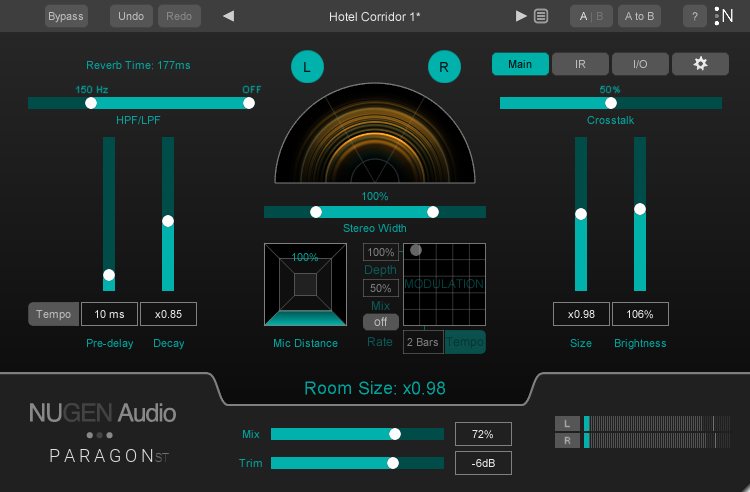
Features include frequency-dependent decay rate, configurable crosstalk, high-pass and low-pass filters, spectral analysis and a compact mode. It is positioned for two-channel work, alongside the surround-capable Paragon (up to 7.1.4).
Key features
True convolution
It is built on impulse responses of real spaces, and the parameters then reshape them. It may be a starting point when you want a natural-sounding space.
Re-synthesis
Because impulse responses are analysed and rebuilt, changing decay time or room size is said to avoid time-stretching artefacts. It may help when you want the same space with a different length.
Frequency-dependent decay
You can change how the tail fades by frequency band, for example shorter lows and longer highs. That could be used to tidy a muddy low end in a mix.
Configurable crosstalk
The amount of left/right channel mixing can be set. It may be used to widen the space or pull it toward the centre.
HPF and LPF
High-pass and low-pass filters shape the reverb. They may help the tail sit with the dry sound by trimming low and high ends.
Spectral analysis and compact mode
You can adjust while viewing the frequency content of the impulse response. Compact mode shrinks the window to save screen space in the DAW.
Specifications
| Item | Details |
|---|---|
| Type | Convolution reverb (stereo) |
| Formats | AAX, VST3, AU, AudioSuite (64-bit only) |
| Minimum OS | Mac OS X 10.9 / Windows 7, 512 MB RAM |
| Licensing | Registered through a NUGEN account (iLok conversion available) |
What is included and system requirements
- Paragon ST plug-in (AAX / VST3 / AU / AudioSuite)
- Supported OS: Mac OS X 10.9 or later, Windows 7 or later (64-bit only)
How to use it
- After buying at Plugin Boutique, the licence code appears in your account.
- Create an account on the NUGEN Audio site and register the licence code.
- Complete licence registration from the email link and set a password.
- Download the product from MY DOWNLOADS and run the installer.
- Open the plug-in in your DAW, choose USE LICENCE then ON-LINE, and enter the code.
- Insert it on the track or bus you want to reverberate and adjust space size and decay time.
- Use the HPF/LPF and frequency-dependent decay to tidy the low and high ends of the tail.
- Check the balance with the dry signal in the mix.
Where it may come in handy
Natural space on vocals
It could add a space based on real rooms behind a vocal. A shorter decay may keep the vocal outline clear.
Matching rooms for video and narration
It might be used to add a church or large-room feel to a scene, with fine control over room size.
Air on a drum bus
A light amount with shorter low-frequency decay may add space without clouding the mix.
Gluing a home-recorded mix
Several separately recorded parts could share one space to sound more cohesive.
Who it may suit
- People who want convolution realism with algorithmic-style adjustability
- Those looking for a reverb for stereo mixes
- Anyone who needs to match room sound closely in video or music
Good to know before you buy
- This is the stereo edition; the full Paragon handles surround up to 7.1.4.
- Licence registration needs a NUGEN Audio account, and conversion to iLok is available.
How it differs from similar products
We do not pick a winner; the official figures are placed side by side.
NUGEN Audio Paragon
NUGEN's page says Paragon works in up to 7.1.4 channels, including Dolby Atmos bed tracks. Plugin Boutique describes Paragon ST as designed for stereo.
Price
$299 (Plugin Boutique, checked 2026-10-27). Prices can vary by region and promotion, so check the official page before buying.
See Paragon ST on the product page
More of the same kind
We have introduced 112 reverbs. Here are some of the others.
- AudioThing Fog Convolver 2
- Universal Audio Galaxy Tape Echo
- D16 Group Toraverb 2
- Kuassa Efektor RV3604 Reverb
- PSP Audioware PSP PianoVerb2
- Pulsar Audio Pulsar Primavera
We have introduced 30 other products from NUGEN Audio.
- NUGEN Audio NUGEN Audio Paragon
- NUGEN Audio Monofilter
- NUGEN Audio NUGEN Audio Stereoplacer Elements
- NUGEN Audio AMB
- NUGEN Audio NUGEN Audio Monofilter Elements
For a side-by-side comparison scored on the same criteria, see our comparison of reverbs.
See the full list in Product database: Effects.
Sources: nugenaudio.com pluginboutique.com (checked 2026-10-27)










Comments