
Disclosure: This page may contain affiliate links. Prices were checked on the date shown and may change.
An introduction to NUGEN Audio NUGEN Audio Stereoplacer Elements, based on information from the maker and distributors: what it does, how to use it and who it may suit. It is not scored.
Stereoplacer Elements is a simplified version of our Stereoplacer plug-in, allowing the same frequency-specific panoramic placement, in a lightweight package.
— NUGEN Audio official site
What is NUGEN Audio Stereoplacer Elements?
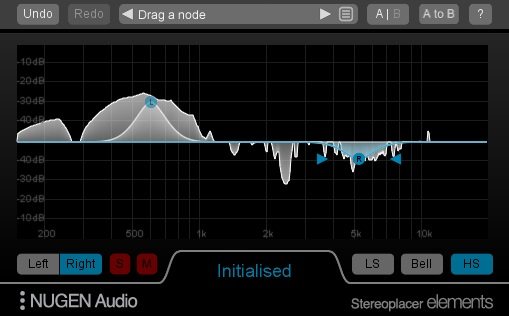
Stereoplacer Elements is a simplified version of NUGEN Audio's Stereoplacer. Instead of moving the whole sound, you move selected frequency ranges across the stereo field, leaving the position and balance of the rest intact.
NUGEN lists uses such as rebuilding a stereo image from mono, fixing poorly placed stereo microphones, restoring archive recordings and tidying samples taken from old records.
With its controls left at default the display acts as a stereo differential spectrum analyzer. The sound is not changed, but its stereo content is shown visually.
NUGEN also describes handling bass: keep the lows in the center and move only the higher, directional frequencies (the attack) with a shelving band, so the bass part gives the impression of being panned.
Key features
Frequency-specific panning
Selected bands are moved to any position left or right; NUGEN says the position and balance of the rest is preserved.
Fixing mic placement
Poorly placed stereo microphones can be corrected by moving bands individually.
Stereo differential display
At default settings it analyzes the stereo content without changing the sound.
Bass handling
NUGEN describes keeping lows centered and moving only the higher components, which avoids problems from off-center low frequencies.
Specifications
| Item | Details |
|---|---|
| Type | Frequency-specific stereo placement (simplified) |
| Formats (Mac) | AAX / VST3 / AU / AudioSuite (64-bit) |
| Formats (Windows) | AAX / VST3 / AudioSuite (64-bit) |
| Supported OS | Mac OS X 10.7+ / Windows XP+ |
| RAM | 512 MB |
What is included and system requirements
- Stereoplacer Elements plug-in
- Formats: AAX / VST3 / AU (Mac only) / AudioSuite
- Requirements: Mac OS X 10.7+ / Windows XP+, 64-bit only, 512 MB RAM
How to use it
- After installing, insert it on a stereo track or bus.
- Play it at default settings and look at the stereo distribution in the analyzer.
- Select the band for the range you want to move and set its frequency.
- Use solo to listen to just that range.
- Move it to the target position with the placement control.
- For bass, keep the lows centered and move the highs with a shelving band.
- Switch against the original to check how the sound changed.
Adjusting sample loops
It may help where loops taken from old records have uneven placement.
Correcting stereo recordings
Band-by-band correction might suit recordings pulled to one side by mic placement.
Sounds with low end such as bass
Keeping the lows centered while moving the attack to the sides might fit.
Who it may suit
- People tidying the placement of samples or old recordings
- Those fixing lopsided stereo-mic recordings
- Users who want to move specific frequency ranges rather than the whole sound
Good to know before you buy
- It is a simplified version of the full Stereoplacer, with fewer features.
- NUGEN offers a free demo.
How it differs from similar products
We do not pick a winner; the official figures are placed side by side.
NUGEN Audio Stereoplacer
On NUGEN's site Stereoplacer is $129 and Elements $49. The full version offers bell, high and low shelving curves and additional harmonically linked bell curves, while Elements is the simplified version.
Price
$49 (NUGEN Audio official site, checked 2026-10-27). Prices can vary by region and promotion, so check the official page before buying.
See NUGEN Audio Stereoplacer Elements on the product page
More of the same kind
Other introduction articles of the same kind.
- Baby Audio Smooth Operator Pro
- United Plugins Lofinity
- Metric Halo / Make Believe MB TMPC
- Serato Hex FX
- UJAM Finisher FLUXX
- MeldaProduction MDrumCleaner
We have introduced 30 other products from NUGEN Audio.
- NUGEN Audio Halo Vision
- NUGEN Audio Monofilter
- NUGEN Audio SigMod
- NUGEN Audio Halo Upmix
- NUGEN Audio MasterCheck
See the full list in Product database: Effects.
Sources: nugenaudio.com pluginboutique.com (checked 2026-10-27)










Comments